Unknown's avatar

About spector13

Cloud Evangelist at Dell and open source community manager (in the near past) for OpenStack and Xen.org.

Provision Virtual Machines with an Open Source Physical Infrastructure Solution

Rob Hirschfeld, CEO/Co-Founder, RackN created a new Digital Rebar Provision (DRP) video highlighting the creation of virtual machines within the standard automation process. Highlights:

  • Create a New Virtual Machine from the Physical Provisioning Tool – DRP
  • VirtualBox IMPI Plugin – Preview of Pre-Release Tool
  • RackN Portal will inventory virtual machines available on network for management
  • Packet IMPI Plugin – enable creation of VMs on Packet cloud hardware

This expansion to virtual machines allows DRP users to not only provision physical infrastructure but virtual as well both locally and in clouds.

More information on the Digital Rebar community and Digital Rebar Provision:

Podcast: Justin Garrison on Cloud Native Infrastructure, Immutability, Observability and Much More

In this week’s podcast, we speak with Justin Garrison, co-author of Cloud Native Infrastructure (CNI).

  • Behind scenes for O’Reilly book and choice of cover animal
  • Infrastructure and CNI approach
  • State and Immutability / Immutable VM
  • Terraform and Kubernetes
  • Observability
  • The Why of Immutability
  • Infrastructure as Software (Netflix)
  • Site Reliability Engineering and DevOps

Topic                                                               Time (Minutes.Seconds)

Introduction                                                     0.0 – 2.11
TechNative Podcast on writing book          2.11 – 2.45
Cover of Cloud Native book                         2.45 – 4.52 (Andean Condor)
Why is infrastructure a dead carcass?        4.52 – 5.38 (Shift and lift is not enough)
Describe your approach to infrastructure  5.38 – 8.40
Maintain state with immutability                  8.40 – 13.14 (Containers don’t mean cloud native)
Immutable VM                                                13.14 – 18.55
Terraform                                                         18.55 – 21.55
Kubernetes                                                      21.55 – 27.52 (Helm example)
Observability                                                   27.52 – 35.32 (Prometheus)
Immutability and Why                                   35.32 – 38.08 (Repository dependencies)
Infrastructure as Software                            38.08 – 40.33 (Chaos engineering)
Google SRE Book                                           40.33 – 44.11 (Build empathy vs everyone as dev)
Wrap Up                                                          44.11– END


Podcast Guest

Justin Garrison, co-author of Cloud Native Infrastructure (CNI)

Justin loves open source almost as much as he loves community. He is not a fan of buzz words but searches for the patterns and benefits behind technology trends. He frequently shares his findings and tries to disseminate knowledge through practical lessons and unique examples. He is an active member in many communities and constantly questions the status quo. He is relentless in trying to learn new things and giving back to the communities who have taught him so much.


Week in Review: RackN talks Immutability and DevOps at SRECon Americas

Welcome to the RackN and Digital Rebar Weekly Review. You will find the latest news related to Edge, DevOps, SRE and other relevant topics.

Immutable Deployments talk at SRECon Americas

Rob Hirschfeld presented at SRECon Americas this week, “Don’t Ever Change! Are Immutable Deployments Really Simpler, Faster and Safer?”

Configuration is fragile because we’re talking about mutating a system. Infrastructure as code, means building everything in place. Every one of our systems have to be configured and managed and that creates a dependency graph. We can lock things down, but we inevitably have to patch our systems.

Immutable infrastructure is another way of saying “pre-configured systems”. Traditional deployment models do configuration after deployment, but it’s better if we can do it beforehand. Immutability is a DevOps pattern. Shift configuration to the left of our pipeline; move it from the production to build stage.

Finish Reading Review from Tanya Reilly (@whereistanya)


News

RackN

Digital Rebar Community

L8ist Sh9y Podcast

Social Media

Podcast – Dave Nielsen talks Redis and usage at the Edge

Joining us this week is Dave Nielsen, Head of Ecosystem Programs at Redis Labs. Dave provides background on the Redis project and discusses ideas for using Redis in edge devices.

Highlights

  • Background of Redis project and Redis Labs
  • Redis and Edge Computing
  • Where is the Edge?
  • Raspberry Pi for edge devices? It’s about management
  • Wasteland of IT management at the edge

Topic                                                                                  Time (Minutes.Seconds)

Introduction                                                                     0.0 – 1.40
What is Redis and Redis Labs?                                    1.40 – 6.18
Redis product                                                                  6.18 – 6.54 (in-memory data store)
Need to store state of service                                      6.54 – 10.40 (queue storage in memory)
Using Redis at edge                                                       10.40 – 15.01(Dave’s definition of edge)
Data generated at edge than can be uploaded       15.01 – 16.55
Redis and other platforms at edge                             16.55 – 18.01 (Kubernetes, Docker)
Does edge need platform and a winner?                  18.01 – 21.01
Global distribution to edge sites                                 21.01 – 24.55 (Where is the edge?)
Difference b/w CDN and containers                          24.55 – 26.10 (Storage vs Compute)
Smaller devices and intermediary edge hub           26.10 – 34.10 (Raspberry Pi)
IoT devices fragmented market and hubs                34.10 – 36.44
Pushing updates at massive scale                             36.44 – 40.55 (infra not data centers)
How get code out to the edge devices?                   40.55 – 44.00 (unchartered territory)
Wrap Up                                                                          44.00 – END

Podcast Guest: Dave Nielsen, Head of Ecosystem Programs at Redis Labs

Dave works for Redis Labs organizing workshops, hackathons, meetups and other events to help developers learn when and how to use Redis. Dave is also the co-founder and lead organizer of CloudCamp, a community of Cloud Computing enthusiasts in over 100 cities around the world. Dave graduated from Cal Poly: San Luis Obispo and has worked in developer relations for 12 years at companies like PayPal, Strikeiron and Platform D. Dave gained modest notoriety when he proposed to his girlfriend in the book “PayPal Hacks.”

Twitter: @davenielsen


Week in Review: Data Center 2020 Blog Series from IBM Think 2018

Welcome to the RackN and Digital Rebar Weekly Review. You will find the latest news related to Edge, DevOps, SRE and other relevant topics.

Data Center of 2020 Blog Series from IBM Think 2018
(Series by Rob Hirschfeld, CEO/Co-Founder, RackN)

When discussing the data center of the future, it’s critical that we start by breaking the concept of the data center as a physical site with guarded walls, raised floors, neat rows of servers and crash cart pushing operators. The Data Center of 2020 (DC2020) is a distributed infrastructure comprised of many data centers, cloud services and connected devices.

The primary design concept of DC2020 is integrated automation not actual infrastructures.

RackN Portal Management Connection for the 10 Minute Demo

In my previous blog, I provided step by step directions to install Digital Rebar Provision on a new endpoint and create a new node using Packet.net for users without a local hardware setup. (Demo Tool on GitHub) In this blog, I will introduce the RackN Portal and connect it to the active setup running on Packet.net at the end of the demo process.

Read More


News

RackN

Digital Rebar Community

L8ist Sh9y Podcast

Social Media

RackN Portal Management Connection to the 10 Minute Demo

In my previous blog, I provided step by step directions to install Digital Rebar Provision on a new endpoint and create a new node using Packet.net for users without a local hardware setup. (Demo Tool on GitHub) In this blog, I will introduce the RackN Portal and connect it to the active setup running on Packet.net at the end of the demo process.

NOTE – You will need to run the demo process again to have both the DRP installation and endpoint active on Packet.net.

Current Status

There will be two machines running in Packet:

  • Digital Rebar Provision running on an Endpoint
  • A new physical node provided by DRP

In order to have run the process in the previous blog, you will have created a RackN Portal account to get the RackN code to add into the Secrets file.

Steps to Connect RackN Portal

When you first go to the RackN Portal you will see the following screen:

The first step is to enter the Endpoint Address which will come from the Packet.net Endpoint server setup in the previous blog. To get the address go to the “Configure DRP” step and you will see the following which contains the Endpoint http address:

running ACTION:  drp-setup-demo
+ set +x
+ drpcli –endpoint=https://147.##.##.63:8092 bootenvs uploadiso centos-7-install
{
 “Path”: “CentOS-7-x86_64-Minimal-1708.iso”,

“Size”: 830472192
}
+ set +x
{
 “centos-7-install”: “packet-ssh-keys:Success”,

“discover”: “packet-discover:Success”,
“packet-discover”: “centos-7-install:Reboot”,
“packet-ssh-keys”: “complete-nowait:Success”
}

Enter the following https address https://147.##.##.63:8092 into the Endpoint Address and press the blue arrow. You will then be taken to the login screen where you enter the standard login info:

Select “Defaults” to have the system fill in the Login information. If you need more information on this screen, please review the Install Guide.

RackN Portal Tour

After completing the login your RackN Portal screen will look like this:

At this point, we want to see the new node that was created in the final step of our demo process. Select “Machines” on the left-hand navigation below SYSTEM and you will see the new machine that was created. NOTE – The Red X next to Subnets is appropriate for Packet.net infrastructure.

You can confirm this machine name with the name of the machine in the last stage of the process. Both the RackN Portal and the data below indicate that I have created a new node called “spectordemo-machines-ewr1-01“.

Selecting the newly created machine you will see the following information:

In the next blog, we will use the RackN Portal to create a second node and look at the Workflow process to install an operating system on both nodes.

If you have any questions or would like to get started learning more about Digital Rebar Provision and RackN please join the Slack community.

Podcast – Oliver Gould on Service Mesh, Containers, and Edge

Joining us this week is Oliver Gould, CTO Buoyant who provides a service mesh abstraction view to micro-services and Kubernetes. Oliver and Rob also take a look at how applications are managed at the edge and highlights the future roadmap for Conduit.

Highlights

  • Defining microservices and Kubernetes from Buoyant viewpoint
  • Service mesh abstractions at a request level (load balance, get, put, …)
  • Conduit overview – client-side load balancing
  • Service mesh tool comparisons
  • Edge Computing discussion from service mesh view

Topic                                                                           Time (Minutes.Seconds)

Introduction                                                                0.0 – 1:39
Define Microservices                                                1:39 – 5.25
Define Kubernetes                                                     5.25 – 10.23 (Memory as a Service)
Service Mesh Abstractions                                       10.23 – 12.37 (L5 or L7)
Conduit Overview                                                      12.37 – 18.20 (Sidecar Container)
When do I need Service Mesh?                              18.20 – 19.55 (Complex Debugging)
Service Mesh Comparisons                                     19.55 – 22.31
Deployment Times / V2 to 3 for DRP                    22.31 – 25.13 (Kubernetes into Production)
Edge Computing                                                       25.13 – 27.04 (Define)
App in Cloud + Edge Device?                                  27.04 – 31.10 (POP = Point of Prescience)
Containers + Serverless                                            31.10 – 34.30 (Proxy in Browser)
Future Roadmap                                                       34.30 – 37.06 (Conduit.io)
Wrap Up                                                                     37.06 – END

Podcast Guest:  Oliver Gould, CTO Buoyant

Oliver Gould is the CTO of Buoyant, where he leads open source development efforts. Previously, he was a staff infrastructure engineer at Twitter, where he was the tech lead of the Observability, Traffic, and Configuration and Coordination teams. Oliver is the creator of linkerd and a core contributor to Finagle, the high-volume RPC library used at Twitter, Pinterest, SoundCloud, and many other companies.

Week in Review : Test Digital Rebar in Minutes with Hosted Physical Infrastructure

Welcome to the RackN and Digital Rebar Weekly Review. You will find the latest news related to Edge, DevOps, SRE and other relevant topics.

Deploy and Test Digital Rebar Provision with No Infrastructure in 10 Minutes

For operators looking to better understand Digital Rebar Provision (DRP) RackN has developed an easy to follow process leveraging Packet.net for physical device creation. This process allows new users to create a physical DRP endpoint and then provision a new physical node on Packet. Information and code to run this guide is available at https://github.com/digitalrebar/provision/tree/master/examples/pkt-demo.

In this blog, I will take the reader through the process with images based on running via my Mac.

Read More

Site Reliability Engineering: 4 Things to Know

Organizations that have embraced DevOps and cloud-native architecture might also want to investigate SRE. Interop ITX expert Rob Hirschfeld explains why.

To find out more about site reliability engineering, Network Computing spoke with Rob Hirschfeld, who has been in the cloud and infrastructure space for nearly 15 years, including work with early ESX betas and serving on the Open Stack Foundation Board. Hirschfeld, cofounder and CEO of RackN, will present “DevOps vs SRE vs Cloud Native” at Interop ITX 2018.

Read More


News

RackN

Digital Rebar Community

L8ist Sh9y Podcast

Social Media

Deploy and Test Digital Rebar Provision in less than 10 Minutes : How To Guide

Part 1 of 3 in Digital Rebar Provision How To Blog Series

For operators looking to better understand Digital Rebar Provision (DRP) RackN has developed an easy to follow process leveraging Packet.net for physical device creation. This process allows new users to create a physical DRP endpoint and then provision a new physical node on Packet. Information and code to run this guide is available at https://github.com/digitalrebar/provision/tree/master/examples/pkt-demo.

In this blog, I will take the reader through the process with images based on running via my Mac.

SETUP

  • You will need an account on Packet at https://www.packet.net/. I created a personal account and entered a credit card to pay for the services used. The cost on Packet to run this is minimal.
    • From your Packet.net account you will need to create a NEW Project and an API Key. The API key will look like 7DE1Be6NLjGP6KUH4mbUAbysjwOx9kHo and the Project will look like b5d29881-8561-4f3b-8efb-2d61003fe2e7. NOTE – The values shown are changed and will not work in Packet.
  • You will need an account on the RackN Portal via https://portal.rackn.io. From this account you will need your Username which looks like t98743fk-3865-4315-8d11-11127p9e41bd. NOTE – The value shown is not a valid Username.
  • Mac Users – I needed to have Homebrew installed on my machine to run this demo script. Run the 2 steps below…

PROCESS

  • Git Clone the guide (DO NOT run w/ “sudo”)
  • Edit the Secrets file with Packet and RackN Portal info from Setup
    • vi private-content/secrets

# specify your API KEY that has access to PROJECT ID below
API=”insert_api_key_here”
# specify the PROJECT ID that API KEY has access to
PROJECT=”insert_project_id_here”
# RackN Username – necessary to download registered (but free) content packs
USERNAME=”insert username here”

  • Run the demo-run.sh Script
    • ./demo-run.sh : this will launch the guide and you will see the Digital Rebar bear along with a request to run the next step

  • <RETURN> “Install Terraform”

  • <RETURN> “Install Secrets”

  • <RETURN> “Generate Public/Private RSA Keys”

  • <RETURN> “Packet SSH Key”

  • <RETURN> “2nd Packet SSH Key”

  • <RETURN> Creating the DRP Endpoint on Packet

  • <RETURN> Create a Terraform Plan

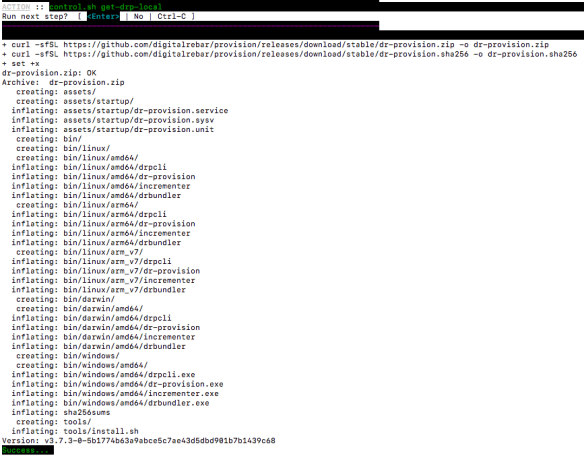
  • <RETURN> Download DRP to Endpoint

  • <RETURN> SSH Keygen

  • <RETURN> SSH Keyscan

  • <RETURN> Install DRP onto Packet Host Endpoint

Additional Installation Content Not Shown

  • <RETURN> Configure DRP

Additional Configuration Content Not Shown

NOTE – Getting a FAILED at this stage is expected and you should continue

  • <RETURN> Setup DRP Endpoint

  • <RETURN> Create new Packet Physical Node form DRP Endpoint

At this point you will have 2 machines running in Packet:

  • Digital Rebar Provision running on an Endpoint
  • A new physical node provisioned by DRP
  • To clean-up this process and shut down the 2 Packet machines run the following command ./bin/control.sh cleanup
    • It will clean up Packet as well as reset all files back to the original state when cloned from github.

In my next blog, I will introduce the process to connect your Packet Endpoint machine to the RackN Portal so you can see the newly created node and begin working with it from the RackN Portal.

If you have any questions, please leverage the RackN Slack #Community channel where Digital Rebar community members and RackN engineers are available to assist.

Cloud Native Surfing at IBM Think 2018

Rob Hirschfeld speaks with Kevin Allen, Content Lead, IBM [@KevJosephAllen] about next week’s IBM Think 2018 conference (Mach 19-22) in Las Vegas. Contact us if you are interested in setting up a meeting with Rob next week at the event.

Highlights:

What is RackN working on? Physical Infrastructure Automation to manage metal in the data center as you would a VM in the cloud.

Trends in Infrastructure and Cloud space?  Getting involved in immutable infrastructure, CI/CD pipelines, and focus on zero-touch management. We have also been talking about Edge Computing and how it will be managed vs cloud.

Cloud Native movement is developers on surfboards and see a huge wave in the distance, where are we now? We are still at the point in open source that the technology is powerful and people are still learning how they work. Layers are forming on top of these container tools and customers are moving up the stack to understand more and more. The tide is coming in and the waves are getting bigger with lots and lots of wavelets still growing out at sea.

Enterprise user base is looking for more integration from projects, doesn’t have to be in 1 project but multiple projects connecting with each other.

Hybrid Cloud conversation has changed? Hybrid Cloud is the way people do business. The focus has moved to Hybrid IT with infrastructure being located at various locations allowing customers to take advantage of best of breed based on needs. The market is hybrid and customers need to integrate data flows between these services. Tools are lacking in this marketplace to manage this.

Looking forward to Think 2018? Interested in new AI and machine learning but key focus for the event is talking to real users and seeing real applications. Focus on actual deployments of this technology is more important that what is coming.

Advice for Event? Comfortable shoes. Allow time for unexpected things to happen – attend new talks based on speakers or topics you don’t know much about.