Details behind RackN Kubernetes Workload for OpenCrowbar

Rob H's avatarRob Hirschfeld

Since I’ve already bragged about how this workload validates OpenCrowbar’s deep ops impact, I can get right down to the nuts and bolts of what RackN CTO Greg Althaus managed to pack into this workload.

Like any scale install, once you’ve got a solid foundation, the actual installation goes pretty quickly.  In Kubernetes’ case, that means creating strong networking and etcd configuration.

Here’s a 30 minute video showing the complete process from O/S install to working Kubernetes:

Here are the details:

Clustered etcd – distributed key store

etcd is the central data service that maintains the state for the Kubernetes deployment.  The strength of the installation rests on the correctness of etcd.  The workload builds an etcd cluster and synchronizes all the instances as nodes are added.

Networking with Flannel and Proxy

Flannel is the default overlay network for Kubernetes that handles IP assignment and intercontainer communication with UDP…

View original post 419 more words

StackEngine Docker on Metal via RackN Workload for OpenCrowbar

6/19: This was CROSS POSTED WITH STACKENGINE

In our quest for fast and cost effective container workloads, RackN and StackEngine have teamed up to jointly develop a bare metal StackEngine workload for the RackN Enterprise version of OpenCrowbar.  Want more background on StackEngine?  TheNewStack.io also did a recent post covering StackEngine capabilities.

While this work is early, it is complete enough for field installs.  We’d like to include potential users in our initial integration because we value your input.

Why is this important?  We believe that there are significant cost, operational and performance benefits to running containers directly on metal.  This collaboration is a tangible step towards demonstrating that value.

What did we create?  The RackN workload leverages our enterprise distribution of OpenCrowbar to create a ready state environment for StackEngine to be able to deploy and automate Docker container apps.

In this pass, that’s a pretty basic Centos 7.1 environment that’s hardware and configured.  The workload takes your StackEngine customer key as the input.  From there, it will download and install StackEngine on all the nodes in the system.  When you choose which nodes also manage the cluster, the workloads will automatically handle the cross registration.

What is our objective?  We want to provide a consistent and sharable way to run directly on metal.  That accelerates the exploration of this approach to operationalizing container infrastructure.

What is the roadmap?  We want feedback on the workload to drive the roadmap.  Our first priority is to tune to maximize performance.  Later, we expect to add additional operating systems, more complex networking and closed-loop integration with StackEngine and RackN for things like automatic resources scheduling.

How can you get involved?  If you are interested in working with a tech-preview version of the technology, you’ll need to a working OpenCrowbar Drill implementation (via Github or early access available from RackN), a StackEngine registration key and access to the RackN/StackEngine workload (email info@rackn.com or info@stackengine.com for access).

exploring Docker Swarm on Bare Metal for raw performance and ops simplicity

As part of our exploration of containers on metal, the RackN team has created a workload on top of OpenCrowbar as the foundation for a Docker Swarm on bare metal cluster.  This provides a second more integrated and automated path to Docker Clusters than the Docker Machine driver we posted last month.

It’s really pretty simple: The workload does the work to deliver an integrated physical system (Centos 7.1 right now) that has Docker installed and running.  Then we build a Consul cluster to track the to-be-created Swarm.  As new nodes are added into the cluster, they register into Consul and then get added into the Docker Swarm cluster.  If you reset or repurpose a node, Swarm will automatically time out of the missing node so scaling up and down is pretty seamless.

When building the cluster, you have the option to pick which machines are masters for the swarm.  Once the cluster is built, you just use the Docker CLI’s -H option against the chosen master node on the configured port (defaults to port 2475).

This work is intended as a foundation for more complex Swarm and/or non-Docker Container Orchestration deployments.  Future additions include allowing multiple network and remote storage options.

You don’t need metal to run a quick test of this capability.  You can test drive RackN OpenCrowbar using virtual machines and then expand to the full metal experience when you are ready.

Contact info@rackn.com for access to the Docker Swarm trial.   For now, we’re managing the subscriber base for the workload.  OpenCrowbar is a pre-req and ungated.  We’re excited to give access to the code – just ask.

Ceph in an hour? Boring! How about Ceph hardware optimized with advanced topology networking & IPv6?

This is the most remarkable deployment that I’ve had the pleasure to post about.

The RackN team has refreshed the original OpenCrowbar Ceph deployment to take advantage of the latest capabilities of the platform.  The updated workload (APL2) requires first installing RackN Enterprise or OpenCrowbar.

The update provides five distinct capabilities:

1. Fast and Repeatable

You can go from nothing to a distributed Ceph cluster in an hour.  Need to rehearse on VMs?  That’s even faster.  Want to test and retune your configuration?  Make some changes, take a coffee break and retest.  Of course, with redeploy that fast, you can iterate until you’ve got it exactly right.

2. Automatically Optimized Disc Configuration

The RackN update optimizes the Ceph installation for disk performance by finding and flagging SSDs.  That means that our deploy just works(tm) without you having to reconfigure your OS provisioning scripts or vendor disk layout.

3. Cluster Building and Balancing

This update allows you to place which roles you want on which nodes before you commit to the deployment.  You can decide the right monitor to OSD/MON ratio for your needs.  If you expand your cluster, the system will automatically rebalance the cluster.

4. Advanced Networking Topology & IPv6

Using the network conduit abstraction, you can separate front and back end networks for the cluster.  We also take advantage of native IPv6 support and even use that as the preferred addressing.

5. Both Block and Object Services

Building up from Ready State Core, you can add the Ceph workload and be quickly installing Ceph for block and object storage.
That’s a lot of advanced capabilities included out-of-the-box made possible by having a ops orchestration platform that actually understands metal.
Of course, there’s always more to improve.  Before we take on further automated tuning, we want to hear from you and learn what use-cases are most important.

Manage Hardware like a BOSS – latest OpenCrowbar brings API to Physical Gear

A few weeks ago, I posted about VMs being squeezed between containers and metal.   That observation comes from our experience fielding the latest metal provisioning feature sets for OpenCrowbar; consequently, so it’s exciting to see the team has cut the next quarterly release:  OpenCrowbar v2.2 (aka Camshaft).  Even better, you can top it off with official software support.

Camshaft coordinates activity

Dual overhead camshaft housing by Neodarkshadow from Wikimedia Commons

The Camshaft release had two primary objectives: Integrations and Services.  Both build on the unique functional operations and ready state approach in Crowbar v2.

1) For Integrations, we’ve been busy leveraging our ready state API to make physical servers work like a cloud.  It gets especially interesting with the RackN burn-in/tear-down workflows added in.  Our prototype Chef Provisioning driver showed how you can use the Crowbar API to spin servers up and down.  We’re now expanding this cloud-like capability for Saltstack, Docker Machine and Pivotal BOSH.

2) For Services, we’ve taken ops decomposition to a new level.  The “secret sauce” for Crowbar is our ability to interweave ops activity between components in the system.  For example, building a cluster requires setting up pieces on different systems in a very specific sequence.  In Camshaft, we’ve added externally registered services (using Consul) into the orchestration.  That means that Crowbar will either use existing DNS, Database, or NTP services or set it’s own.  Basically, Crowbar can now work FIT YOUR EXISTING OPS ENVIRONMENT without forcing a dedicated Crowbar only services like DHCP or DNS.

In addition to all these features, you can now purchase support for OpenCrowbar from RackN (my company).  The Enterprise version includes additional server life-cycle workflow elements and features like HA and Upgrade as they are available.

There are AMAZING features coming in the next release (“Drill”) including a message bus to broadcast events from the system, more operating systems (ESXi, Xenserver, Debian and Mirantis’ Fuel) and increased integration/flexibility with existing operational environments.  Several of these have already been added to the develop branch.

It’s easy to setup and test OpenCrowbar using containers, VMs or metal.  Want to learn more?  Join our community in Gitteremail list or weekly interactive community meetings (Wednesdays @ 9am PT).

Start-ups are Time Machines for Big Companies [and open source is a worm hole]

My time at Dell (ended 10/2014) forced me to correct one of the most common misconceptions I hear about big companies – that they cannot innovate. My surprise at Dell was not the lack of innovation, but it’s overabundance. Having talked to many colleagues at big companies, I find the same pattern is everywhere. It’s not that these companies lack amazing and creative ideas, it’s that they have so many that it’s impossible for them to filter and promote them.

Innovation at a big company is like a nest of baby chicks all fighting for a worm but the parent bird can’t decide which chicks to feed.

In order for an idea to win at a big company, it generally has to shout so loudly and promise so extravagantly that it’s setup to fail right out of incubation. Consequently, great ideas are either never launched or killed in adolescence. Of course YMMV, but I’ve seen this pattern repeated throughout the tech industry.

TeamTimeCar.com-BTTF DeLorean Time Machine-OtoGodfrey.com-JMortonPhoto.com-07.jpg

“TeamTimeCar.com-BTTF DeLorean Time Machine-OtoGodfrey.com-JMortonPhoto.com-07” by Terabass. Licensed under CC BY-SA 4.0 via Wikimedia Commons

What big companies really need is a time machine. That way, they can retroactively pick the right innovation and nurture it into a product that immediately benefits from their customer base, support infrastructure and market presence.

Money is a time machine.

With enough money, they can go backwards in time and unwind the decision to not invest in that innovative idea or team. It’s called purchasing a company. Sure, there’s a significant cash premium but that’s easier than stealing more plutonium for your DeLorean. In my experience, it’s behaviorally consistent for companies to act quickly on large outlays for retroactively correct decisions while being unwilling to deal with the political and long-term planning aspects of incubation.

I’ve come to embrace this cycle of innovation with an interesting twist: the growth of open source business models enables a new degree of cross innovation between start-ups and big companies. With open source, corporate locked innovators can exercise their ideas with start-ups and start-ups can leverage the talent and financial depth of big companies.

That’s like creating temporal worm holes in the venture-time continuum. Now that sounds like a topic for a future post… thoughts?

Delicious 7 Layer DIP (DevOps Infrastructure Provisioning) model with graphic!

Applying architecture and computer science principles to infrastructure automation helps us build better controls.  In this post, we create an OSI-like model that helps decompose the ops environment.

The RackN team discussions about “what is Ready State” have led to some interesting realizations about physical ops.  One of the most critical has been splitting the operational configuration (DNS, NTP, SSH Keys, Monitoring, Security, etc) from the application configuration.

Interactions between these layers is much more dynamic than developers and operators expect.  

In cloud deployments, you can use ask for the virtual infrastructure to be configured in advance via the IaaS and/or golden base images.  In hardware, the environment build up needs to be more incremental because that variations in physical infrastructure and operations have to be accommodated.

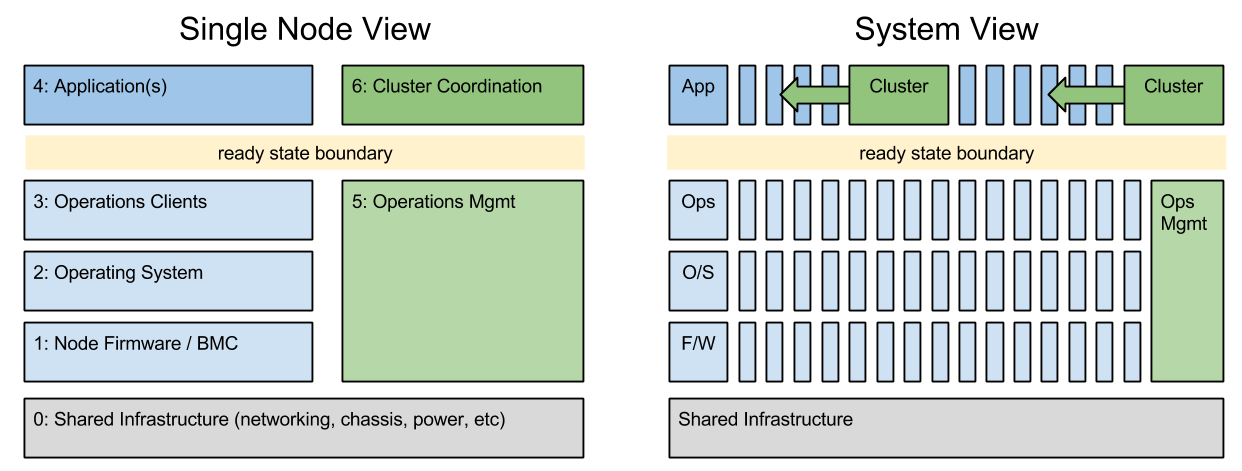
Greg Althaus, Crowbar co-founder, and I put together this 7 layer model (it started as 3 and grew) because we needed to be more specific in discussion about provisioning and upgrade activity.  The system view helps explain how layer 5 and 6 operate at the system layer.

7 Layer DIP

The Seven Layers of our DIP:

  1. shared infrastructure – the base layer is about the interconnects between the nodes.  In this model, we care about the specific linkage to the node: VLAN tags on the switch port, which switch is connected, which PDU ID controls turns it on.
  2. firmware and management – nodes have substantial driver (RAID/BIOS/IPMI) software below the operating system that must be configured correctly.   In some cases, these configurations have external interfaces (BMC) that require out-of-band access while others can only be configured in pre-install environments (I call that side-band).
  3. operating system – while the operating system is critical, operators are striving to keep this layer as thin to avoid overhead.  Even so, there are critical security, networking and device mapping functions that must be configured.  Critical local resource management items like mapping media or building network teams and bridges are level 2 functions.
  4. operations clients – this layer connects the node to the logical data center infrastructure is basic ways like time synch (NTP) and name resolution (DNS).  It’s also where more sophisticated operators configure things like distributed cache, centralized logging and system health monitoring.  CMDB agents like Chef, Puppet or Saltstack are installed at the “top” of this layer to complete ready state.
  5. applications – once all the baseline is setup, this is the unique workload.  It can range from platforms for other applications (like OpenStack or Kubernetes) or the software itself like Ceph, Hadoop or anything.
  6. operations management – the external system references for layer 3 must be factored into the operations model because they often require synchronized configuration.  For example, registering a server name and IP addresses in a DNS, updating an inventory database or adding it’s thresholds to a monitoring infrastructure.  For scale and security, it is critical to keep the node configuration (layer 3) constantly synchronized with the central management systems.
  7. cluster coordination – no application stands alone; consequently, actions from layer 4 nodes must be coordinated with other nodes.  This ranges from database registration and load balancing to complex upgrades with live data migration. Working in layer 4 without layer 6 coordination creates unmanageable infrastructure.

This seven layer operations model helps us discuss which actions are required when provisioning a scale infrastructure.  In my experience, many developers want to work exclusively in layer 4 and overlook the need to have a consistent and managed infrastructure in all the other layers.  We enable this thinking in cloud and platform as a service (PaaS) and that helps improve developer productivity.

We cannot overlook the other layers in physical ops; however, working to ready state helps us create more cloud-like boundaries.  Those boundaries are a natural segue my upcoming post about functional operations (older efforts here).

Starting RackN – Delivering open ops by pulling an OpenCrowbar Bunny out of our hat

When Dell pulled out from OpenCrowbar last April, I made a commitment to our community to find a way to keep it going.  Since my exit from Dell early in October 2014, that commitment has taken the form of RackN.

Rack N BlackToday, we’re ready to help people run and expand OpenCrowbar (days away from v2.1!). We’re also seeking investment to make the project more “enterprise-ready” and build integrations that extend ready state.

RackN focuses on maintenance and support of OpenCrowbar for ready state physical provisioning.  We will build the community around Crowbar as an open operations core and extend it with a larger set of hardware support and extensions.  We are building partnerships to build application integration (using Chef, Puppet, Salt, etc) and platform workloads (like OpenStack, Hadoop, Ceph, CloudFoundry and Mesos) above ready state.

I’ve talked with hundreds of people about the state of physical data center operations at scale. Frankly, it’s a scary state of affairs: complexity is increasing for physical infrastructure and we’re blurring the lines by adding commodity networking with local agents into the mix.

Making this jumble of stuff work together is not sexy cloud work – I describe it as internet plumbing to non-technical friends.  It’s unforgiving, complex and full of sharp edge conditions; however, people are excited to hear about our hardware abstraction mission because it solves a real pain for operators.

I hope you’ll stay tuned, or even play along, as we continue the Open Ops journey.