Unknown's avatar

About Rob H

A Baltimore transplant to Austin, Rob thinks about ways of building scale infrastructure for the clouds using Agile processes. He sat on the OpenStack Foundation board for four years. He co-founded RackN enable software that creates hyperscale converged infrastructure.

Collaboration between Dell Crowbar & VMware Cloud Foundry – unleashes your inner cloud

Sometimes a single sprint can deliver magic: when I signed up to document how to create a Crowbar module (aka a barclamp) two weeks ago, I had no idea that it would add a new flavor to Crowbar .

I’m proud to announce that the first public non-Dell Crowbar module will be supporting the VMware Cloud Foundry Open PaaS project.

Development is still in progress (on the Crowbar “CF” branch) and you’ll be able to watch us (even help!) collaborate on this project.  Initially, the deployment will be to single server but we’re hoping to quickly expand to a distributed install that fully leverages the capabilities of both projects.

By creating a Crowbar module, Cloud Foundry™ is able to leverage the cloud deployment capabilities that allow it to be setup on any physical or virtualized data center.  This is core to the Crowbar message: the value of a cloud solution can best be realized when it’s coupled with open practices for deploying it.

There are many significant aspects of this collaboration:

  1. Cloud Foundry is taking the right approach to PaaS.  Their team’s perspective on PaaS mirrors my own: A PaaS is a collection of application services.  That approach makes it extensible and flexible.  Plus, they are also multi-language and multi-platform.
  2. Crowbar is proving our breadth of support.  Last week we announced coming RHEL support and now adding Cloud Foundry is a natural extension.  We did not design Crowbar to be a one-trick pony.  It’s modular design makes it easy to extend while leveraging the existing body of work.
  3. Big companies are acting like start-ups.  Both Crowbar and Cloud Foundry are projects that focus on putting the core functionality out quickly to prove their value proposition, get feedback, and change the game.  This collaboration is positive proof of these companies being Agile and starting a project Lean.
  4. Big companies are acting in the open.  Both Dell via Crowbar and VMware via Cloud Foundry are contributing their source and working on it in the open.

Stay tuned for that “how to create a barclamp” post (or check out the barclamp rake task).

For more information:

Video of Crowbar Install & Introduction (two 15 min videos)

These Crowbar videos are the first two in a series of how to setup and use your own local Crowbar dev environment (here’s more info & the ISO).   I used VMware Workstation, but any virtual hosts that support Ubuntu 10.10 will work fine.  We use ESX, KVM and Xen for testing too.

Creating this environment is the basis for learning Crowbar, experimenting with OpenStack and creating your own barclamps.  It’s also a handy way to play with Opscode Chef since it includes a stand alone Chef server.

Some items from the install video that I want to re-emphasize:

  • The admin server REQUIRES >1 GB of RAM (more is better)
  • All other nodes REQUIRE > 512 MB of RAM (more depending on what you install)
  • At least TWO NICS are required.
  • You must disable DHCP on the virtual network because Crowbar has a DHCP server and they will conflict.
  • The login for the Crowbar admin server is openstack/openstack.  You must “sudo -i” before you run the install script.
  • The default url for Crowbar is http://192.168.124.10:3000  (crowbar/crowbar)

Installing Crowbar (15 mins)

Introduction to Crowbar (15 mins)

9/30 Bonus Video: How to change the default networking

Continue reading

The Tao of Agile: focus on delivery while still dreaming BIG

This post is a continuation of the Agile Strategy post.

So, how do we get into the right frame of mind for roadmapping?

You must embrace the Tao of Planning.

There are two conflicting principles behind roadmapping: you must keep thinking out of the box while keeping work deliverable. Neither of these principles is difficult in isolation. The challenge is the keep them in balance and to make sure that the whole team is included.

For my team, we struggle to find group times when we can do some big thinking. The challenge is not the thinking – it’s the TEAM aspect of working on strategy together. Our sprint planning needs to focus on the “keeping work deliverable” objective; consequently, there is precious little time in planning to have big ideas. To make the meeting duration manageable, planning meetings should have a tactical focus. Unfortunately, that leaves a strategy gap.

So, where does a team go to dream?

I wish I had a clear answer to this problem. Ideally, sprint review meetings should extend into deep thinking about where things could go. Strategy during Review is a natural extension because a review mindset should be forward looking. Reviews help us think about how we’re going to use what we delivered and the audience should bring external perspectives. If we could do this then it would be very empowering and exciting during review.

That’s why it’s important to celebrate, play, reflect and pause. All work and no play leaves a team that makes very dull products

Note: the Agile decorations that I use are: Sprint Planning (commits that plan) -> Stand-up (daily sync meeting -> Review (demo/sprint close) -> Retrospective / Hats (team feedback, improvement).

Agile takes discipline: having a strategy means saying “no” more than saying “yes”

With the Crowbar release behind us, it’s time for my team at Dell to do some Capital “P” Planning. Planning for us includes both tactical (next release) and strategic (the releases beyond the one after next), but each type of planning looks very different. I’m going to call it “roadmapping” because planning means something specific and tactical in Agile.

I love roadmapping but I’m a pain to roadmap with because I’m a ruthless prioritizer.

When I sit down for roadmapping, I always do it from a 1 to N list without ties. That means that when marketing asks for a new feature (double the foo on the bar!) we put it on the list relative to other work that needs to get done. If you add something at the top then something else will fall off the bottom. Effectively, we’re using the list to say no to a lot of great ideas. This is essential because “the great is the enemy of the good (Voltaire).” It’s hard, but that’s the cold reality of delivering product.

The most important part of strategy is figuring out what to push down to make room for the precious few yes items.

Successful roadmapping is negotiating the splitting of big ideas into smaller ones. Decomposition is a circular process because one compromise may require another, but one change may force a cascading assumption fault. If you get too emotionally committed to one feature or subset then you’re going to slow down the process. It’s vital to approach roadmapping in free fall.

As always, my advice is to not mix meeting objectives. If you need more strategy then you’ve got to make time for it.

Interested in more…stay tuned for Agile Tao: balancing tactics & strategy

How we use Rally for Agile: it’s about going off the reservation to Rob some Banks.

Dell’s corporate choice of Agile Planning tool is Rally (if you’re wondering, my recommendation on Agile planning tools is ThoughtWorks’ Mingle). This post is rather detailed about how we use Rally, but hopefully useful more broadly. I should mention that I’ve been using Rally since 2005, so I know the tool pretty well. Our objective is to not spend time maintaining Rally (or, as we call it “feeding the Rally Monkey”) while still getting usable burn downs for our releases.
We do NOT use Rally to plan very more than 2 iterations in advance. Even if the tool made planning further easy, I would still recommend against it. I feel strongly that it’s better to have generally defined stories (aka Features or Epics) with general estimates that we call “BANKS.” Our work process is to create a wiki page for each feature that contains information about the goals for the feature and holds documentation for it as the work progresses. The wiki becomes the persistent place for the story, not our planning tool. We even embed [[wiki names]] into the story names to simplify linking.

Our planning process works like this: we create a placeholder story for each feature that we want and attach it to the release that we are working on. These features get a “BANK” suffix because they are the place holder and we put the story point estimate into these stories. You can ALWAYS see the remaining effort estimates by looking at the BANK stories remaining for the sprint. These banks are never assigned to a sprint – they are our backlog. We also maintain the priority order for these banks so we know which ones to work on first.

Before planning, marketing and engineering review the list together and make sure that our priorities are correct. If a story is finished, then we’ll accept the story. If an estimate changes, we may increase it. We NEVER lower the estimates unless the work scope changes! Reducing estimates create graphing artifacts in Rally. If we finish early, then the story is accepted and we burn off the remaining points (which shows as a progress jump towards completing the release).

On planning day, we go to the backlog and pick out the highest priority bank story. We then create another story with the same [[wiki name]] feature in the title and without the BANK suffix. We estimate the story points for this effort and remove that amount from the BANK story. Doing this credit/debit entry ensures that the release estimate remains the same. REPEATING: by removing points from the BANK story when we create a story for work in the sprint we keep the release estimate the same. This is VERY IMPORTANT if you want to show a burn up without creating a lot of stories in advance. Creating detailed stories in advance is a huge waste of time (queue the sound of a giant time sucking vortex vacuum machine). If you are doing this, stop. Really, you can stop because it is a huge waste of time on the scale of passing budget legislation in Congress.

In Rally, we do ALL of our sprint planning from the Track…Releases page (filter set to “defined” stories). This allows us to quickly see and edit the BANK stories that are in our backlog. When we want to talk about requirements or acceptance criteria, we pop over to the feature wiki page. This makes sure that we collect information across sprints. It also allows us to cross reference easily. The new stories are assigned to the sprint and we assign tasks/people to the story. We’ll continue this until we’ve assigned 100% of our team’s velocity for the sprint. At that point, we review the story point estimates and make sure that our time estimate aligns with the points (for us, 1 point ≈ 4 days). If they don’t match then we’ll adjust BOTH the story and the bank so the total is maintained.

If this sounds complicated then you’re reading it correctly. I’ve found this approach is much clearer, faster and simpler than the “right” way to do backlog planning with Rally. At the end of the sprint we accept stories and it shows a release burn up. If a BANK goes to zero then the release scope will show an increase every time we create a new story towards that feature. We do not delete BANK, we only accept them. If you’re BANK is 0 and the feature is not complete then your estimate was wrong. That is good information to track and the increasing in release scope is an accurate reflection of your backlog.

Wow – this post ended up with a lot of very technical Rallyisms. I’d be interested in hearing how you’re using the tool or what you think of these recommendations.

Big Questions? Big Answers with Dell BigData solution (plus Crowbar gets RHEL)

In my enthusiasm for all things Dell + OpenStack, I have neglected to talk about my team’s interesting Big Data work with Apache Hadoop.  Hadoop is a suite of open source projects for analyzing large data sets of unstructured data.  Initially, Hadoop centered around use of the map-reduce algorithm; however, it’s grown way beyond that as the community has worked to solve problems related to data storage, discovery, and scheduling.

Big Data clouds are well suited to my team because the model (non-redundant/cloud) and scale (hyper) of their deployments.  It should be no surprise that builders of analysis clouds have the same goals (maximizing operational ROI per compute unit) as builders of other types of clouds.

Our Hadoop solution relies on the same core principles (CloudOps) and technologies (Crowbar) as our OpenStack solution.  Like our other cloud solutions, we are working closely with a proven leader: Cloudera.  Now that we’ve formally announced our solution and partnership, I can talk a about what we’re doing on the Big Data front.

One extra thing that I’m proud to announce, we’ll be adding Red Hat Enterprise Linux (RHEL) support to Crowbar to support our Hadoop solution.  This support is not just at the node level: we are making Crowbar admin run on either platform too!  This is significant for two reasons:

  1. It expands the number of platforms and support options for Crowbar users
  2. It provides the framework to support more varieties of node operating environment (e.g.: XenServer, BSD, DRDOS, etc)

For more information, check out:

Crowbar build, build, run notes on project Github Wiki

Now that Crowbar has a Dell sponsored listserv and Wiki, I’m encouraging people to use those resources.

We are still adding to the wiki, but it’s got the basics covered.

Here are the links to get started:

Build Sledgehammer, the Crowbar discovery image / build prerequisite

Note: This content has been copied to the Crowbar Wiki.
Victor “got your back” Lowther, CI & build automation czar on our team at Dell, spent a lot of time cleaning up the open source build to make it MUCH easier.  The latest build only requires ONE server for all components.  To make it repeatable and fast, I’m using a hosted VM from Rackspace Cloud.
Here are the steps that you should follow (cool: if you build before the prereqs are in place, the script will tell you what’s missing).
Note: You must build the discovery image (build_sledgehammer.sh) before building Crowbar.  This image does not change very often, so it’s helpful to cache it somewhere (like in the Crowbar cache where it normally lives) and save time.
  1. Starting from a Rackspace Cloud Ubuntu 10.10 image (512 RAM is OK, $0.03/hr)
  2. Get libraries for git, RPM, & Ruby: apt-get install git rpm ruby
  3. Get the sledgehammer repo: git clone git://github.com/dellcloudedge/crowbar-sledgehammer.git
  4. Go to sledgehammer: cd crowbar-sledgehammer
  5. Download the CentOS image: curl -o ../CentOS-5.6-x86_64-bin-DVD-1of2.iso http://mirror.cs.vt.edu/pub/CentOS/5.6/isos/x86_64/CentOS-5.6-x86_64-bin-DVD-1of2.iso
    1. takes some time (10+ mins) even in the cloud
  6. Tell the build where to look for the CentOS image: CENTOS_ISO=~/CentOS-5.6-x86_64-bin-DVD-1of2.iso ./build_sledgehammer.sh
    1. you may need to change the path of the image if you did not put it in your home directory
    1. wait a long time while magic happens and the tar gets created
    2. check out the tar ball in the /bin directory!
  7. Create the cache location for Sledgehammer: mkdir -p ~/.crowbar-build-cache
  8. Move the the cache location: cd ~/.crowbar-build-cache
  9. Extract the Sledgehammer tar: tar xzvf ~/crowbar-sledgehammer/bin/sledgehammer-tftpboot.tar.gz 
Or, use the tar copy that I’ve cached it on zehicle.com!  Then you can start at step 8.
Now you can build crowbar as per instructions (duplicated below)
  1. cd ~
  2. git clone git://github.com/dellcloudedge/crowbar.git
  3. apt-get update
  4. apt-get install build-essential mkisofs debootstrap
  5. crowbar/build_crowbar.sh
    1. kicks off a long download to create the cache (first time only!)
    2. look in the home directory for the openstack-dev.iso

Of course, you still need to INSTALL CROWBAR (as root, /tftpboot/ubuntu_dvd/extra/install) after you use the ISO to boot a VM.  Instructions on that shortly…

Why I love erlang – a mini recursive JSON parser

As a mental break and to support my erlang version of Cucumber (“BravoDelta”), I spent a little time building out a JSON parser.

Some notes before the code:

  • I could have done it without the case statements (using pattern matching in the functions) but I felt the code was not as readable and there were some cases where I needed the RAW input.
  • I used records because it was important to return BOTH the list and the remaining text.  It also improves the readability if you follow know the syntax (#json = new record, JSON#json = existing)
  • Has minimal error checking – fails = good in a BDD tool
  • Assumed that keys are “safe” words (don’t really need quotes)

Here’s the code.  Enjoy!

Note 2013-11-15: Here’s the active source for this on github.

-export([json/1]).
-record(json, {list=[], raw=[]}).
-record(jsonkv, {value=[], raw=[]}).
% handles values that are quoted (this one ends the quote)
json_value_quoted(Value, [$" | T]) ->
  #jsonkv{value=Value, raw=T};

json_value_quoted(Value, [Next | T]) ->
  json_value_quoted(Value ++ [Next], T).

% returns JSON Key Values with remaining JSON
json_value(Value, RawJSON) ->
  [Next | T] = RawJSON, 
  case Next of
    $: -> throw('unexpected token');
    ${ -> J = json(RawJSON),                                  % recurse to get list
            #jsonkv{value=J#json.list, raw=J#json.raw};  
    $, -> #jsonkv{value=string:strip(Value), raw=RawJSON};    % terminator, return
    $} -> #jsonkv{value=string:strip(Value), raw=RawJSON};    % terminator, return
    $" -> json_value_quoted(Value, T);                        % run to next quote,exit
    _ -> json_value(Value ++ [Next], T)                       % recurse
  end.
% parses the Key Value pairs (KVPs) based on , & } delimiters
json(JSON, Key) ->
  [Next | T] = JSON#json.raw,
  case {Next, T} of
    {$", _} -> json(JSON#json{raw=T}, Key);        % ignore
    {${, _} -> json(#json{raw=T}, []);             % start new hash
    {$,, _} -> json(JSON#json{raw=T}, []);         % add new value
    {$:, _} -> KV = json_value([], T),  % get value for key
            List = lists:merge(JSON#json.list, [{string:strip(Key), KV#jsonkv.value}]),
            json(#json{list=List, raw=KV#jsonkv.raw}, []);  % add new KVP
    {$}, []} -> JSON#json.list;                    %DONE!
    {$}, _} -> JSON#json{raw=T};                   %List parse, but more remains!
    {_, _} -> json(JSON#json{raw=T}, Key ++ [Next])  % add to key
  end.
% entry point
json(RawJSON) ->
  json(#json{raw=RawJSON}, []).

OSCON preso: how Dell Crowbar brings DevOps to OpenStack Cloud (“No Soup for You!”)

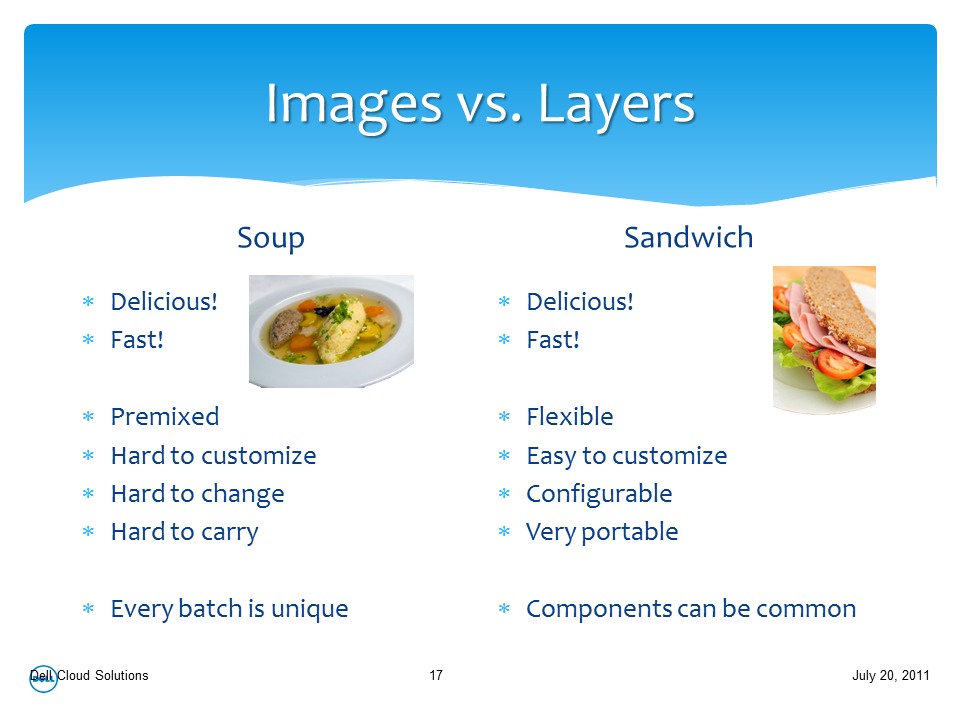
Today I presented about how Crowbar + DevOps + OpenStack = CloudOps.   The highlight of the presentation (to me, anyway) is the Images vs Layers analogy of Soup vs Sandwiches.  I hope it helps explain why we believe that a DevOps approach to Cloud is essential to success.

Here’s the preso: OSCON 07 2011

I’ll add a link to the videos when they are available.