Crowbar HK Hack Report

Purple Fuzzy H for Hackathon (and Havana)Overall, I’m happy with our three days of hacking on Crowbar 2.  We’ve reached the critical “deploys workload” milestone and I’m excited about well the design is working and how clearly we’ve been able to articulate our approach in code & UI.

Of course, it’s worth noting again that Crowbar 1 has also had significant progress on OpenStack Havana workloads running on Ubuntu, Centos/RHEL, and SUSE/SLES

Here are the focus items from the hack:

  • Documentation – cleaned up documentation specifically by updating the README in all the projects to point to the real documentation in an effort to help people find useful information faster.  Reminder: if unsure, put documentation in barclamp-crowbar/doc!
  • Docker Integration for Crowbar 2 progress.  You can now install Docker from internal packages on an admin node.  We have a strategy for allowing containers be workload nodes.
  • Ceph installed as workload is working.  This workload revealed the need for UI improvements and additional flags for roles (hello “cluster”)
  • Progress on OpenSUSE and Fedora as Crowbar 2 install targets.  This gets us closer to true multi-O/S support.
  • OpenSUSE 13.1 setup as a dev environment including tests.  This is a target working environment.
  • Being 12 hours offset from the US really impacted remote participation.

One thing that became obvious during the hack is that we’ve reached a point in Crowbar 2 development where it makes sense to move the work into distinct repositories.  There are build, organization and packaging changes that would simplify Crowbar 2 and make it easier to start using; however, we’ve been trying to maintain backwards compatibility with Crowbar 1.  This is becoming impossible; consequently, it appears time to split them.  Here are some items for consideration:

  1. Crowbar 2 could collect barclamps into larger “workload” repos so there would be far fewer repos (although possibly still barclamps within a workload).  For example, there would be a “core” set that includes all the current CB2 barclamps.  OpenStack, Ceph and Hadoop would be their own sets.
  2. Crowbar 2 would have a clearly named “build” or “tools” repo instead of having it called “crowbar”
  3. Crowbar 2 framework would be either part of “core” or called “framework”
  4. We would put these in a new organization (“Crowbar2” or “Crowbar-2”) so that the clutter of Crowbar’s current organization is avoided.

While we clearly need to break apart the repo, this suggestion needs community more discussion!

Looking to Leverage OpenStack Havana? Crowbar delivers 3xL!

openstack_havanaThe Crowbar community has a tradition of “day zero ops” community support for the latest OpenStack release at the summit using our pull-from-source capability.  This release we’ve really gone the extra mile by doing it one THREE Linux distros (Ubuntu, RHEL & SLES) in parallel with a significant number of projects and new capabilities included.

I’m especially excited about Crowbar implementation of Havana Docker support which required advanced configuration with Nova and Glance.  The community also added Heat and Celiometer in the last release cycle plus High Availability (“Titanium”) deployment work is in active development.  Did I mention that Crowbar is rocking OpenStack deployments?  No, because it’s redundant to mention that.  We’ll upload ISOs of this work for easy access later in the week.

While my team at Dell remains a significant contributor to this work, I’m proud to point out to SUSE Cloud leadership and contributions also (including the new Ceph barclamp & integration).  Crowbar has become a true multi-party framework!


Want to learn more?  If you’re in Hong Kong, we are hosting a Crowbar Developer Community Meetup on Monday, November 4, 2013, 9:00 AM to 12:00 PM (HKT) in the SkyCity Marriott SkyZone Meeting Room.  Dell, dotCloud/Docker, SUSE and others will lead a lively technical session to review and discuss the latest updates, advantages and future plans for the Crowbar Operations Platform. You can expect to see some live code demos, and participate in a review of the results of a recent Crowbar 2 hackathon.  Confirm your seat here – space is limited!  (I expect that we’ll also stream this event using Google Hangout, watch Twitter #Crowbar for the feed)

My team at Dell has a significant presence at the OpenStack Summit in Hong Kong (details about activities including sponsored parties).  Be sure to seek out my fellow OpenStack Board Member Joseph George, Dell OpenStack Product Manager Kamesh Pemmaraju and Enstratius/Dell Multi-Cloud Manager Founder George Reese.

Note: The work referenced in this post is about Crowbar v1.  We’ve also reached critical milestones with Crowbar v2 and will begin implementing Havana on that platform shortly.

OpenStack Havana provides foundation for XXaaS you need

Folsom SummitIt’s been a long time, and a lot of summits, since I posted how OpenStack was ready for workloads (back in Cactus!).  We’ve seen remarkable growth of both the platform technology and the community surrounding it.  So much growth that now we’re struggling to define “what is core” for the project and I’m proud be on the Foundation Board helping to lead that charge.

So what’s exciting in Havana?

There’s a lot I am excited about in the latest OpenStack release.

Complete Split of Compute / Storage / Network services

In the beginning, OpenStack IaaS was one service (Nova).  We’ve been breaking that monolith into distinct concerns (Compute, Network, Storage) for the last several releases and I think Havana is the first release where all of the three of the services are robust enough to take production workloads.

This is a major milestone for OpenStack because knowledge that the APIs were changing inhibited adoption.

ENABLING TECH INTEGRATION: Docker & Ceph

We’ve been hanging out with the Ceph and Docker teams, so you can expect to see some interesting.  These two are proof of the a fallacy that only OpenStack projects are critical to OpenStack because neither of these technologies are moving under the official OpenStack umbrella.  I am looking forward to seeing both have dramatic impacts in how cloud deployments.

Docker promises to make Linux Containers (LXC) more portable and easier to use.  This paravirtualization approach provides near bear metal performance without compromising VM portability.  More importantly, you can oversubscribe LXC much more than VMs.  This allows you to dramatically improve system utilization and unlocks some other interesting quality of service tricks.

Ceph is showing signs of becoming the scale out storage king.  Beyond its solid data dispersion algorithm, a key aspect of its mojo is that is delivers both block and object storage.  I’ve seen a lot of interest in consolidating both types of storage into a single service.  Ceph delivers on that plus performance and cost.  It’s a real winner.

Crowbar Integration & High Availability Configuration!

We’ve been making amazing strides in the Crowbar + OpenStack integration!  As usual, we’re planning our zero day community build (on the “Roxy” branch) to get people started thinking about operationalizing OpenStack.   This is going to be especially interesting because we’re introducing it first on Crowbar 1 with plans to quickly migrate to Crowbar 2 where we can leverage the attribute injection pattern that OpenStack cookbooks also use.  Ultimately, we expect those efforts to converge.  The fact that Dell is putting reference implementations of HA deployment best practices into the open community is a major win for OpenStack.

Tests, Tests, Tests & Continuous Delivery

OpenStack continue to drive higher standards for reviews, integration and testing.  I’m especially excited to the volume and activity around our review system (although backlogs in reviews are challenges).  In addition, the community continues to invest in the test suites like the Tempest project.  These are direct benefits to operators beyond simple code quality.  Our team uses Tempest to baseline field deployments.  This means that OpenStack test suites help validate live deployments, not just lab configurations.

We achieve a greater level of quality when we gate code check-ins on tests that matter to real deployments.   In fact, that premise is the basis for our “what is core” process.  It also means that more operators can choose to deploy OpenStack continuously from trunk (which I consider to be a best practice scale ops).

Where did we fall short?

With growth comes challenges, Havana is most complex release yet.  The number of projects that are part the OpenStack integrated release family continues to expand.  While these new projects show the powerful innovation engine at work with OpenStack, they also make the project larger and more difficult to comprehend (especially for n00bs).  We continue to invest in Crowbar as a way to serve the community by making OpenStack more accessible and providing open best practices.

We are still struggling to resolve questions about interoperability (defining core should help) and portability.  We spent a lot of time at the last two summits on interoperability, but I don’t feel like we are much closer than before.  Hopefully, progress on Core will break the log jam.

Looking ahead to Ice House?

I and many leaders from Dell will be at the Ice House Summit in Hong Kong listening and learning.

The top of my list is the family of XXaaS services (Database aaS, Load Balanacer aaS, Firewall aaS, etc) that have appeared.  I’m a firm believer that clouds are more than compute+network+storage.  With a stable core, OpenStack is ready to expand into essential platform services.

If you are at the summit, please join Dell (my employer) and Intel for the OpenStack Summit Welcome Reception (RSVP!) kickoff networking and social event on Tuesday November 5, 2013 from 6:30 – 8:30pm at the SkyBistro in the SkyCity Marriott.   My teammate, Kamesh Pemmaraju, has a complete list of all Dell the panels and events.

OpenStack Neutron using Linux Bridges (technical explanation)

chris_net3Apparently this is “Showcase Dell OpenStack/Crowbar Team Member Week” because today I’m proxy positioning for Dell OpenStack engineer Chris Dearborn.  Chris has been leading our OpenStack Neutron deployment for Grizzly and Havana.

If you’re familiar with the OpenStack Networking, skip over my introductory preamble and jump right down to the meat under “SDN Client Connection: Linux Bridge.”  Hopefully we can convince Chris to put together more in this series and cover GRE and VLAN configurations too.

OpenStack and Software Defined Network

Software Defined Networking (SDN) is an emerging concept that describes a family of functionality.  Like cloud, the exact meaning of SDN appears to be in the eye (or brochure) of the company providing the technology.  Overall, the concept for SDN is to have programmable networks that can be automatically provisioned.

Early approaches to this used the OpenFlow™ API to programmatically modify switch routing tables (aka OSI Layer 2) on a flow by flow basis across multiple switches.  While highly controlled, OpenFlow has proven difficult to implement at scale in dynamic environments; consequently, many SDN implementations are now using overlay networks based on inventoried VLANs  and/or dynamic tunnels.

Inventoried VLAN overlay networks create a stable base layer 2 infrastructure that can be inventoried and handed out dynamically on-demand.  Generally, the management infrastructure dynamically connects the end-points (typically virtual machines) to a dedicated existing layer 2 network.  This provides all of the isolation desired without having to thrash the underlying network switch infrastructure.

Dynamic tunnel overlay network also uses client connection points to isolate traffic but do not rely on switch layer 2.  Instead, they encrypt traffic before sending it over a shared network.  This avoids having to match dynamic networks to static inventory; however, it also adds substantial encryption overhead to the network communication.  Consequently, tunnels provide more flexibility and less up front-confirmation but with lower performance.

OpenStack Networking, project Neutron (previously Quantum), is responsible for connecting virtual machines setup by OpenStack Compute (aka Nova) to the software defined networking infrastructure.  By design, Neutron accommodates different implementation plug-ins.  That allows operators to choose between different approaches including the addition of commercial offerings.   While it is possible to use open source capabilities for small deployments and trials, most large scale deployments choose proprietary SDN technologies.

The Crowbar OpenStack installation allows operators to choose between “Open vSwitch GRE Tunnels” and “Linux Bridge VLAN” configuration.  The GRE option is more flexible and requires less up front configuration; however, the encryption used by GRE will degrade performance.  The Linux Bridge VLAN option requires more upfront configuration and design.

Since GRE works with minimal configuration, let’s explore what’s required to for Crowbar to setup OpenStack Neutron Linux Bridge VLAN networking.

Note: This review assumes that you already have a working knowledge of Crowbar and OpenStack.

Background

Before we dig into how OpenStack configures SDN , we need to understand how we connect between virtual machines running in the system and the physical network.  This connection uses Linux Bridges.  For GRE tunnels, Crowbar configures an Open vSwitch (aka OVS) on the node to create and manage the tunnels.

One challenge with SDN traffic isolation is that we can no longer assume that virtual machines with network access can reach destinations on our same network.  This means that the infrastructure must provide paths (aka gateways and routers) between the tenant and infrastructure networks.  A major part of the OpenStack configuration includes setting up these connections when new tenant networks are created.

Note: In the OpenStack Grizzly and earlier releases, open source code for network routers were not configured in a highly available or redundant way.  This problem is addressed in the Havana release.

For the purposes of this explanation, the “network node” is the shared infrastructure server that bridges networks.  The “compute node” is any one of the servers hosting guest virtual machines.  Traffic in the cloud can be between virtual machines within the cloud instance (internal) or between a virtual machine and something outside the OpenStack cloud instance (external).

Let’s make sure we’re on the same page with terminology.

  • OSI Layer 2 – just above physical connections (layer 1), Layer two manages traffic between servers including providing logical separation of traffic.
  • VLAN – Virtual Local Area Network are switch enforced isolation zones created by adding 1 of 4096 tags in the network traffic (aka tagged traffic).
  • Tenant – a group of users in a cloud that are logically isolated (cannot see other traffic or information) but still using shared resources.
  • Switch – a physical device used to provide layer 1 networking connections between end points.  May provide additional services on other OSI layers such as VLANs.
  • Network Node – an OpenStack infrastructure server that connects tenant networks to infrastructure networks.
  • Compute Node – an OpenStack server that runs user workloads in virtual machines or containers.

SDN Client Connection: Linux Bridge 
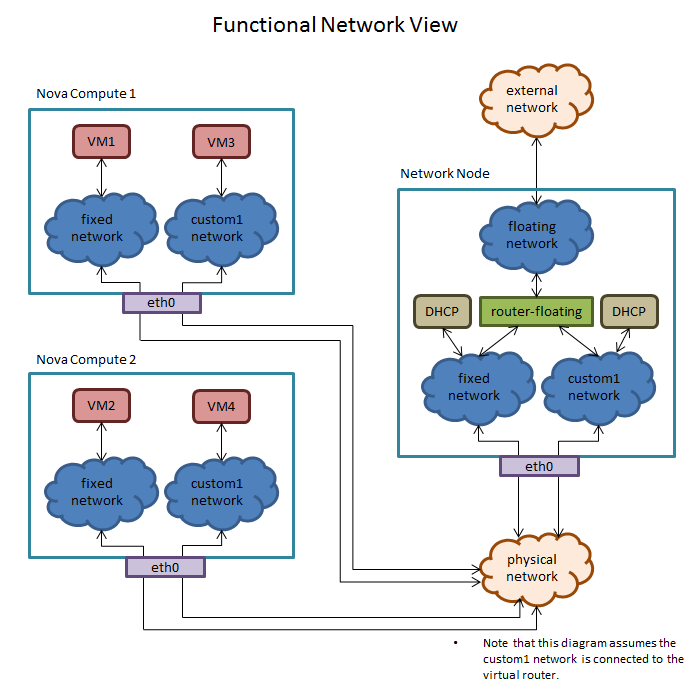
chris_net1

The VLAN range for Linux Bridge is configurable in /etc/quantum/quantum.conf by changing the network_vlan_ranges parameter.  Note that this parameter is set by the Crowbar Neutron chef recipe.  The VLAN range is configured to start at whatever the “vlan” attribute in the nova_fixed network in the bc-template-network.json is set to.  The VLAN range end is hard coded to end at the VLAN start plus 2000.

Reminder: The maximum VLAN tag is 4096 so the VLAN tag for nova_fixed should never be set to anything greater than 2095 to be safe.

Networks are assigned the next available VLAN tag as they are created.  For instance, the first manually created network will be assigned VLAN 501, the next VLAN 502, etc.  Note that this is independent of what tenant the new network resides in.

The convention in Linux Bridge is to name the various network constructs including the first 11 characters of the UUID of the associated Neutron object.  This allows you to run the quantum CLI command listing out the objects you are interested in, and grepping on the 11 uuid characters from the network construct name.  This shows what Neutron object a given network construct maps to.
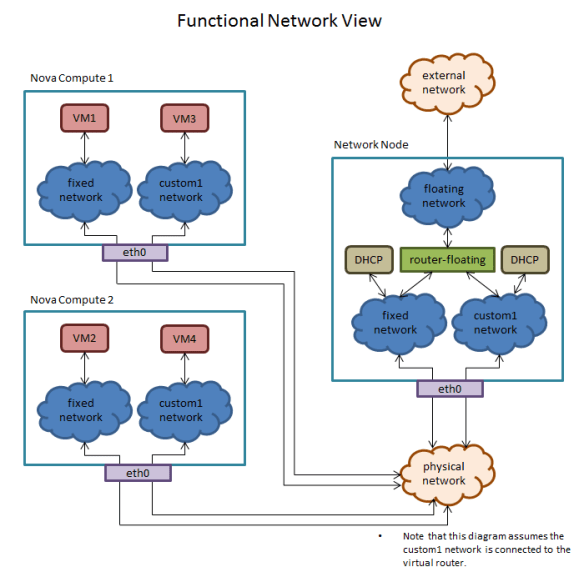
chris_net2

Network Creation

When a network is created, a corresponding bridge is created and is given the name br<network_uuid>.  A subinterface of the NIC is also created and is named <interface_name>.<vlan_tag>.  This subinterface is slaved to the bridge.  Note that this only happens when the network is needed (when a VM is created on the network).

This occurs on both the network node and the compute nodes.

Additional Steps Taken On The Network Node During Network Creation

On the network node, a bridge and subinterface is created per network and the subinterface is slaved to the bridge as described above.  If the network is attached to the router, then a TAP interface that the router listens on is created and slaved to the bridge.  If DHCP is selected, then another TAP interface is created that the dnsmasq process talks to, and that interface is also slaved to the bridge.

VM Creation On A Compute Node

When a VM is created, a TAP interface is created and named tap<port_uuid>.  The port is the Neutron port that the VM is plugged in to.  This TAP interface is slaved to the bridge associated with the network that the user selected when creating the VM.  Note that this occurs on compute nodes only.

Determining the dnsmasq port/tap interface for a network

The TAP port associated with dnsmasq for a network can be determined by first getting the uuid of the network, then looking on the network node in /var/lib/quantum/dhcp/<network_uuid>/interface.  The interface will be named ns-.  Note that this is only the first 11 characters of the uuid.  The tap interface will be named tap.

chris_net3

Summary

Understanding OpenStack Networking is critical to operating a successful cloud deployment.  The Crowbar Team at Dell has invested significant effort to automate the configuration of Neutron.  This helps you eliminate the risk of manual configuration and leverage our extensive testing and field experience.

If you are interested in seeing the exact sequences used by Crowbar, please visit the Crowbar Github repository for the “Quantum Barclamp.

Crowbar 2 Status Update > I can feel the rumble of the engines

two

Crowbar Two

While I’ve been more muted on our Crowbar 2 progress since our pivot back to CB1 for Grizzly, it has been going strong and steady.  We took advantage of the extra time to do some real analysis about late-binding, simulated annealing, emergent services and functional operations that are directly reflected in Crowbar’s operational model (yes, I’m working on posted explaining each concept).

We’re planning Crowbar 2 hack-a-thon in Hong Kong before the OpenStack Ice House Summit (11/1-3).  We don’t expect a big crowd on site, but the results will be fun to watch remote and it should be possible to play along (watch the crowbar list for details).

In the mean time, I wanted to pass along this comprehensive status update by Crowbar’s leading committer, Victor Lowther:

It has been a little over a month since my last status report on
Crowbar 2.0, so now that we have hit the next major milestone
(installing the OS on a node and being able to manage it afterwards),
it is time for another status report.

Major changes since the initial status report:

* The Crowbar framework understands node aliveness and availability.
* The Network barclamp is operational, and can manage IPv4 and IPv6 in
  the same network.
* delayed_jobs + a stupidly thin queuing layer handle all our
  long-running tasks.
* We have migrated to postgresql 9.3 for all our database needs.
* DHCP and DNS now utilize the on_node_* role hooks to manage their
  databases.
* We support a 2 layer deployment tree -- system on top, everything
  else in the second layer.
* The provisioner can install Ubuntu 12.04 on other nodes.
* The crowbar framework can manage other nodes that are not in
  Sledgehammer.
* We have a shiny installation wizard now.

In more detail:

Aliveness and availability:

Nodes in the Crowbar framework have two related flags that control
whether the annealer can operate on them.

Aliveness is under the control of the Crowbar framework and
encapsulates the framework's idea of whether any given node is
manageable or not.  If a node is pingable and can be SSH'ed into as
root without a password using the credentials of the root user on
the admin node, then the node is alive, otherwise it is dead.
Aliveness is tested everytime a jig tries to do something on a node
-- if a node cannot be pinged and SSH'ed into from at least one of
its addresses on the admin network, it will be marked as
dead.  When a node is marked as dead, all of the noderoles on that
node will be set to either blocked or todo (depending on the state of
their parent noderoles), and those changes will ripple down the
noderole dependency graph to any child noderoles.

Nodes will also mark themselves as alive and dead in the course of
their startup and shutdown routines.

Availability is under the control of the Crowbar cluster
administrators, and should be used by them to tell Crowbar that it
should stop managing noderoles on the node.  When a node is not
available, the annealer will not try to perform any jig runs on a
node, but it will leave the state of the noderoles alone.

A node must be both alive and available for the annealer to perform
operations on it.

The Network Barclamp:

The network barclamp is operational, with the following list of
features:

* Everything mentioned in Architecture for the Network Barclamp in
  Crowbar 2.0
* IPv6 support.  You can create ranges and routers for IPv6 addresses
  as well as IPv4 addresses, and you can tell a network that it should
  automatically assign IPv6 addresses to every node on that network by
  setting the v6prefix setting for that network to either:
  * a /64 network prefix, or
  * "auto", which will create a globally unique RFC4193 IPv6 network
    prefix from a randomly-chosen 40 bit number (unique per cluster
    installation) followed by a subnet ID based on the ID of the
    Crowbar network.
  Either way, nodes in a Crowbar network that has a v6prefix will get
  an interface ID that maps back to their FQDN via the last 64 bits of
  the md5sum of that FQDN. For now, the admin network will
  automatically create an RFC4193 IPv6 network if it is not passed a
  v6prefix so that we can easily test all the core Crowbar components
  with IPv6 as well as IPv4.  The DNS barclamp has been updated to
  create the appropriate AAAA records for any IPv6 addresses in the
  admin network.

Delayed Jobs and Queuing:

The Crowbar framework runs all jig actions in the background using
delayed_jobs + a thin queuing layer that ensures that only one task is
running on a node at any given time.  For now, we limit ourselves to
having up to 10 tasks running in the background at any given time,
which should be enough for the immediate future until we come up with
proper tuning guidelines or auto-tuning code for significantly larger
clusters.

Postgresql 9.3:

Migrating to delayed_jobs for all our background processing made it
immediatly obvious that sqlite is not at all suited to handling real
concurrency once we started doing multiple jig runs on different nodes
at a time. Postgresql is more than capable of handling our forseeable
concurrency and HA use cases, and gives us lots of scope for future
optimizations and scalability.

DHCP and DNS:

The roles for DHCP and DNS have been refactored to have seperate
database roles, which are resposible for keeping their respective
server roles up to date.  Theys use the on_node_* roles mentioned in
"Roles, nodes, noderoles, lifeycles, and events, oh my!" along with a
new on_node_change event hook create and destroy DNS and DHCP database
entries, and (in the case of DHCP) to control what enviroment a node
will PXE/UEFI boot into.  This gives us back the abiliy to boot into
something besides Sledgehammer.

Deployment tree:

Until now, the only deployment that Crowbar 2.0 knew about was the
system deployment.  The system deployment, however, cannot be placed
into proposed and therefore cannot be used for anything other than
initial bootstrap and discovery.  To do anything besides
bootstrap the admin node and discover other nodes, we need to create
another deployment to host the additional noderoles needed to allow
other workloads to exist on the cluster.  Right now, you can only
create deployments as shildren of the system deployment, limiting the
deployment tree to being 2 layers deep.

Provisioner Installing Ubuntu 12.04:

Now, we get to the first of tqo big things that were added in the last
week -- the provisioner being able to install Ubuntu 12.04 and bring
the resulting node under management by the rest of the CB 2.0
framework.  This bulds on top of the deployment tree and DHCP/DNS
database role work.  To install Ubuntu 12.04 on a node from the web UI:

1: Create a new deployment, and add the provisioner-os-install role to
that deployment.  In the future you will be able to edit the
deployment role information to change what the default OS for a
deployment should be.
2: Drag one of the non-admin nodes onto the provisioner-os-install
role.  This will create a proposed noderole binding the
provisioner-os-install role to that node, and in the future you would
be able to change what OS would be installed on that node by editing
that noderole before committing the deployment.
3: Commit the snapshot.  This will cause several things to happen:
  * The freshly-bound noderoles will transition to TODO, which will
    trigger an annealer pass on the noderoles.
  * The annealer will grab all the provisioner-os-install roles that
    are in TODO, set them in TRANSITION, and hand them off to
    delayed_jobs via the queuing system.
  * The delayed_jobs handlers will use the script jig to schedule a
    reboot of the nodes for 60 seconds in the future and then return,
    which will transition the noderole to ACTIVE.
  * In the crowbar framework, the provisioner-os-install role has an
    on_active hook which will change the boot environment of the node
    passed to it via the noderole to the appropriate os install state
    for the OS we want to install, and mark the node as not alive so
    that the annealer will ignore the node while it is being
    installed.
  * The provisioner-dhcp-database role has an on_node_change handler
    that watches for changes in the boot environment of a node.  It
    will see the bootenv change, update the provisioner-dhcp-database
    noderoles with the new bootenv for the node, and then enqueue a
    run of all of the provisioner-dhcp-database roles.
  * delayed_jobs will see the enqueued runs, and run them in the order
    they were submitted.  All the runs sholuld happen before the 60
    seconds has elapsed.
  * When the nodes finally reboot, the DHCP databases should have been
    updated and the nodes will boot into the Uubntu OS installer,
    install, and then set their bootenv to local, which will tell the
    provisioner (via the provisioner-dhcp-database on_node_change
    hook) to not PXE boot the node anymore.
  * When the nodes reboot off their freshly-installed hard drive, they
    will mark themselves as alive, and the annealer will rerun all of
    the usual discovery roles.
The semi-astute observer will have noticed some obvious bugs and race
conditions in the above sequence of steps.  These have been left in
place in the interest of expediency and as learning oppourtunities for
others who need to get familiar with the Crowbar codebase.

Installation Wizard:

We have a shiny installation that you can use to finish bootstrapping
your admin node.  To use it, pass the --wizard flag after your FQDN to
/opt/dell/bin/install-crowbar when setting up the admin node, and the
install script will not automatically create an admin network or an
entry for the admin node, and logging into the web UI will let you
customize things before creating the initial admin node entry and
committing the system deployment.  

Once we get closer to releasing CB 2.0, --wizard will become the default.

OpenStack Core Online Forum, Oct 16 13:30 UTC / Oct 22 0100 UTC

Go Online!OpenStack Community, you are invited on an online discussion about OpenStack Core on October 16th at UTC 13:30 (8:30 am US Central) and October 22nd at UTC 0100 (8:00 pm US Central)

At the next OpenStack Foundation Board meeting, we will be setting a timeline for implementing an OpenStack Core Definition process that promotes a clear and implementation driven metric for deciding which projects should be considered “required.”  This is your chance to review and influence the process!

We’ll review the OpenStack Core Definition process (20 minutes) and then open up the channel for discussion using the IRC (#openstack-meeting) & Google Hangout on Air (link posted in IRC).

The forum will be coordinated through the IRC channel for links and questions.

Can’t make it?  The session was recorded > here!

How to build a community? Watch OpenStack’s Anne Gentle

wow girlI strongly believe that learning to operate in a collaborative community is a learned skill.  It’s also #1 career talent that I look for when I screen resumes (Linux experience is #2 and my team is hiring).

That’s why I’m simply humbled when I watch some of the OpenStack leaders work to support our community.  It’s worth supporting these efforts in every way possible.

In this specific case, OpenStack (under Anne Gentle‘s leadership) is actively recruiting both mentors and interns for the Outreach Program for Women. Rackspace is sponsoring one intern, and I’m still seeking funding for additional interns. Support levels start at $5750 for one intern.

Here her comments about the program:

OpenStack provides open source software for building public and private clouds. We are constantly moving and growing and very excited to invite newcomers to our community. For a third round, OpenStack is participating in GNOME Outreach Program for Women. As you may know, representation of women among free and open source participants has been cited at 3% [ref] as contrasted with the percentages of computing degrees earned by women (all at over 10% higher) in the US. Eek! At the October 2012 OpenStack Summit, Anne Gentle led an unconference session about including more women in OpenStack and identified one of the goals as bringing more newcomers to OpenStack. The GNOME Outreach program is an excellent way for OpenStack to meet that inclusion goal, and we specifically want to reach out to women who are interested in open source. The program starts in December 2013, going until March 2014. Also, we have been able to support our interns meeting their mentors at the OpenStack Summit, which would be in April 2014. You can find out all the details about how to apply to an OpenStack spot by going to OpenStack For Women.

Thinking about how to Implement OpenStack Core Definition

THIS POST IS #10 IN A SERIES ABOUT “WHAT IS CORE.”

Tied UpWe’ve had a number of community discussions (OSCON, SFO & SA-TX) around the process for OpenStack Core definition.  These have been animated and engaged discussions (video from SA-TX): my notes for them are below.

While the current thinking of a testing-based definition of Core adds pressure on expanding our test suite, it seems to pass the community’s fairness checks.

Overall, the discussions lead me to believe that we’re on the right track because the discussions jump from process to impacts.  It’s not too late!  We’re continuing to get community feedback.  So what’s next?

First…. Get involved: Upcoming Community Core Discussions

These discussions are expected to have online access via Google Hangout.  Watch Twitter when the event starts for a link.

Want to to discuss this in your meetup? Reach out to me or someone on the Board and we’ll be happy to find a way to connect with your local community!

What’s Next?  Implementation!

So far, the Core discussion has been about defining the process that we’ll use to determine what is core.  Assuming we move forward, the next step is to implement that process by selecting which tests are “must pass.”  That means we have to both figure out how to pick the tests and do the actual work of picking them.  I suspect we’ll also find testing gaps that will have developers scrambling in Ice House.

Here’s the possible (aggressive) timeline for implementation:

  • November: Approval of approach & timeline at next Board Meeting
  • January: Publish Timeline for Roll out (ideally, have usable definition for Havana)
  • March: Identify Havana must pass Tests (process to be determined)
  • April: Integration w/ OpenStack Foundation infrastructure

Obviously, there are a lot of details to work out!  I expect that we’ll have an interim process to select must-pass tests before we can have a full community driven methodology.

Notes from Previous Discussions (earlier notes):

  • There is still confusion around the idea that OpenStack Core requires using some of the project code.  This requirement helps ensure that people claiming to be OpenStack core have a reason to contribute, not just replicate the APIs.
  • It’s easy to overlook that we’re trying to define a process for defining core, not core itself.  We have spent a lot of time testing how individual projects may be effected based on possible outcomes.  In the end, we’ll need actual data.
  • There are some clear anti-goals in the process that we are not ready to discuss but will clearly going to become issues quickly.  They are:
    • Using the OpenStack name for projects that pass the API tests but don’t implement any OpenStack code.  (e.g.: an OpenStack Compatible mark)
    • Having speciality testing sets for flavors of OpenStack that are different than core.  (e.g.: OpenStack for Hosters, OpenStack Private Cloud, etc)
  • We need to be prepared that the list of “must pass” tests identifies a smaller core than is currently defined.  It’s possible that some projects will no longer be “core”
  • The idea that we’re going to use real data to recommend tests as must-pass is positive; however, the time it takes to collect the data may be frustrating.
  • People love to lobby for their favorite projects.  Gaps in testing may create problems.
  • We are about to put a lot of pressure on the testing efforts and that will require more investment and leadership from the Foundation.
  • Some people are not comfortable with self-reporting test compliance.   Overall, market pressure was considered enough to punish cheaters.
  • There is a perceived risk of confusion as we migrate between versions.  OpenStack Core for Havana seems to specific but there is concern that vendors may pass in one release and then skip re-certification.  Once again, market pressure seems to be an adequate answer.
  • It’s not clear if a project with only 1 must-pass test is a core project.  Likely, it would be considered core.  Ultimately, people seem to expect that the tests will define core instead of the project boundary.

What do you think?  I’d like to hear your opinions on this!

Doing is Doing – my 10 open source principles

2013-07-14_17-28-21_468Open source projects’ greatest asset is their culture and FOSS practitioners need to deliberately build and expand it. To me, culture is not soft or vague.  Culture is something specific and actionable that we need to define and hold people accountable for.

I have simple principles that guide me in working in open source.   At their root, they are all simply “focus on the shared work.”

I usually sum them up as “Doing is Doing.”  While that’s an excellent test to see if you’re making the right choices, I suspect many will not find that tautology sufficiently actionable.

The 10 principles I try to model in open source leadership:

  1. Leadership includes service: connecting, education, documentation and testing
  2. Promotion is a two-edged sword – leaders needs to take extra steps to limit self-promotion or we miss hearing the community voice.
  3. Collaboration must be modeled by the leaders with other leaders.
  4. Vision must be articulated, but shared in a way that leaves room for new ideas and tactical changes.
  5. Announcements should be based on available capability not intention. In open source, there is less need for promises and forward-looking statements because your actions are transparent.
  6. Activity (starting from code and beyond) should be visible (Github = social coding) – it’s the essence of collaboration.
  7. Testing is essential because it allows other people to join with reduced risk.
  8. Docs are essential because it reduces friction for users to adopt.
  9. Upstreaming (unlike Forking) is a team sport so be prepared for some give-and-take.
  10. It’s not just about code, open source is about solving shared problems together.  When we focus on the shared goals (“the doing”) then the collaboration comes naturally.

Taking OpenStack Core discussions to community

core flowTHIS POST IS #9 IN A SERIES ABOUT “WHAT IS CORE.”

We’ve been building up to a broad discussion about the OpenStack Core and I’d like to invite everyone in the OpenStack community to participate (review latest).

Alan Clark (Board Chairman) officially kicked off this open discussion with his post on the OpenStack blog last week.  And we’re trying to have face-to-face events for dialog like the Core meetup tonight in San Francisco.  Look for more to come!

Of course, this will also be a topic at the summit (Alan and I submitted two sessions about this).  The Board needs to move this forward in the November meeting, so NOW is the time to review and give us input.