Video of Crowbar Install & Introduction (two 15 min videos)

These Crowbar videos are the first two in a series of how to setup and use your own local Crowbar dev environment (here’s more info & the ISO).   I used VMware Workstation, but any virtual hosts that support Ubuntu 10.10 will work fine.  We use ESX, KVM and Xen for testing too.

Creating this environment is the basis for learning Crowbar, experimenting with OpenStack and creating your own barclamps.  It’s also a handy way to play with Opscode Chef since it includes a stand alone Chef server.

Some items from the install video that I want to re-emphasize:

  • The admin server REQUIRES >1 GB of RAM (more is better)
  • All other nodes REQUIRE > 512 MB of RAM (more depending on what you install)
  • At least TWO NICS are required.
  • You must disable DHCP on the virtual network because Crowbar has a DHCP server and they will conflict.
  • The login for the Crowbar admin server is openstack/openstack.  You must “sudo -i” before you run the install script.
  • The default url for Crowbar is http://192.168.124.10:3000  (crowbar/crowbar)

Installing Crowbar (15 mins)

Introduction to Crowbar (15 mins)

9/30 Bonus Video: How to change the default networking

Continue reading

Big Questions? Big Answers with Dell BigData solution (plus Crowbar gets RHEL)

In my enthusiasm for all things Dell + OpenStack, I have neglected to talk about my team’s interesting Big Data work with Apache Hadoop.  Hadoop is a suite of open source projects for analyzing large data sets of unstructured data.  Initially, Hadoop centered around use of the map-reduce algorithm; however, it’s grown way beyond that as the community has worked to solve problems related to data storage, discovery, and scheduling.

Big Data clouds are well suited to my team because the model (non-redundant/cloud) and scale (hyper) of their deployments.  It should be no surprise that builders of analysis clouds have the same goals (maximizing operational ROI per compute unit) as builders of other types of clouds.

Our Hadoop solution relies on the same core principles (CloudOps) and technologies (Crowbar) as our OpenStack solution.  Like our other cloud solutions, we are working closely with a proven leader: Cloudera.  Now that we’ve formally announced our solution and partnership, I can talk a about what we’re doing on the Big Data front.

One extra thing that I’m proud to announce, we’ll be adding Red Hat Enterprise Linux (RHEL) support to Crowbar to support our Hadoop solution.  This support is not just at the node level: we are making Crowbar admin run on either platform too!  This is significant for two reasons:

  1. It expands the number of platforms and support options for Crowbar users
  2. It provides the framework to support more varieties of node operating environment (e.g.: XenServer, BSD, DRDOS, etc)

For more information, check out:

Crowbar build, build, run notes on project Github Wiki

Now that Crowbar has a Dell sponsored listserv and Wiki, I’m encouraging people to use those resources.

We are still adding to the wiki, but it’s got the basics covered.

Here are the links to get started:

Build Sledgehammer, the Crowbar discovery image / build prerequisite

Note: This content has been copied to the Crowbar Wiki.
Victor “got your back” Lowther, CI & build automation czar on our team at Dell, spent a lot of time cleaning up the open source build to make it MUCH easier.  The latest build only requires ONE server for all components.  To make it repeatable and fast, I’m using a hosted VM from Rackspace Cloud.
Here are the steps that you should follow (cool: if you build before the prereqs are in place, the script will tell you what’s missing).
Note: You must build the discovery image (build_sledgehammer.sh) before building Crowbar.  This image does not change very often, so it’s helpful to cache it somewhere (like in the Crowbar cache where it normally lives) and save time.
  1. Starting from a Rackspace Cloud Ubuntu 10.10 image (512 RAM is OK, $0.03/hr)
  2. Get libraries for git, RPM, & Ruby: apt-get install git rpm ruby
  3. Get the sledgehammer repo: git clone git://github.com/dellcloudedge/crowbar-sledgehammer.git
  4. Go to sledgehammer: cd crowbar-sledgehammer
  5. Download the CentOS image: curl -o ../CentOS-5.6-x86_64-bin-DVD-1of2.iso http://mirror.cs.vt.edu/pub/CentOS/5.6/isos/x86_64/CentOS-5.6-x86_64-bin-DVD-1of2.iso
    1. takes some time (10+ mins) even in the cloud
  6. Tell the build where to look for the CentOS image: CENTOS_ISO=~/CentOS-5.6-x86_64-bin-DVD-1of2.iso ./build_sledgehammer.sh
    1. you may need to change the path of the image if you did not put it in your home directory
    1. wait a long time while magic happens and the tar gets created
    2. check out the tar ball in the /bin directory!
  7. Create the cache location for Sledgehammer: mkdir -p ~/.crowbar-build-cache
  8. Move the the cache location: cd ~/.crowbar-build-cache
  9. Extract the Sledgehammer tar: tar xzvf ~/crowbar-sledgehammer/bin/sledgehammer-tftpboot.tar.gz 
Or, use the tar copy that I’ve cached it on zehicle.com!  Then you can start at step 8.
Now you can build crowbar as per instructions (duplicated below)
  1. cd ~
  2. git clone git://github.com/dellcloudedge/crowbar.git
  3. apt-get update
  4. apt-get install build-essential mkisofs debootstrap
  5. crowbar/build_crowbar.sh
    1. kicks off a long download to create the cache (first time only!)
    2. look in the home directory for the openstack-dev.iso

Of course, you still need to INSTALL CROWBAR (as root, /tftpboot/ubuntu_dvd/extra/install) after you use the ISO to boot a VM.  Instructions on that shortly…

Crowbar build using Ubuntu 10.10 vm on Rackspace Cloud from Github Repo

Our OpenStack team at Dell (especially Victor Lowthor) has been working hard with the public Crowbar repos to make it possible for the community to build their own version of a Crowbar ISO.   When you build the ISO, you’ll be downloading a whole bunch (that’s the technical term) of open source licensed components to make it work: we’re trying to maintain a list of licenses on the Github wiki.

To make sure that it was possible for mortals, I signed up for a Ubuntu 10.10 VM (512 Mb RAM, $0.03/hr) at RackSpace Cloud.  I did this from a non-Dell to ensure that it was as independent from our source as possible.

Once I had my vm, there were just a few steps to follow (these are NOT verbatim):

  • apt-get install debootstrap, mkisofs, git, build-essential packages
  • git clone git://github.com/dellcloudedge/crowbar.git
  • Got the results from a sledgehammer build (a fresh sledgehammer tarball) and extracted it into $HOME/.crowbar-build-cache/tftpboot, which is where build_crowbar.sh expects to find it cached.
    • NOTE: I’m not ready to document sledgehammer builds yet, but I will tell you that you’d need a CentOS VM.
  • In the crowbar directory, ran ./build_crowbar.sh
  • The build will pull down all the packages that you need and cache them to the VM.  Subsequent builds will be much faster!

The end result of the build is an “openstack-dev.iso” that will install Crowbar with the OpenStack barclamps (here’s how to do it on VMs).  Just for fun, I copied _my build_ output ISO off the build VM and to my web server.

Please let me know if you have problems with this process, we want people to try Crowbar!

$$ Note: Turn off your VM when you’re done so you don’t incur extra expenses.  Since this process only took about 2 hours, the whole build cost me less than a dime.  Which is good, since I was building it on “my own dime” anyway.

Crowbar modules (aka barclamps) perform many functions and enable multi-vendor hardware

10/18 Update:

More recent information about Barclamps can be found at https://robhirschfeld.com/2011/09/14/details-of-crowbar-changes/.  We’ve also created videos showing how you can create your own barclamps.

Original Post

Just after we’d started deep Crowbar development, Andi Abes, Paul Webster and Victor Lowther joined the Dell Crowbar+OpenStack team.  They immediately started to dig into our Swift, BIOS/RAID, and Network components.  They also started to bump into each other in our original code base.  It quickly became apparent that we needed to modularize Crowbar.

Restructuring Crowbar into modules has proved essential as a method for safe community collaboration.

Greg Althaus coined the name “barclamps” during the modularization rearchitecture.  A barclamp is a class extension of the Crowbar ServiceObject that allows Crowbar to identify the Chef components used by the barclam

p (name p

attern in Chef is bc-template-[barclamp]) and provides capabilities that are specific to each barclamp.

  • In the simplest case, the barclamp is a minimal wrapper that just provides naming hooks for your Chef cookbooks.  This makes it very easily to adapt existing Chef work to work with Crowbar.
  • In more complex cases, the barclamp will help identity how nodes are allocated, interacts with other barclamps, extends the provisioner state machine and provides custom user interfaces.
  • In most cases, the barclamp’s generic integration and UI are sufficient.
Initially, barclamps were entirely exposed via REST using the ServiceObject.  We quickly wrapped those into a CLI for our continuous integration system.  Lately, we’ve expressed them in the user interface.
At launch, you’ll find all but two in the open source repository.  Unfortunately, we were not able to include BIOS and RAID barclamps in the open version because they use licensed components – we are working to correct this.  They are available in the Dell licensed version.
When looking at the barclamps, it is critical to understand that even the most core Crowbar functionality is expressed as a barclamp.
This exposure of Crowbar internals as barclamps is important because it
  1. helps modularize the code and
  2. reflects the deep integration between Chef and Crowbar.

Consequently, the core logic of the state machine, networking configuration, and provisioning are all exposed in barclamps.  This makes it possible to modify and extend the most basic Crowbar operations; however, there are currently no guards against breaking these barclamps either!

The following list includes all the barclamps that we’ve created for Crowbar.
Barclamp   Function  Included
Crowbar The roles and recipes to set up the barclamp framework.  Yes
Deployer Initial classification system for the Crowbar environment (aka the state machine)  Yes
Provisioner The roles and recipes to set up the provisioning server and a base environment for all nodes  Yes
Network Instantiates network interfaces on the crowbar managed systems. Also manages the address pool.  Yes
NTP Common NTP service for the cluster. An NTP server or servers can be specified and all other nodes will be clients of them.  Yes
DNS manages the DNS subsystem for the cluste  Yes
Logging centralized logging system based on syslog  Yes
IPMI Integrates with IP management to allow direct hardware control bypassing the operating system.  Yes
RAID LSI Licensed components.  Cannot be included in open source release at this time.  No
BIOS
PowerEdge C series: Dell License component.  Cannot be included in open source release at this time.  No
Ganglia Optional: a common Ganglia service for the cluster that can be used by other barclamps  Yes
Nagios Optional : common monitoring service for the cluster that can be used by other barclamps  Yes
Nova OpenStack: installs and configures the Openstack Nova (Cactus Release) component. It relies upon the network and glance barclamps for normal operation.  Yes
Swift OpenStack: part of Openstack (Cactus Release) , and provides a distributed blob storage  Yes
Glance OpenStack: Glance service (Cactus Release, Nova image management) for the cloud  Yes
Test provides a shell for writing tests against  Yes

Crowbar design: solving the multi master update issue and adding a pause before configuration

The last few weeks for my team at Dell have been all about testing as Crowbar goes through our QA cycle and enters field testing. These activities are the run up to Dell open sourcing the bits.
The Crowbar testing cycle drove two significant architectural changes that are interesting as general challenges and important in the details for Crowbar adopters.

Challenge #1: Configuration Sequence.

Crowbar has control of every step of deployment from discovery, BIOS/RAID configuration, base image, core services and applications. That’s a great value prop but there’s a chicken and egg problem: how do you set the RAID for a system when you have not decided which applications you are going to install on it?

The urgency of solving this problem became obvious during our first full integration tests. Nova and Swift need very different hardware configurations. In our first Crowbar flows, we would configure the hardware before you selected the purpose of the node.  This was an effect of “rushing” into a Chef client ready state. 

We also needed a concept of collecting enough nodes to deploy a solution.  Building an OpenStack cloud requires that you have enough capacity to build the components of the system in the correct sequence.

Our solution was to inject a “pause” state just after node discovery.  In the current Crowbar state machine, nodes pause after discovery.  This allows you to assign them into the roles that you want them to play in your system.

In testing, we’ve found that the pause state helps manage the system deployment; however, it also added a new user action requirement. 

Challenge #2: Multi-Master Updates

In Chef, the owner of a node’s data in the centralized database is the node, not the server.  This is a logical (but not a typical) design pattern and has interesting side effects.  Specifically, updates from Chef Client runs on the nodes are considered authoritative and will over-write changes made on the server. 

This is correct behavior because Chef’s primary focus is updating the node (edge) and not the central system (core).  If the authority was reversed then we would miss critical changes that Chef effected on the nodes.   From this perspective, the server is a collection point for data that is owned/maintained at the nodes.

Unfortunately, Crowbar’s original design was to inject configuration into the Chef server’s node objects.  We found that Crowbar’s changes could be silently lost since the server is not the owner of the data.  This is not a locking issue – it is a data ownership issue.  Crowbar was not talking to the master of the data when it made updates!

To correct this problem, we (really Greg Althaus in a coding blitz) changed Crowbar to store data in a special role mapped to each node.  This works because roles are mastered on the server.  Crowbar can make reliable updates to the node’s dedicated role without worrying the remote data will override changes. 

This pattern is a better separation of concerns because Crowbar and barclamp configuration in stored in a very clearly delineated location (a role named crowbar-[node] and is not mixed with edge configuration data.

It turns out that these two design changes are tightly coupled.  Simultaneous edge/server writes became very common after we added the pause state.  They are infrequent for single node changes; however, the frequency increases when you are changing a system of interconnected nodes through multiple state.

More simply put: Crowbar is busy changing the node configs at the exactly same time the nodes are busy changing their own configuration.

Whew!  I hope that helped clarify some interesting design considerations behind Crowbar design.

Note: I want to repeat that Crowbar is not tied to Dell hardware! We have modules that are specifically for our BIOS/RAID, but Crowbar will happily do all the other great deployment work if those barclamps are missing.

I’ll be at OSCON 7/25-29/11 (Dell=sponsor & speaking w/ @jbgeorge)

As part of our commitment to open source, Dell is a sponsor of OSCON 2011.  The Dell OpenStack Cloud team will have a booth presence with our well-travelled Crowbar Install rack (now with BOTH PowerEdge C6100 & C6105s).  We’re doing our famous 30 minute OpenStack installs and handing out goodies including USB keys. 

Joseph George (@jbgeorge) and I are speaking:

We’ll be giving specifics about how Crowbar works to deliver the Dell OpenStack Cloud Solution including a narrated demo and details about how the community can extend Crowbar using barclamps.

Note:  Stephen Spector (opnstk_com_mgr), the amazing OpenStack community manager, wanted me to remind everyone that we’re celebrating OpenStack’s 1 year anniversary with activites at OSCON.  He’s asking for video commentary about OpenStack and RSVPs if you can attend the events.  More at OpenStack Blog.

OpenStack Crowbar User Guide: explaining how barclamps get deployed

My whole team is working feverishly on the final touches of Crowbar before we turn over the keys.  We’re putting it through a complete release cycle (extensive QA, customer pilots, documentation, etc) because internal Dell consumers are expecting that level of finish. 

For those in the community eagerly waiting to see the code, I hope you like the extra polish (for example: I18N, user & deployment guides, bundled continuous integration scripts, and months of testing).

RUMOR CONTROL NOTE: Crowbar is NOT limited to deployments on Dell products!!  Our BIOS and RAID barclamps are, of course, targeted and licensed for Dell customers.  The OpenStack and other barclamps will work on any gear that can run Chef Client.

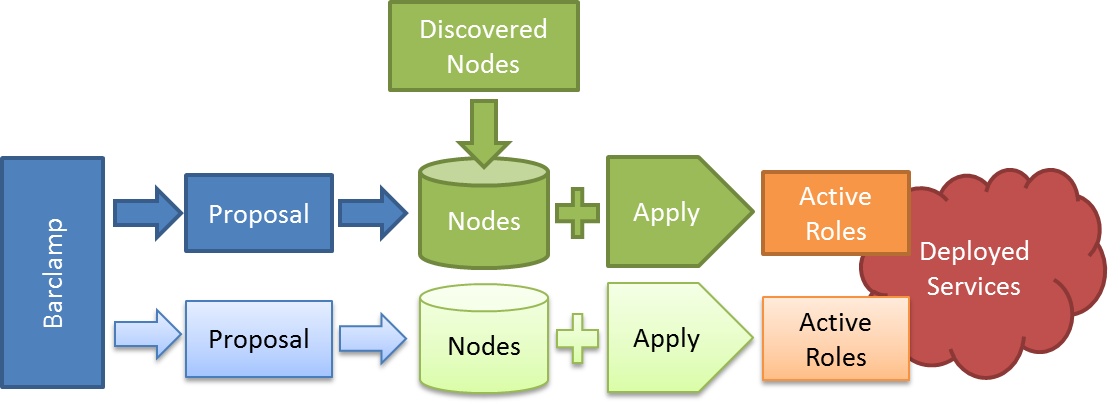
Tonight I was working on the user guide and thought I would share the graphic and text describing how a barclamp gets deployed.

The figure shows the entire of a barclamp within the Crowbar user interface.  A Barclamp defines the capability for a service but cannot be deployed.  To deploy a barclamp, you must create a Proposal.  Once the proposal is created, you must selection nodes to operate on.  As discussed in the next sections, you may also edit the Proposal’s attributes as needed.  

Applying the Proposal tells Crowbar to deploy the proposal onto the nodes.  While deploying, nodes return to the Ready state when deployment is completed.  Once a proposal has become an Active Role, you cannot edit it.  You must delete the Role and repeat the Apply process

Preview Crowbar GUI (OpenStack Installer by Dell for Cloud)

I can’t show you the really cool Overview screen yet, but here’s the one that replaces the one we’ve demo’ed before.  The nodes are grouped by switch and ordered by port so it creates a very nice “rack” layout if your wiring is organized.

Props to Jon Roberts (@emptyflask) for his excellent UI work!