Unknown's avatar

About Rob H

A Baltimore transplant to Austin, Rob thinks about ways of building scale infrastructure for the clouds using Agile processes. He sat on the OpenStack Foundation board for four years. He co-founded RackN enable software that creates hyperscale converged infrastructure.

DevOps approaches to upgrade: Cube Visualization

I’m working on my OpenStack summit talk about DevOps upgrade patterns and got to a point where there are three major vectors to consider:

  1. Step Size (shown as X axis): do we make upgrades in small frequent steps or queue up changes into larger bundles? Larger steps mean that there are more changes to be accommodated simultaneously.
  2. Change Leader (shown as Y axis): do we upgrade the server or the client first? Regardless of the choice, the followers should be able to handle multiple protocol versions if we are going to have any hope of a reasonable upgrade.
  3. Safeness (shown as Z axis): do the changes preserve the data and productivity of the entity being upgraded? It is simpler to assume to we simply add new components and remove old components; this approach carries significant risks or redundancy requirements.

I’m strongly biased towards continuous deployment because I think it reduces risk and increases agility; however, I laying out all the vertices of the upgrade cube help to visualize where the costs and risks are being added into the traditional upgrade models.
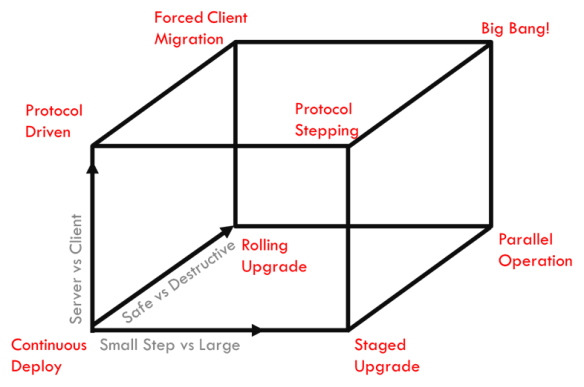
Breaking down each vertex:

  1. Continuous Deploy – core infrastructure is updated on a regular (usually daily or faster) basis
  2. Protocol Driven – like changing to HTML5, the clients are tolerant to multiple protocols and changes take a long time to roll out
  3. Staged Upgrade – tightly coordinate migration between major versions over a short period of time in which all of the components in the system step from one version to the next together.
  4. Rolling Upgrade – system operates a small band of versions simultaneously where the components with the oldest versions are in process of being removed and their capacity replaced with new nodes using the latest versions.
  5. Parallel Operation – two server systems operate and clients choose when to migrate to the latest version.
  6. Protocol Stepping – rollout of clients that support multiple versions and then upgrade the server infrastructure only after all clients have achieved can support both versions.
  7. Forced Client Migration – change the server infrastructure and then force the clients to upgrade before they can reconnect.
  8. Big Bang – you have to shut down all components of the system to upgrade it

This type of visualization helps me identify costs and options. It’s not likely to get much time in the final presentation so I’m hoping to hear in advance if it resonates with others.

PS: like this visualization? check out my “magic 8 cube” for cloud hosting options.

What foo is “contribution” to open source? Mik Kersten & Tasktop @ SXSW

Nested

How do we really know who influences most in a software project?  We can easily track code commits, but there are more bits to the project than the commits.

I had the good fortune to attend Mik Kersten’s Code Graph presentation at SXSW last week. Mik started the Eclipse Mylyn project and went on to found Tasktop. Both are built on the very intriguing concepts that software development production (aka work) is organized around tasks.

His premise is that organizing around tasks provides a more manageable and actionable view of a project than a more traditional application life-cycle management (ALM) approaches.  I’m a sucker for any presentation about lean development process that includes references to both DevOps and industrial engineering (I have an MS in IE), but Mik surprised me by taking his code graph concept to a whole ‘nutha level.

The software value chain is much deeper than just the people who write code. Mik’s approach included managers, testers and operators in the interaction graphs for his projects.

By including all of the ALM artifacts in the analysis, you get a much richer picture of the influencers for a project.

For example, the development manager may never show up as a code committer; however, they are hugely influential in which work gets prioritized. If your graph includes who is touching the work assignments and stories then the manager’s influence jumps out immediately. That knowledge would completely change how and who you may interact with a team. It effectively brings a shadow contributor into the light.

The same is true for QA members who are running tests and opening defects and operators who are building deployment scripts. Ideally, it should include users who exercise different parts of the applications capabilities.

Mik’s graphs clearly showed the influence impact of managers because they touched all of the story cards for the project.  The people who own the story cards are the most potent influencers in a project, yet they are invisible in code repositories!

I would love to see an impact graph for a software project that equally reflected the wide range of contributions that people make to its life-cycle.  This type of information helps rebalance the power in a project.

Industrial engineering legend W.E. Demming‘s advice is to look at production as a system.  Finding ways to show everyone’s contributions is an important step towards bringing lean processes fully into software manufacturing.

Creating Communities: the intersection between Twitter celebrities and open source

calvin_leeOne of the unexpected perks of my Chevy SXSW experience was access to some real social media celebrities such as Josh Estrin, Calvin LeeKristin Brandt, Doug MoraSamantha Needham and Jennie Chen.  They are all amazing, fun, wicked smart and NOT INTO CLOUD COMPUTING.

While I already knew Samantha (via Dell) and Jennie (via TechRanch), all of Chevy’s guests brought totally different perspectives to Chevy’s SXSW team ranging from pop culture  and mommies to hypermilers and gearheads.

The common thread is that we are all looking to engage our communities.

We each wanted to find something that would be interesting for our very different audiences to discuss.  That meant using our experiences at SXSW, Chevy and with each other to start a conversation within our communities.  We need good content as a seed but the goal is to drive the interaction.

Josh was the most articulate about this point saying that he measured his success when his followers talked to each other more than to him.   Being able to create content that engages people to do that is a true talent.

Calvin’s focus was more on helping people connect.  He felt successful when he was able to bring people together through his extended network. In those cases and others, the goals and challenges of a social media celebrity were remarkably similar to those helping lead open source projects.

In building communities, you must measure success in member communication and interaction.

If you are intent on being at the center of the universe then your project cannot grow; however, people also need celebrities to bring them together.  The amazing thing about the the people I met at SXSW through Chevy is that they managed to both attract the attention needed to build critical mass and get out of the way so communities could form around them. That’s a skill that we all should practice and foster.

PS: I also heard clearly that “I ate …” tweets are some of their most popular.  Putting on my collaboration hat: if you’re looking to engage a community then food is the most universal and accessible discussion topic.  Perhaps I’ll have to eat crow on that one.  

SXSW Volt hard to give up – this is the EV that my family wants me to buy

my volt and I

Today Chevy took my SXSW loaner Volt back to the dealership in the cloud.  While I was already inclined toward the Volt, I was much more impressed that I expected.  Frankly, the fact that the Volt and my home-conversion RAVolt both have a 30 mile range made the Volt seem like a pretend EV on the surface.  Yet, the Volt proved it was a full EV and more.

The Volt is a very solid electric car with the all torque and feel I was expecting.

Since the Volt was delivered without a charge, my first day in the car relied on the gas hybrid feature.  Even on gas, I was getting >40 MPG.  While I would have preferred to get the Volt fully charged, it was an important lesson for me to see it perform as a gas fueled car first.

Once I got it charged, I was able to drive nearly all my trips electric only.  That included my 30+ mile commute.  The magic of the Volt is that I never worried about running out of charge.  As an EV driver who has had close scrapes, that is a truly liberating experience.

I enjoyed playing with the Volt’s drive system.  I managed to find an accurate power input/output gauge on the dash instrumentation (the center console view is mainly a pretty animation for passengers).  I was able to extend my electric range using feedback from the more accurate gauge.  In addition, the built-in tutorial explained that I could use the PRNDL “low gear” in traffic.  Low gear activated behaviors in the Volt that made it more efficient AND EASIER to drive in traffic than conventional gas cars.  I was also intrigued by how efficiently the Volt used its gas generator – it used some smarts so the generator ran as little of possible.  Of course, I also enjoyed the acceleration of the electric motor 🙂

In addition to the power train, I found the fit and finish of the Volt to be very satisfying.  The electronics were effective, interior comfortable and handling responsive.  While it did not pretend to be a luxury car, the Volt does not feel like a econobox either.

One note: if you are considering a Volt then plan on a 220 charger.  Relying on charging from household power is simply not practical.  Using 220, you can charge quickly at night when power is cheapest/cleanest to generate.

Helping redefine “what is a car” on Chevy tours at SXSWi

I’m at SWSW as a guest of Chevy and enjoying the benefits of behind the scenes tours and access.  On Friday, the Volt team toured me and a collection of bloggers and journalists through the Pecan Street project and GM’s customer interaction center.

At one point, Colin Rowan compared the relatively long cell phone adoption (they first appeared  in 1973) to the likely ramp of electric cars and green homes.  Doug Moran from GearDiary pointed out the weakness of this comparison.  Cell phones are inexpensive with short life-cycles while cars are expensive durables.

However, Cell phones stopped being phones around 2007 when iPhone adoption exploded.  Smart phones are not phones – they are mobile platforms.  In fact, they are lousy phones when compared to cell phones.

Comparing electric cars to gas cars is more like comparing smart phones to dumb phones!

While both electric and gas cars can be used for transportation, electric cars have the potential to become energy transportation platforms.

You cannot use the energy stored in your car’s gas tank for anything but moving the car around.  Further, you can only get more gas from a very small set of vendors.

Electric cars are fundamentally different – the energy stored in the car’s batteries can be apply to nearly any application you want from transportation to lighting to computing to heating and refrigeration.  Further, you can get more energy for your car from nearly any source (local solar and wind or grid power).  For a hybrid like the Volt, the options are even broader because it includes gas to electricity generation.

From this perspective, electric cars are an energy mobility platform.

We need to accept that we are living in a world with unreliable power distribution due to weather, peak demand and/or carbon tax.   In this type of situation, cars with batteries are as fundamentally different from gas cars as smart phones are to rotary POTS phone.

PS: For more extra credit reading, check out the Vehicle to Grid concept

5 things keeping DevOps from playing well with others (Chef, Crowbar and Upstream Patterns)

Sharing can be hardSince my earliest days on the OpenStack project, I’ve wanted to break the cycle on black box operations with open ops. With the rise of community driven DevOps platforms like Opscode Chef and Puppetlabs, we’ve reached a point where it’s both practical and imperative to share operational practices in the form of code and tooling.

Being open and collaborating are not the same thing.

It’s a huge win that we can compare OpenStack cookbooks. The real victory comes when multiple deployments use the same trunk instead of forking.

This has been an objective I’ve helped drive for OpenStack (with Matt Ray) and it has been the Crowbar objective from the start and is the keystone of our Crowbar 2 work.

This has proven to be a formidable challenge for several reasons:

  1. diverging DevOps patterns that can be used between private, public, large, small, and other deployments -> solution: attribute injection pattern is promising
  2. tooling gaps prevent operators from leveraging shared deployments -> solution: this is part of Crowbar’s mission
  3. under investing in community supporting features because they are seen as taking away from getting into production -> solution: need leadership and others with join
  4. drift between target versions creates the need for forking even if the cookbooks are fundamentally the same -> solution: pull from source approaches help create distro independent baselines
  5. missing reference architectures interfere with having a stable baseline to deploy against -> solution: agree to a standard, machine consumable RA format like OpenStack Heat.

Unfortunately, these five challenges are tightly coupled and we have to progress on them simultaneously. The tooling and community requires patterns and RAs.

The good news is that we are making real progress.

Judd Maltin (@newgoliath), a Crowbar team member, has documented the emerging Attribute Injection practice that Crowbar has been leading. That practice has been refined in the open by ATT and Rackspace. It is forming the foundation of the OpenStack cookbooks.

Understanding, discussing and supporting that pattern is an important step toward accelerating open operations. Please engage with us as we make the investments for open operations and help us implement the pattern.

SXSWi bound thanks to GM & Chevy Volt

I’ll be blogging from SXSWi over the next few days as a guest of the Chevy Volt team AND they’ve given me a Volt to drive for the week (disclaimer: total cash value of $1150).  I’ve been in Austin for over 10 years and find it ironic that my electric car past gets me to event instead of my cloud or software work.  Either way, I’m delighted to attend.

RAVolt maiden 037Yes, I have electric car construction experience…

About 6 years ago before the first days of $4 gas, I took on the entrepreneurial/science project of converting an electric car (a 96 RAV4) to run on batteries.   The result proved clearly that there was no sustainable business in converting gas cars to electric because the mechanics are different enough to require purpose-built design.

My conversion project, the RAVolt, is still in daily use with over 3,000 electric miles.  I never intended it to be a show car – my goal was to be time and cash effective so it uses the most time-tested components: lead acid batteries, 18 hp elevator motor and a forklift DC control system.   With a 30 minute range, it has limited utility.

And now, I find myself in the market for a new car AND being given a Volt for the week.  The Volt was on my short list to consider (I drive a Honda Fit now) along with the Tesla S, Leaf and Smart.  This topic deserves it’s own post.

For the next few days, I’m going to wallow in the SXSWi nerdfest and enjoy experimenting with a production class electric car.  I will, of course, be sharing my experiences and observations about both here and on twitter.  Both are subjects of long-standing interest.

Disclaimer: Chevy has provided me with a SXSWi pass and Volt use ($1150 value).  They have asked for nothing in return and I have made no commitments for favorable comments.  Further, my employer, Dell, is aware of this arrangement with Chevy.  My opinions are my own.

Installing SSD + Windows8 = Blank Primary Monitor (fixable!)

2012-10-28_12-44-51_691I could not find the solution to this easily, so I’m leaving a breadcrumb trail here… I did not keep the links so I cannot give proper attribution but will try to pay it forward.

Short version: Try HDMI/VGA output if your Win8 primary monitor is blank.  Then update the BIOS.

Long version:

I decided to update my wife’s Dell Inspiron N5110 laptop to an SSD and Windows 8.  Sadly, the machine’s factory config had a very slow HDD and that was impacting the system’s total performance.  Replacing the HDD with an SSD required major surgery to the laptop – it is not for the faint of heart.

After installing the SSD and installing Windows 8 (painless!) the system booted though the splash screen and turned off the display.  Yes, it simply went completely blank.

I stumbled upon a tip that suggested that the system was working but using the HDMI output.  That proved correct.  I was able to complete the configuration using HDMI and/or VGA monitors.

Even after completing and updating the monitor (still blank) was clearly working because the BIOS screens and splash screen worked on the monitor.  Deleting the Video Card from Devices did NOT work.

Ultimately, I found a site that recommended updating the BIOS (was A09, now A11 from 11/2012).  The BIOS update corrected the problem.

I should have known to update the BIOS and firmware before starting the upgrade.  I hope you learn from my experience.

Oh…. the SSD+Win8 made an AMAZING performance difference.  It’s like a brand new 10x faster laptop and an excellent investment.  I’ve become a bit of a Linux appologist; however, I was pleasantly surprised to find Windows 8 to be very usable once I learned the latest hot-key assignments (Search on Win key -> Win+F).

Behavior Driven Development (BDD) and Crowbar

Test Test TestI’m a huge advocate of both behavior and test driven development (BDD & TDD). For the Crowbar 2 refactor, I’ve insisted (with community support) that new code has test coverage to the largest extent possible. While this inflicted some technical debt, it dramatically reduces the risk and effort for new developers to contribute.

For open source projects, they are even more important because they allow the community to contribute to the project with confidence.

A core part of this effort has been the Erlang BDD (“bravo delta”) tool that I had started before my team began Crowbar (code link).

I’m a big fan of BDD domain specific languages (DSL) because I think that they are descriptive. Ideally, everyone on the team including marketing and documentation authors should be able to understand and contribute to these tests.

I’ve been training our QA team on how the BDD system works and they are surprised at the clarity of the DSL. By reading the DSL for a feature, then can figure out what the developer had in mind for the system to do. Even better, they can see which use-cases the developer is already testing. Yet the real excitement comes from the potential to collaborate on the feature definitions before the code is written. My blue-sky-with-rainbows hope is that developers and testers will sit down together and review the BDD feature descriptions before code is written (perhaps even during planning). Even short of that nirvana, the BDD feature descriptions provide something that everyone can review and discuss where code (even with verbose documentation) falls short.

Ok, so you already know the benefits of BDD. Why didn’t I do this in the Cucumber? It’s the leading tool and a logical fit for a Rails project like Crowbar. Frankly, I have a love-hate relationship with Cucumber.

  1. It’s slow. And that does not scale for testing. I’m of the belief that slows tests destroy developer productivity because they encourage distractions.  Our BDD is fast and is not yet optimized.
  2. Too coupled to app framework – you can bypass the UI/API for testing if needed. If I’m doing behavior testing then I want to make sure that everything I test is accessible to the user too.
  3. While Cucumber has a lot of good “webrat” steps to validate basic web pages, I found that these were very basic and I quickly had to write my own.
  4. Erlang pattern matching made it much easier to define steps in a logical way with much less RegEx than Cucumber
  5. Erlang is designed to let us parallelize the tests.
  6. I like programming in Erlang (and I had started BDD before I started Crowbar)

And it goes beyond just testing our code…

We ultimately want to use the BDD infrastructure to gate Crowbar deployments not just code check-ins. That means that when Crowbar orchestrates an application deployment, the BDD infrastructure will execute tests to verify that the deployment is exhibiting the expected behaviors. If the installation does not pass then Crowbar would roll-back or hold the deployment.

This objective is not new or unique – it’s modus operandi at advanced companies who practice continuous deployment. Our position is that this should be an integral part of the orchestration framework.

One side benefit of the BDD system as designed is that it is also a simulator. We are able to take the same core infrastructure and turn it into a load generator and database populator. Unlike more coupled tools, you can run these from anywhere.

Post Script: Here’s the topic that I’m submitting for presentation at OSCON

Continue reading