“Flatness at the Edges” guides hyperscale cloud design

As I’m working on a larger “cloud bootstrapping” white paper (look for a pending Dell release), I stumbled on an apparent unifying principle for hyperscale cloud design.  I’m interested in feedback about this concept to see if it fairly encapsulates a common target for cloud hardware, networking and software design.

“Flatness at the Edges” is one of the guiding principles of hyperscale cloud designs.  

Flatness means that cloud infrastructure avoids creating tiers where possible.  For example, having a blade in a frame aggregating networking that is connected to a SAN via a VLAN is a tiered design in which the components are vertically coupled.  A single node with local disk connected directly to the switch has all the same components but in a single “flat” layer.  

Edges are the bottom tier (or “leaves” to us CS geeks) of the cloud.  Being flat creates a lot of edges because most of the components are self contained.  To scale and reduce complexity, clouds must rely on the edges to make independent decisions such as how to route network traffic, where to replicate data, or when to throttle VMs.  The anti-example of edge design is using VLANs to segment tenants because VLANs (a limited resource) require configuration at the switching tier to manage traffic generated by an edge component.  We are effectively distributing an intelligence overhead tax on each component of the cloud rather than relying on a “centralized overcloud” to rule them all. 

Combining flatness and edges evolves the sympathetic concepts into full-fledged cloud design principle.

Interested in discussing this face to face?  I’ll presenting this and other cloud setup concepts that the SJC OpenStack meetup on 2/3.

Adding #11 to RightScale CEO’s Top 10 Cloud Myths

Generally, I think of a “Top 10 Cloud Myths” post as pure self-serving marketing fluffery, so I was pleasantly surprised to see Michael Crandal (RightScale’s CEO) producing a list with some substance.   Don’t get me wrong, the list is still a RightScale value prop 101.  It’s just that they have the good fortune to be addressing real problems and creating real value.

So, here’s my Myth #11 “We have to re-write our applications to run in the cloud.”  While that’s largely a myth; it may be a good myth to keep around because many applications SHOULD be rewritten – not for the cloud, but for changing usage patterns (more mobile users, more remote users, more SOA clients, etc)

Cloud Gravity – launching apps into the clouds

Dave McCrory‘s Cloud Gravity series (Data Gravity & Escape Velocity) brings up some really interesting concepts and has lead to some spirited airplane discussions while Dell shuttled us to an end of year strategy meeting.  Note: whoever was on American 34 seats 22A/C – we apologize if we were too geek-rowdy for you.

Dave’s Cloud Gravity is the latest unfolding of how clouds are evolving as application architectures before more platform capable.  I’ve explored these concepts in previous posts (Storage Banana, PaaS vs IaaS, CAP Chasm) to show how cloud applications are using services differently than traditional applications.

Dave’s Escape Velocity post got me thinking about how cleanly Data Gravity fits with cloud architecture change and CAP theorem.

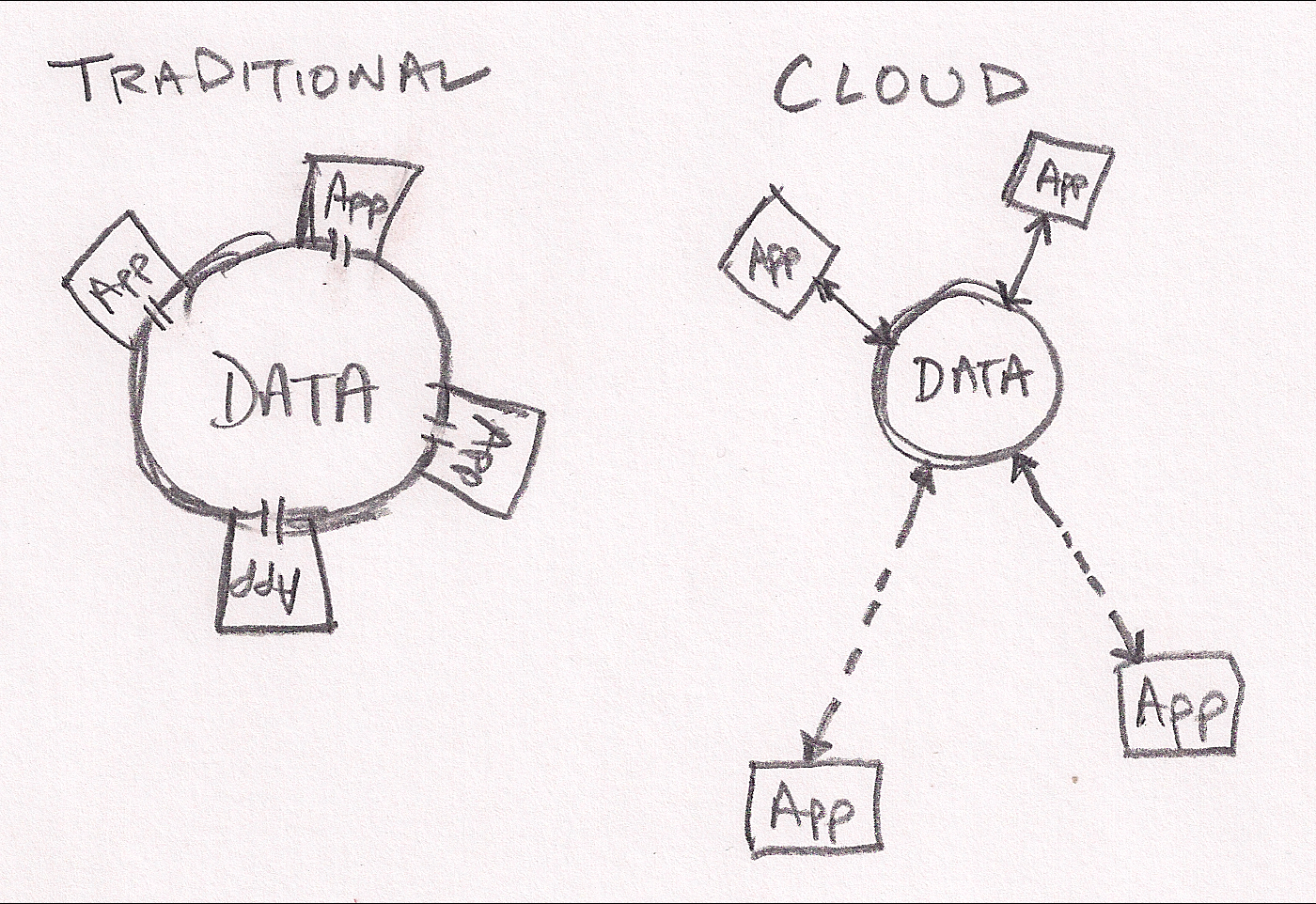
My first sketch shows how traditional applications are tightly coupled with the data they manipulate.  For example, most apps work directly on files or a database direct connection.  These apps rely on very consistent and available data access.  They are effectively in direct contact with their data much like a building resting on it’s foundation.  That works great until your building is too small (or too large).  In that case, you’re looking a substantial time delay before you can expand your capcity.

Cloud applications have broken into orbit around their data.  They still have close proximity to the data but they do their work via more generic network connections.  These connections add some latency, but allow much more flexible and dynamic applications.  Working within the orbit analogy, it’s much much easier realign assets in orbit (cloud servers) to help do work than to move buildings around on the surface.

In the cloud application orbital analogy, components of applications may be located in close proximity if they need fast access to the data.  Other components may be located farther away depending on resource availability, price or security.  The larger (or more valuable) the data, the more likely it will pull applications into tight orbits.

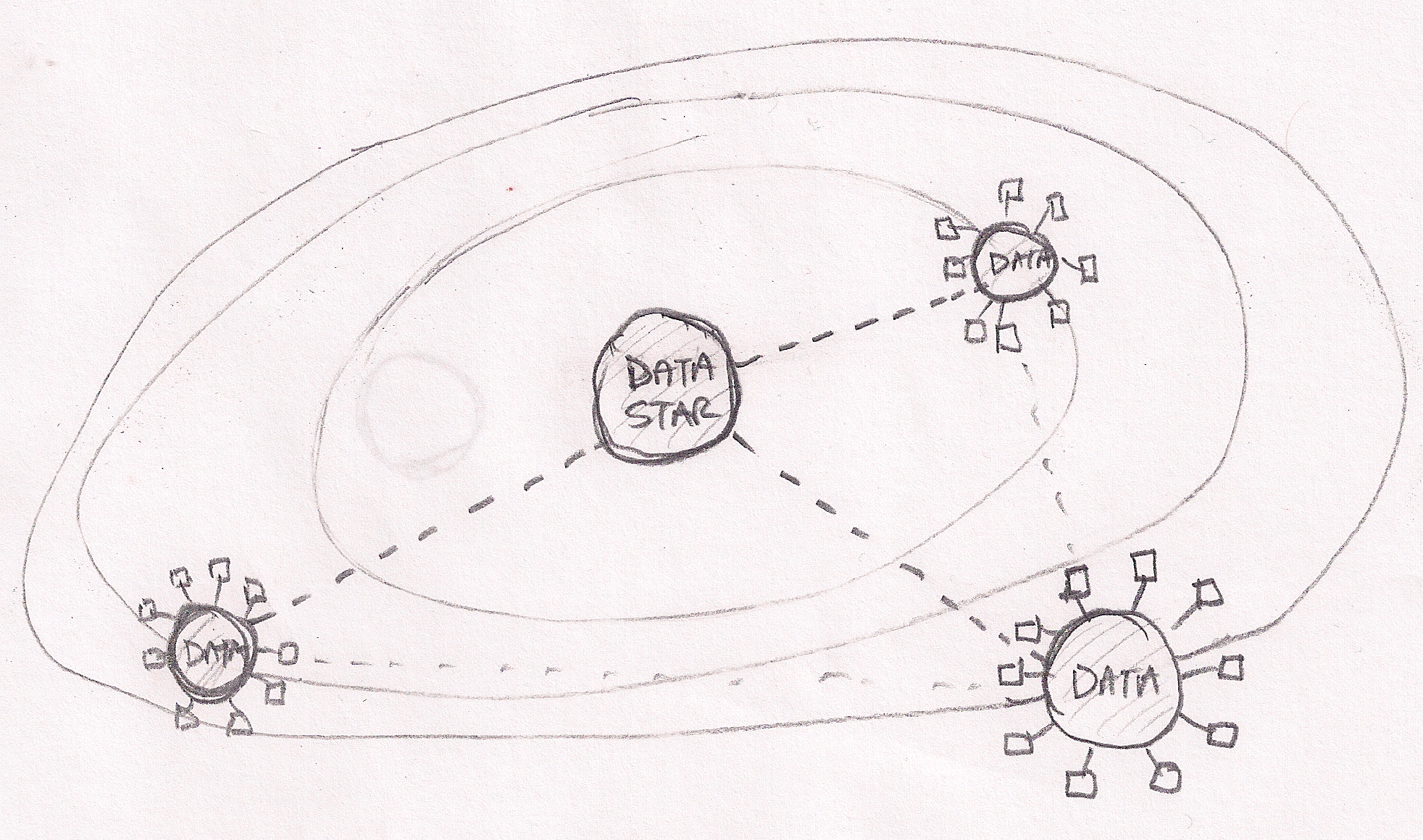
My second sketch extends to analogy to show that our cloud universe is not simply point apps and data sources.  There truly a universe of data on the internet with hugh sources (Facebook, Twitter, New York Stock Exchange, my blog, etc) creating gravitational pull that brings other data into orbit around them.  Once again, applications can work effectively on data at stellar distances but benefit from proximity (“location does not matter, but proximity does”).

Looking at data gravity in this light leads me to expect a data race where clouds (PaaS and SaaS) seek to capture as much data as possible.

Microsoft Azure Cloud – Top 20 Lessons Learned about MS’s PaaS

Last week Dave McCrory (@McCrory) and I (@Zehicle) had the benefit of intensive Azure training at Microsoft HQ to support Dell’s Azure Stamp.

We’ve assembled a top 20 list of things to know about programming for Azure (and really any PaaS leaning cloud):

  1. If you want performance, optimize to reduce fees. Azure (and any cloud) is architected to penalize you if you use their resources poorly. The challenge is to fix this before your boss get the tab for your unenlightened design decisions.
  2. Coding .NET on Azure easy, architecting for Azure requires learning. Clouds put things in different places than you are used to and the rules are different. Expect a learning curve.
  3. Partitioning = parallelism. Learn to love partitions in all their forms, because your app will be throttled if you throw everything into a single partition! On the upside, each partition operates in parallel and even better, they usually don’t cost extra (SQL is the exception).
  4. Roles are flexible. You can run web servers (Apache, etc) on a worker and worker tasks on a web role. This is a good way to save some change since you pay per role instance. It’s counter to separation of concerns, but financially you should also combine workers into a single role where possible.
  5. Understand walking deployments. You can (and should) have simultaneous versions of the code operating against the same data so that you can roll upgrades (ala Timothy Fitz/Eric Ries) to reduce risk and without reducing performance. You should expect your data schema to simultaneously span mutiple code versions.
  6. Learn about Update Domains (UDs). Deployment domains allow rolling upgrades and changes to Applications and Services. They are part of how you partition your overall application. If you’re planning a VIP swap deployment, then you won’t care.
  7. Each service = ONE external IP. You can have many VMs backing each service (and multiple roles in a service) and Azure will load balance between them so you can scale out each service. Think of each service as a clonable entity: there will be at least 1 and more can be added if you want to scale.
  8. Understand between VIP and DIP. VIPs stand for Virtual IPs and are external, public, and metered. DIPs are internal, private, and load balanced. Azure provides an API to discover your DIPs – do not assume you know them because they are DYNAMIC IPs. Azure won’t let you see other DIPs inside the system.
  9. Azure has rich diagnostics, but beware. Azure leverages the existing diagnostics built into their system, but has to get the data off box since instances are volitile. This means that problems can be hard to isolate while excessive logging can impact performance and generate fees. Microsoft lets you target individual systems for elevated levels. You can also Terminal Server to a VM for troubleshooting (with caution).
  10. The new Azure admin console rocks. Take your pick between Silverlight or MMC Snap-in.
  11. Everything goes into Azure Storage. Learn to love it. Queues -> storage. Tables -> storage. Blobs -> storage. Logging -> storage. Code Repo -> storage. vDisk -> storage. SQL -> SQL (they march to their own drummer).
  12. Queues are essential, but tricky. Learn the meaning of idempotent because using queues requires you to handle failures and timeouts. The scary part is that it will work nicely until you exceed some limits and then you’ll experience cascading failure. Whee! Oh yea, and queues require polling (which stinks as a notification model).
  13. SQL Azure is just mostly like MS SQL. Microsoft did a smart thing in keeping Cloud SQL so it was highly compatible with Local SQL. The biggest note is that limited in size of partition. If you embrace the size limits you will get better performance. So stop pushing BLOBs into databases and start sharding.
  14. Duplicating data in tables will improve performance. This has to do with how partitions and keys operate but is an interesting architecture for NoSQL – stage data for use. Don’t be afraid to stage the same data in multiple ways. It may be faster/cheaper to write data twice if it becomes easier to find when you search it 1000s of times.
  15. Table data can be “warmed up.” Storage has logic that makes frequently accessed items faster (sort of like a cache ;). If you can anticipate load spikes then you should warm the data just before the spike.
  16. Storage billing is both amount and transactions. You can get burned on a small, but busy set of data. Note: you will pay even if you 404 a request.
  17. Azure has a CDN. Leveraging Microsoft’s Content Delivery Network (CDN) will improve performance for your users with small, low latency, high request items. You need to change your URLs for those assets. Best practice is to use some versioning in the URI so that you can force changes. Remember, CDN is SLOWER for the first hit when the data is not in cache so avoid CDN for low volume assets!
  18. Provisioning time is not instant. Azure needs anywhere from 1-3 minutes to spin a new instance of a role. Build this lag into your architecture and dynamic scale plans. New databases and partitions are fast.
  19. The VM Role is maintained by YOU. Using the VM role is a handy shortcut, but has a long list of gotcha’s. Some of note: 1) the VM can be “reset” to the last VM image state that you uploaded, 2) you are responsble for VM OS upgrades and patches, 3) VMs must be clonable because they will operate in parallel.
  20. Azure supports more than .NET. You can setup anything in a worker (and now VM) role, but there are nuances to doing this effectively. You really need to understand how Azure works and had better be ready to crack open Visual Studio for some things even if you’re writing in Java.

We hope this list helps you navigate Azure deployments. No matter what cloud you use, understanding Azure’s architecture will help you write better cloud scale applications.

We’d love to hear your suggestions and recommendations!

Mirrored on both blogs: Rob Hirschfeld’s Blog & Dave McCrory’s Blog

CAP Chasm: why clouds say “no SANank you” to SANs

My personal bias against SANs in cloud architectures is well documented; however, I am in the minority at my employer (Dell) and few enterprise IT shops share my view.  In his recent post about CAP theorem, Dave McCrory has persuaded me to look beyond their failure to bask in my flawless reasoning.  Apparently, this crazy CAP thing explains why some people loves SANs (enterprise) and others don’t (clouds).

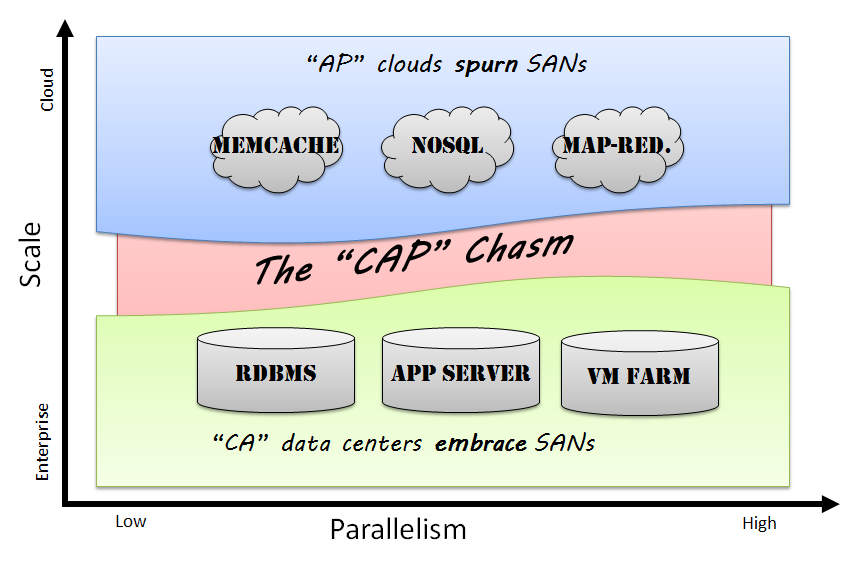
The deal with CAP is that you can only have two of Consistency, Availability, or Partitioning Tolerance.  Since everyone wants Availablity, the choice is really between Consitency or Partitioning.  Seeking Availability you’ve got two approaches:

  1. Legacy applications tried to eliminate faults to achieve Consistency with physically redundant scale up designs. 
  2. Cloud applications assume faults to achieve Partitioning Tolerance with logically redundant scale out design.

According to CAP, Legacy and cloud approaches are so fundamentally different that they create a “CAP Chasm” in which the very infrastructure fabric needed to deploy these applications is different.

As a cloud geek, I consider the inherent cost and scale limitations of a CA approach much too limited.   My first hand experience is that our customers and partners share my view: they have embraced AP patterns.  These patterns make more efficient use of resources, dictate simpler infrastructure layout, scale like hormone-crazed rabbits at a carrot farm, and can be deployed on less expensive commodity hardware.

As a CAP theorem enlightened IT professional, I can finally accept that there are other intellectually valid infrastructure models. 

See Mom?  I can play nicely with others after all.

PaaS, much ado about network services

There’s a surprising about of a hair pulling regarding IaaS vs PaaS.  People in the industry get into shouting matches about this topic as if it mattered more than Lindsay Lohan’s journey through rehab.

The cold hard reality is that while pundits are busy writing XaaS white papers, developers are off just writing software.  We are writing software that fits within cloud environments (weak SLA, small VMs), saves money (hosted data instead of data in VMs), and changes quickly (interpreted languages).  We’re doing using an expanding tool kit of networked components like databases, object stores, shared cache, message queue, etc.

Using network components in an application architecture is about as novel as building houses made of bricks.  So, what makes cloud architectures any better or different?

Nothing!  There is no difference if you buy VMs, install services, and wire together your application in its own little cloud bubble.  If I wanted to bait trolls, I’d call that an IaaS deployment.

However, there’s an emerging economic driver to leverage lower cost and more elastic infrastructure by using services provided by hosts rather than standing them up in a VM.  These services replace dedicated infrastructure with managed network attached services and they have become a key differentiator for all the cloud vendors

  • At Google App Engine, they include Big Tables, Queues, MemCache, etc
  • At Microsoft Azure, they include SQL Azure, Azure Storage, AppFabric, etc
  • At Amazon AWS, they include S3, SimpleDB, RDS (MySQL), Queue & Notify, etc

Using these services allows developers to focus on the business problems we are solving instead of building out infrastructure to run our applications.  We also save money because consuming an elastic managed network service is less expensive (and more consumption based) than standing up dedicated VMs to operate the services.

Ultimately, an application can be written as stateless code (really “externalized state” is more a accurate description) that relies on these services for persistence.  If a host were to dynamically instantiate instances of that code based on incoming requests then my application resource requirements would become strictly consumption based.   I would describe that as true cloud architecture. 

On a bold day, I would even consider an environment that enforced offered that architecture to be a platform.  Some may even dare to describe that as a PaaS; however, I think it’s a mistake to look to the service offering for the definition when it’s driven by the application designers’ decisions to use network services.

While we argue about PaaS vs IaaS, developers are just doing what they need.  Today they may stand-up their own services and tomorrow they incorporate 3rd party managed services.  The choice is not a binary switch, a layer cake, or a holy war.

The choice is about choosing the right most cost effective and scalable resource model.

Rethinking the “private cloud” as revealed by the Magic 8 Cube

The Magic 8 Cube

This is the first part of 3 posts that look into the real future for “private clouds.”

This concept is something that was initially developed with Greg Althaus, my colleague at Dell and then further refined in discussions with by our broader team.  It grew from my frustration with the widely referenced predictions by the Gartner Group of a private cloud explosion.  Their prognostication did not ring true to me because the economics of “public cloud” are so compelling that going private seems to be like fighting your way out of a black hole.

We’ll get to the gravity well (post 3 of 3) in due time.  For now, we need to look into the all knowing magic 8 cube.

Our breakthrough was seeing cloud hosting as a 3 dimensional problem.  We realized that we could cover all the practical cloud scenarios with these 8 cases.  Showing in the picture (right).

Here are the axis:

  1. X: Hosted vs. On-site – where are the servers running?  On-site means that they are running at your facility or in a co-lo cage that is basically an extended extraterritorial boundary of your company.
  2. Y: Shared vs. Dedicated – are other people mixing with your solution?  Shared means that your bytes are secretly nuzzling up to someone else’s bytes because you’re using a multi-tenant infrastructure.
  3. Z: Managed vs. Unmanaged – do you’re Ops people (if you have any) able to access the infrastructure that runs your applications?  Unmanaged means that you’re responsible for keeping the system operating.

With 3 axis, we have a 8 point cube.

  1. MSH – a PaaS offering in which every aspect of your application is managed and controlled.  GAE or Heroku.
  2. MSO – remember when people used to buy a mainframe and them lease off-hours extra cycles back to kids like Bill Gates?  That’s pretty much what this model means.
  3. MDH – a “mini-cloud” run by a cloud provider by dedicated to just one customer.  Dr. Evil thinks this costs one milllllllllion dollars.
  4. MDO – a cloud appliance.  You install the hardware but someone else does all the management for you.
  5. USH – IaaS.  I think that Amazon EC2 is providing USH.  It may be a service, but you’ve got to do a lot of Ops work to make your application successful.
  6. USO – OpenStack or other open source cloud DYI frameworks let a hosting provider create a shared, hosted model if they have the Ops chops to run it.
  7. UDH – Co Lo.
  8. UDO – The mythical “private cloud.”  Mine, mine, all mine.

In thinking this over, we realized that cloud customers were not likely to jump randomly around this cube.  If they were using MSH then they may want to consider MDH or MSO.  It seemed unlikely that they would go directly from MSH to UDO as Mr. Bittman suggests; however, the market is clearly willing to move directly from UDO to MSH.

We had a good old-fashioned mystery on our hands… the answer will have to wait until my next post.

Alert the villagers, it’s Frankencloud!

I’m growing more and more concerned about the preponderance of Frankencloud offerings that I see being foisted into the market place (no, my employer, Dell, is not guiltless).  Frankenclouds are “cloud solutions” that are created by using duct tape, twine, wishful marketing brochures, and at least 4 marginally cloud enabled products.

The official Frankencloud recipe goes like this:

  • Take 1 product that includes server virtualization (substitutions to VMware at your own risk)
  • Take 1 product that does storage virtualization (substitutions to SAN at your own risk)
  • Take 1 product that does network virtualization (substitutions to VLANs at your own risk)
  • Take 1 product that does IT orchestration (your guess is as good as any)
  • Take 1 product that does IT monitoring
  • Take 1 product that does Virtualization monitoring
  • Recommended: an unlimited Pizza budget for your IT Ops team

Combine the ingredients at high voltage in a climate conditioned environment.  Stir in a seriously large amounts of consulting services, training, and Red Bull.  At the end of this process, you will have your very own Frankencloud!

Frankenclouds are notoriously difficult to maintain because each part has its own version life cycle.  More critically, they also lack a brain.

Unfortunately, there are few alternatives to the Frankencloud today.  I think that the alternatives will rewrite the rules that Ops uses to create clouds.  Here are the rules that I think help drive a wooden stake through the heart of the Frankencloud (yeah, I mixed monsters):

  • not assume that server virtualization == cloud. 
  • simple, simple and simpler than that
  • focus on applications (need to write more about DevOps)
  • start with networking, not computation
  • assume that software containers are replaced, not upgraded

What do you think we can do to defeat Frankenclouds?

Shared Nothing Virtual Cluster

A while back (2004), Dave McCrory and Patent can protect or trap good ideasI patented an interesting curosity that we called the Shared Nothing Virtual Cluster.  Basically, the idea is to use OS RAID 1 on a VM but to have the VHDs split between physical hosts.  If the host died, the VM could be restarted on a the second host using the RAID mirror.

It was an interesting idea, but seemed less than ideal because everyone was running to SAN storage and falling madly (insanely?) in love with vMotion.

Now that we’re looking towards clouds that beyond SAN scale, the idea of mixing DAS and NAS to create instant redundancy for VMs may suddenly have more value.

Of course, Sugient owns the patent now…