Crowbar source released, includes OpenStack Cloud install

I’m delighted to announce (official version) that my team at Dell has opened the Crowbar source under the Apache 2 license. This action is part of the broader Dell OpenStack Cloud Solution which includes OpenStack install packages, Crowbar, reference hardware architectures, and services/consulting to support deployments.

There are two important components to this news:

  1. Dell is officially offering our OpenStack Solution and helping advance the community’s ability to implement OpenStack quickly and consistently.
  2. Dell is releasing the Crowbar code (which is included in the solution) as open source.

Both are significant items; however, my focus here is on the Crowbar release.

Crowbar started as a Dell OpenStack installer project and then grew beyond that in scope.  Now it can be extended to work with other vendors’ kits and other solutions bits.

We are contributing Crowbar to the community because we believe that everyone benefits by sharing in the operational practices that Crowbar embodies. These are rooted in Opscsode Chef (which Crowbar tightly integrates with) and the cloud & hyper-scale proven DevOps practices that are reflected in our deployment model.

Where to get it?

What’s included?

  • A comprehensive set of barclamps to set up an OpenStack cloud.
  • Crowbar UI and Remote APIs to make it easy to set up your cloud
  • Automated testing scripts for community members doing continuous integration with OpenStack.
  • Build scripts so you can create your own Crowbar install ISO
  • Switch discovery so you can create Chef Cookbooks that are network aware.
  • Open source Chef server that powers much of Crowar’s functionality

What’s not included?

  • Non-open source license components (BIOS+RAID config) that we could not distribute under the Apache 2 license.  We are working to address this and include them in our release.  They are available in the Dell Licensed version of Crowbar.
  • Dell Branded Components (skin + overview page).   Crowbar has an OpenSource skin with identical functionality.
  • Pre-built ISOs with install images (you must download the open source components yourself, we cannot redistribute them to you as a package)

Important notes:

  • Crowbar uses Chef Server as its database and relies on cookbooks for node deployments.  It is installed (using Chef Solo) automatically as part of the Crowbar install.
  • Crowbar has a modular architecture so individual components can be removed, extended, and added. These components are known individually as barclamps.
  • Each barclamp has its own Chef configuration, UI sub-component, deployment configuration, and documentation.

On the project roadmap:

  • Hadoop support
  • Additional operating system support (specifically RHEL)
  • Barclamp version repository
  • Network configuration
  • We’d like suggestions!  Please comment!

Sites for more information: Joseph George, Barton George (launch day), Dell
OpenStack at OSCON schedule & event signup

If you’re at OSCON, here’s where to find OpenStack content:

OpenStack Wednesday Evening Event (RSVP REQUIRED):

Wednesday, July 27, 7-9 pm, at Spirit of 77 (right across from the Oregon
Convention Center at the close of the day).  Join us to toast the first
anniversary of the fastest-growing open source project! Please register here and
help promote the event: http://openstack-one-year.eventbrite.com

Speaking Sessions, Wednesday, July 27


Introduction to OpenStack, Eric Day

Wednesday, 1:40 pm http://www.oscon.com/oscon2011/public/schedule/detail/19146

Using OpenStack APIs, Present and Future, Mike Mayo
Wednesday, 4:10 pm http://www.oscon.com/oscon2011/public/schedule/detail/18550

OpenStack Fundamentals Training Part 1, Swift, John Dickinson
Wednesday, 4:10 pm http://www.oscon.com/oscon2011/public/schedule/detail/21287

OpenStack Fundamentals Training Part 2, Nova, Jason Cannavale
Wednesday, 5:00 pm http://www.oscon.com/oscon2011/public/schedule/detail/21347

OpenStack One-Year Anniversary Party, Spirit of 77
Wednesday, 7-9 pm http://openstack-one-year.eventbrite.com/

Speaking Sessions, Thursday, July 28

See why Rob says “No Soup for You” about Cloud Deployments.

Prying Open the Cloud with Dell Crowbar and OpenStack, Joseph George, Rob Hirschfeld
Thursday, 10:40 am http://www.oscon.com/oscon2011/public/schedule/detail/21206

OpenStack + Ceph, Ben Cherian, Jonathan Bryce
Thursday, 1:40 pm http://www.oscon.com/oscon2011/public/schedule/detail/21174

Achieving Hybrid Cloud Mobility with OpenStack and XCP, Paul Voccio, Ewan Mellor
Thursday, 2:30 pm http://www.oscon.com/oscon2011/public/schedule/detail/18726

Crowbar modules (aka barclamps) perform many functions and enable multi-vendor hardware

10/18 Update:

More recent information about Barclamps can be found at https://robhirschfeld.com/2011/09/14/details-of-crowbar-changes/.  We’ve also created videos showing how you can create your own barclamps.

Original Post

Just after we’d started deep Crowbar development, Andi Abes, Paul Webster and Victor Lowther joined the Dell Crowbar+OpenStack team.  They immediately started to dig into our Swift, BIOS/RAID, and Network components.  They also started to bump into each other in our original code base.  It quickly became apparent that we needed to modularize Crowbar.

Restructuring Crowbar into modules has proved essential as a method for safe community collaboration.

Greg Althaus coined the name “barclamps” during the modularization rearchitecture.  A barclamp is a class extension of the Crowbar ServiceObject that allows Crowbar to identify the Chef components used by the barclam

p (name p

attern in Chef is bc-template-[barclamp]) and provides capabilities that are specific to each barclamp.

  • In the simplest case, the barclamp is a minimal wrapper that just provides naming hooks for your Chef cookbooks.  This makes it very easily to adapt existing Chef work to work with Crowbar.
  • In more complex cases, the barclamp will help identity how nodes are allocated, interacts with other barclamps, extends the provisioner state machine and provides custom user interfaces.
  • In most cases, the barclamp’s generic integration and UI are sufficient.
Initially, barclamps were entirely exposed via REST using the ServiceObject.  We quickly wrapped those into a CLI for our continuous integration system.  Lately, we’ve expressed them in the user interface.
At launch, you’ll find all but two in the open source repository.  Unfortunately, we were not able to include BIOS and RAID barclamps in the open version because they use licensed components – we are working to correct this.  They are available in the Dell licensed version.
When looking at the barclamps, it is critical to understand that even the most core Crowbar functionality is expressed as a barclamp.
This exposure of Crowbar internals as barclamps is important because it
  1. helps modularize the code and
  2. reflects the deep integration between Chef and Crowbar.

Consequently, the core logic of the state machine, networking configuration, and provisioning are all exposed in barclamps.  This makes it possible to modify and extend the most basic Crowbar operations; however, there are currently no guards against breaking these barclamps either!

The following list includes all the barclamps that we’ve created for Crowbar.
Barclamp   Function  Included
Crowbar The roles and recipes to set up the barclamp framework.  Yes
Deployer Initial classification system for the Crowbar environment (aka the state machine)  Yes
Provisioner The roles and recipes to set up the provisioning server and a base environment for all nodes  Yes
Network Instantiates network interfaces on the crowbar managed systems. Also manages the address pool.  Yes
NTP Common NTP service for the cluster. An NTP server or servers can be specified and all other nodes will be clients of them.  Yes
DNS manages the DNS subsystem for the cluste  Yes
Logging centralized logging system based on syslog  Yes
IPMI Integrates with IP management to allow direct hardware control bypassing the operating system.  Yes
RAID LSI Licensed components.  Cannot be included in open source release at this time.  No
BIOS
PowerEdge C series: Dell License component.  Cannot be included in open source release at this time.  No
Ganglia Optional: a common Ganglia service for the cluster that can be used by other barclamps  Yes
Nagios Optional : common monitoring service for the cluster that can be used by other barclamps  Yes
Nova OpenStack: installs and configures the Openstack Nova (Cactus Release) component. It relies upon the network and glance barclamps for normal operation.  Yes
Swift OpenStack: part of Openstack (Cactus Release) , and provides a distributed blob storage  Yes
Glance OpenStack: Glance service (Cactus Release, Nova image management) for the cloud  Yes
Test provides a shell for writing tests against  Yes

Crowbar design: solving the multi master update issue and adding a pause before configuration

The last few weeks for my team at Dell have been all about testing as Crowbar goes through our QA cycle and enters field testing. These activities are the run up to Dell open sourcing the bits.

The Crowbar testing cycle drove two significant architectural changes that are interesting as general challenges and important in the details for Crowbar adopters.

Challenge #1: Configuration Sequence.

Crowbar has control of every step of deployment from discovery, BIOS/RAID configuration, base image, core services and applications. That’s a great value prop but there’s a chicken and egg problem: how do you set the RAID for a system when you have not decided which applications you are going to install on it?

The urgency of solving this problem became obvious during our first full integration tests. Nova and Swift need very different hardware configurations. In our first Crowbar flows, we would configure the hardware before you selected the purpose of the node.  This was an effect of “rushing” into a Chef client ready state. 

We also needed a concept of collecting enough nodes to deploy a solution.  Building an OpenStack cloud requires that you have enough capacity to build the components of the system in the correct sequence.

Our solution was to inject a “pause” state just after node discovery.  In the current Crowbar state machine, nodes pause after discovery.  This allows you to assign them into the roles that you want them to play in your system.

In testing, we’ve found that the pause state helps manage the system deployment; however, it also added a new user action requirement. 

Challenge #2: Multi-Master Updates

In Chef, the owner of a node’s data in the centralized database is the node, not the server.  This is a logical (but not a typical) design pattern and has interesting side effects.  Specifically, updates from Chef Client runs on the nodes are considered authoritative and will over-write changes made on the server. 

This is correct behavior because Chef’s primary focus is updating the node (edge) and not the central system (core).  If the authority was reversed then we would miss critical changes that Chef effected on the nodes.   From this perspective, the server is a collection point for data that is owned/maintained at the nodes.

Unfortunately, Crowbar’s original design was to inject configuration into the Chef server’s node objects.  We found that Crowbar’s changes could be silently lost since the server is not the owner of the data.  This is not a locking issue – it is a data ownership issue.  Crowbar was not talking to the master of the data when it made updates!

To correct this problem, we (really Greg Althaus in a coding blitz) changed Crowbar to store data in a special role mapped to each node.  This works because roles are mastered on the server.  Crowbar can make reliable updates to the node’s dedicated role without worrying the remote data will override changes. 

This pattern is a better separation of concerns because Crowbar and barclamp configuration in stored in a very clearly delineated location (a role named crowbar-[node] and is not mixed with edge configuration data.

It turns out that these two design changes are tightly coupled.  Simultaneous edge/server writes became very common after we added the pause state.  They are infrequent for single node changes; however, the frequency increases when you are changing a system of interconnected nodes through multiple state.

More simply put: Crowbar is busy changing the node configs at the exactly same time the nodes are busy changing their own configuration.

Whew!  I hope that helped clarify some interesting design considerations behind Crowbar design.

Note: I want to repeat that Crowbar is not tied to Dell hardware! We have modules that are specifically for our BIOS/RAID, but Crowbar will happily do all the other great deployment work if those barclamps are missing.

Austin CloudCamp 7/20 – Lightening Talk

If you’re in Austin on 7/20 then come to the 2011 ATX CloudCamp @ 6pm (Downtown)

In addition to the normal great unconference format, I’ll be giving one of the lightning talks.  My topic will be about Cloud Operations for OpenStack.

Here’s a copy of my CloudCamp 07 2011 preso.  Unfortunately, the video was not complete so I can’t include it.


Crowbar’s surprise value proposition: continous integration (#ci) testing

As part of our Agile/Lean methodologies, our team at Dell is highly invested in automated testing and continuous integration.  We’re running Jenkins to coordinate builds and EVERY CHECK-IN launches our full integration suite that tests our system end-to-end.  It may not be typical, but I don’t consider that to be particularly note worthy because it’s best practice.    (Rob’s note: if you write code and don’t think you have the authority then you need to geek-up and just do it – that’s our MO at Dell)

It’s important to understand that since Crowbar is an installer, every check-in does a FULL CLEAN INSTALL of all the Cactus OpenStack components.  Our verification requires that we test OpenStack because that’s our #1 exit requirement.  Consequently, we have built an automated build system that does a continuous integration test of a full, multi-node Nova/Glance/Swift deployment.

Automated end-to-end integration tests of OpenStack are a very handy thing!

In the last few weeks, we’ve heard from Dell internal groups and partners who are contributing to OpenStack Diablo that they want to leverage our work in continuous integration.  This will allow them to make sure that their development work does not regress other functions.  It’s a significant opportunity to ensure that we can collaborate between organizations.  It also promotes early development and distribution of Diablo installation scripts.

To support this in Crowbar, we are already planning incorporate more sophisticated revision control (likely based on Git) into Crowbar.

Note: YES, we consider our CI scripts to be part of our open source code.

I’ll be at OSCON 7/25-29/11 (Dell=sponsor & speaking w/ @jbgeorge)

As part of our commitment to open source, Dell is a sponsor of OSCON 2011.  The Dell OpenStack Cloud team will have a booth presence with our well-travelled Crowbar Install rack (now with BOTH PowerEdge C6100 & C6105s).  We’re doing our famous 30 minute OpenStack installs and handing out goodies including USB keys. 

Joseph George (@jbgeorge) and I are speaking:

We’ll be giving specifics about how Crowbar works to deliver the Dell OpenStack Cloud Solution including a narrated demo and details about how the community can extend Crowbar using barclamps.

Note:  Stephen Spector (opnstk_com_mgr), the amazing OpenStack community manager, wanted me to remind everyone that we’re celebrating OpenStack’s 1 year anniversary with activites at OSCON.  He’s asking for video commentary about OpenStack and RSVPs if you can attend the events.  More at OpenStack Blog.

OpenStack Crowbar User Guide: explaining how barclamps get deployed

My whole team is working feverishly on the final touches of Crowbar before we turn over the keys.  We’re putting it through a complete release cycle (extensive QA, customer pilots, documentation, etc) because internal Dell consumers are expecting that level of finish. 

For those in the community eagerly waiting to see the code, I hope you like the extra polish (for example: I18N, user & deployment guides, bundled continuous integration scripts, and months of testing).

RUMOR CONTROL NOTE: Crowbar is NOT limited to deployments on Dell products!!  Our BIOS and RAID barclamps are, of course, targeted and licensed for Dell customers.  The OpenStack and other barclamps will work on any gear that can run Chef Client.

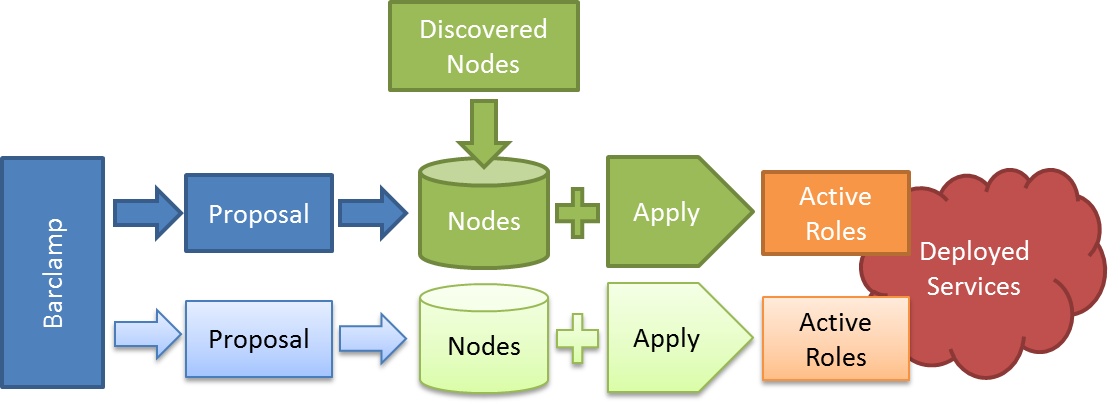
Tonight I was working on the user guide and thought I would share the graphic and text describing how a barclamp gets deployed.

The figure shows the entire of a barclamp within the Crowbar user interface.  A Barclamp defines the capability for a service but cannot be deployed.  To deploy a barclamp, you must create a Proposal.  Once the proposal is created, you must selection nodes to operate on.  As discussed in the next sections, you may also edit the Proposal’s attributes as needed.  

Applying the Proposal tells Crowbar to deploy the proposal onto the nodes.  While deploying, nodes return to the Ready state when deployment is completed.  Once a proposal has become an Active Role, you cannot edit it.  You must delete the Role and repeat the Apply process

Avoid false agreements and saying no with a yes. #TeamDeath

caution

One of my favorite things about Agile is how it helps teams get committed toward a shared goal.  There are so many distractions and confusions, that we need to double down ways to help people get and then stay on the same page.  In some cases, it comes down to something as simple as word choice!

First, I feel like I need some explanation…

There comes a time in any disagreement when the team needs everyone to get on the same page even if they don’t agree.  As a rule, this should be a relatively small window (maybe 20 minutes max) because the team can defer issues by having a sprint long spike* or exploration story that collects more information to settle arguments down the road. 

Personal Experience Note: A team should NEVER spend much time arguing about the mid or long-term future!  It’s just not worth the time to convince someone that your vision is more compelling.  It’s more efficient to accept that there are MULTIPLE VALID FUTURES and that the team needs to watch to see which one(s) is  taking shape.  There is no need to be “right” about the future.

So, back to the fake agreement phrases that effective teams avoid.

#1 “Yes, but…”

This statement really means “Will you shut up already?  I don’t agree.”  The speaker says “yes” to acknowledge the first person has finished; however, it does not mean that they agree.  The confusing thing is the speaker typically does not even realize that they are sending you into a discussion death spiral. 

Anytime someone says “but” then they are disagreeing.   Just for fun, trying have discussions where people are not allowed to say but – it creates a whole new positive dynamic.

#2 “I don’t disagree”

This statement really means “You are full of shit and my opinion is more right.”  The speaker is trying to avoid addressing your points directly and refocus discussion on their opinion.  Agreement means that everyone believes the same thing.  There are many ways to not agree and only one way to agree.

This is one of my pet peeves because the speaker thinks they are rewarding you with some back-handed pat on the head.  In reality, they shutting your ideas down without validation or acknowledgement.

There are many such statements that waste team time and mask disagreement.  If you have some that bug you, please comment on this post and add to the dialog.  I’m sure that I won’t disagree with any of them!

* Spike stories are time bounded stories that have specific research or opinion deliverables.  They are intended to collect enough information that the team can take action and move forward.   Sometimes these are also called “time box” stories.

Preview Crowbar GUI (OpenStack Installer by Dell for Cloud)

I can’t show you the really cool Overview screen yet, but here’s the one that replaces the one we’ve demo’ed before.  The nodes are grouped by switch and ordered by port so it creates a very nice “rack” layout if your wiring is organized.

Props to Jon Roberts (@emptyflask) for his excellent UI work!