Process (not a dirty word!) means knowing how you make decisions

“Process” is the least* understood business word.  I hear it talked about as something that must be added or introduced into various organizations so that they are more controlled.  Most typically, we tend to think of process as a synonym for “going to more meetings.”  So I want to set the record straight.

Process means knowing how your organization makes decisions.

There is nothing more to it than that.  If you know who will make a decision (the product manager), when they will make it (during the planning meeting), and what input they use to make the decision (a product roadmap) then you have a well defined process.  Ideally, you’d also know when you are able to influence the input (quarterly roadmap review or sprint retrospective).

Unfortunately, everyone wants to be able to make decisions all the time.  Making decisions all the time really means that you never make any decisions!  If there’s no agreed time, place, or person to make and communicate the decisions, it is impossible for anyone to know what’s the company is supposed to accomplish.

The default solution is to have meetings, meetings, and more meetings.  These meetings have lots of status updates, impassioned discussions, clever powerpoint slides and the appearance of consensus; however, they universally lack any commitment to execute work.  In the end, individuals doing work follow their own priorities or spin in the prevailing management wind.

So the next time someone suggests that your organization needs to work on a process, start by figuring out how you are going to make decisions.  After that, the rest of the process is just decoration.

* MRD ranks as a close second, but confusion is reduced since it’s as synonym and homophone for the French “merde.”

OpenStack Swift Demo (in a browser)

I’m working on mini-demo project for OpenStack Swift.  To keep things very simple and easy to understand, I decided that the whole demo would work in JavaScript in the browser.  I also choose to use RackSpace’s CloudFiles as a Swift target for testing since they have the same API are are universally available (unlike my lab systems).

One advantage of this approach is that FireBug makes it very nice to debug and check the activity of the code.  Unfortunately, FireBug also seems to eat the headers that I need.  *Let me phrase that in a google friend way so that someone else will not loose the 2 hours I just lost*

“XmlHttpRequest setRequestHeader FireFox Not Respected when using FireBug”

It works great in Safari. So onward and upward.  So far, I’ve got step #1 ready – getting the authorization token back from the cloud site.

Here’s the HTML page (you need jQuery too).  Basically, it uses the username and key from the inputs to set “x-auth-user” and “x-auth-key” header attributes.  These attributes will allow Swift to return a token that you can use on future requests when you want to do useful work.

<!DOCTYPE html>

<html>

<head>

<title>Dell Swift Demo [0.0]</title>

<script src=”jquery.js” type=”text/javascript”></script>

<script type=”text/javascript” charset=”utf-8″>

var xmlhttp = null;

function swiftLogin() {

var usr = $(‘input:text[name=usr]’).val();

var key = $(‘input:text[name=key]’).val();

// code for IE7+, Firefox, Chrome, Opera, Safari (UR SOL IE<7)

xmlhttp = new XMLHttpRequest();

xmlhttp.onreadystatechange=function() //callback

{

if (xmlhttp.readyState==2)

{

$(‘#status’).replaceWith(xmlhttp.getResponseHeader(“X-Auth-Token”));

}

}

xmlhttp.open(‘GET’,’https://auth.api.rackspacecloud.com/v1.0&#8242;, true);

xmlhttp.setRequestHeader(‘Host’, ‘auth.api.rackspacecloud.com’);

xmlhttp.setRequestHeader(‘X-Auth-User’, usr);

xmlhttp.setRequestHeader(‘X-Auth-Key’, key);

xmlhttp.send();

}

</script>

</head>

<body>

<div id=”credentials”>

<fieldset id=”credentials” class=””>

<legend>Swift Login</legend>

<label for=”user”>User: </label><input type=”text” name=”usr” value=”user” id=”user”>

<label for=”key”>Key: </label><input type=”text” name=”key” value=”key” id=”key”>

<input type=”button” name=”Login” value=”login” id=”Login” onclick=”swiftLogin();”>

</fieldset>

</div>

<div id=”status”>[pending]</div>

<div id=”footer”>Time?</div>

<script type=”text/javascript”>

$(‘#footer’).replaceWith((new Date).toString());

swiftLogin();

</script>

</body>

</html>

Black Hat Feedback Essential For Cloud Success

It’s been too long since my “Agile in the Cloud” blog focused on the agile process side of the equation.  Since my theme for 2011 will be “Doing is Doing” (meaning, attending meetings and building powerpoint is NOT doing); it’s vital to embrace processes that are action and delivery focused.  Personally, I tend towards the Lean side (Poppendieck & Ries) of the Agile process spectrum.

Let’s start with something so obvious that most teams don’t bother with it:

The secret to improving your performance is to regularly work to improve your performance.

There is no further magic, no secret sauce, no superhero team member, and no silver process bullet that substitutes for working together to improve.  A team that commits to improving will ultimately transform into a high performing team.  Hmmm…that seems like a desirable result.  So why is it so uncommon?

Unfortunately, many teams skimp on improvement because:

  1. All that talking and listening and improving takes time and attention.
  2. Post mortem or “lessons learned” meetings that never make any difference because they happen after the work is done.  (well, duh).
  3. No one has a methodology that makes the meetings productive.
  4. Lists with more than 3 items on them have too many items to be productive for improvement activities because of reader’s limited attention spans.  Doh!

So #1 and #2 just take some resolve to resolve.  My (atypical) team at Dell spends 1 to 3+ hours every biweekly sprint talking about process improvement (aka retrospective).  That’s nearly half of our planning day and a pretty significant investment; however, it’s the one part of the meeting that no one is willing to shorten.  It just that damn productive, important, and enlightening.

If you’re committed to taking the time to improve then finding a methodology (#3) is a piece of cake by comparison.  I highly recommend De Bono’s Six Thinking Hats the framework for retrospectives.  Michael Klobe taught me this process and I’ve used it successfully on many teams.  Here are some guidelines to retrospectives (we call them “Hats Meetings”) using De Bono’s hats:

  1. Write everything down.  All our planning meetings are documented.  This is ESSENTIAL because we review our past notes.
  2. Start with “Yellow” hats from all team members.  Yellow hats are accolades, complements, thanks, generally positive news, and anything that the team can celebrate.  Yellow hats get the meeting opened on a positive note.
  3. Go until your team runs out of yellows.
  4. Write down and number the “Black” hats.   Black hats are things that impacted team performance.  Ideally, they are concrete and specific examples of a problem and a cost.  Black hats are NOT solutions or suggestions hidden as complaints.  If you’re frustrated that people are late to meeting then a good hat would be “people being late to meeting is costing us 10 minutes of productivity because we have to restart the meeting 3 times.”  Hats like “The vendor messed up” are not as helpful as “The vendor’s late delivery of the futz dinger caused us to work over the weekend.”  Good black hats are a learned skill and are essential to success.
  5. Do NOT record every detail when writing down a black hat.  You just need to capture the ending understanding of the person who brought up the item (not of the team).  I’ve seen many hats that would have been a huge HR problem if we wrote down the starting idea but the ending hat was perfectly ok.
  6. Go until your team runs out of blacks.  This may take a long time if you’re just starting out!
  7. Come up with a “Green” hat for each Black hat.  Green hats are ways that the team or individuals will solve the problem addressed by the Black hat.  Solutions should be practical and immediate.  The team must discuss the solution (free fall) – it cannot be imposed by one member.  In many cases, solutions will go in steps: “everyone will try to show up on time” would be a good hat for my example above.  If that does not work, then future hats may involve “the late person pays $1/minute late.”  The point is that the team agrees on how they will improve.
  8. Don’t worry about White (data), Blue (new ideas), or Red (frustration, issues beyond your control) hats for now.  They are not critical for retrospective meetings.  Sometimes our team has a black hat that is really red.  If you’re arguing over a hat, then it may be red.  Stop fighting and move on.
  9. At your next meeting, review your past Green hats.  This is where accountability and improvement happen.

Please don’t expect that these meetings will be easy – they are messy and potentially emotional.  Since we’re talking about teams of people, we have to expose and resolve issues.  Investing the time upfront allows for continuous improvement and prevents building up larger issues.

Hats provides a durable structure for getting issues on the table in a productive way.

Cloud Gravity – launching apps into the clouds

Dave McCrory‘s Cloud Gravity series (Data Gravity & Escape Velocity) brings up some really interesting concepts and has lead to some spirited airplane discussions while Dell shuttled us to an end of year strategy meeting.  Note: whoever was on American 34 seats 22A/C – we apologize if we were too geek-rowdy for you.

Dave’s Cloud Gravity is the latest unfolding of how clouds are evolving as application architectures before more platform capable.  I’ve explored these concepts in previous posts (Storage Banana, PaaS vs IaaS, CAP Chasm) to show how cloud applications are using services differently than traditional applications.

Dave’s Escape Velocity post got me thinking about how cleanly Data Gravity fits with cloud architecture change and CAP theorem.

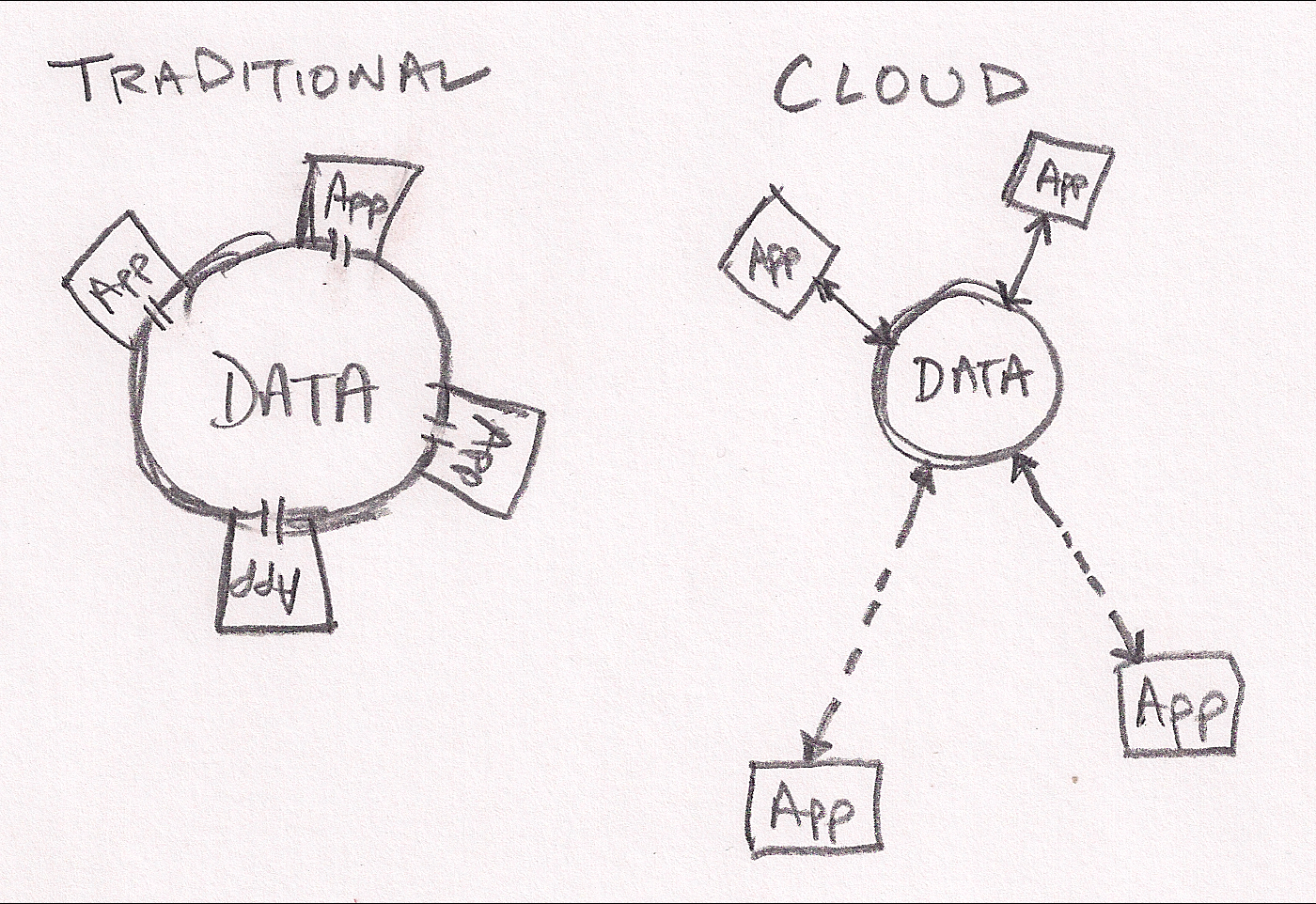
My first sketch shows how traditional applications are tightly coupled with the data they manipulate.  For example, most apps work directly on files or a database direct connection.  These apps rely on very consistent and available data access.  They are effectively in direct contact with their data much like a building resting on it’s foundation.  That works great until your building is too small (or too large).  In that case, you’re looking a substantial time delay before you can expand your capcity.

Cloud applications have broken into orbit around their data.  They still have close proximity to the data but they do their work via more generic network connections.  These connections add some latency, but allow much more flexible and dynamic applications.  Working within the orbit analogy, it’s much much easier realign assets in orbit (cloud servers) to help do work than to move buildings around on the surface.

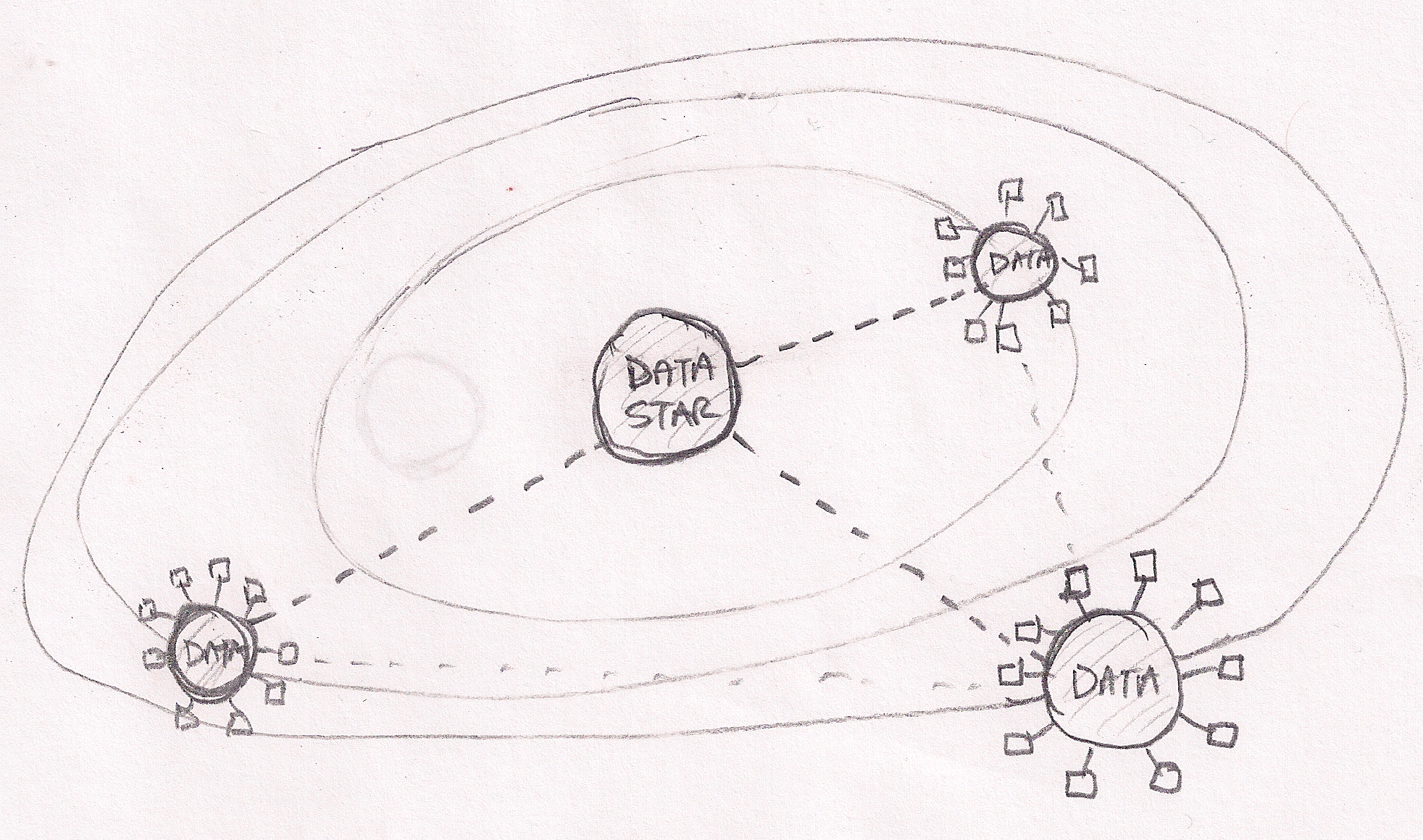
In the cloud application orbital analogy, components of applications may be located in close proximity if they need fast access to the data.  Other components may be located farther away depending on resource availability, price or security.  The larger (or more valuable) the data, the more likely it will pull applications into tight orbits.

My second sketch extends to analogy to show that our cloud universe is not simply point apps and data sources.  There truly a universe of data on the internet with hugh sources (Facebook, Twitter, New York Stock Exchange, my blog, etc) creating gravitational pull that brings other data into orbit around them.  Once again, applications can work effectively on data at stellar distances but benefit from proximity (“location does not matter, but proximity does”).

Looking at data gravity in this light leads me to expect a data race where clouds (PaaS and SaaS) seek to capture as much data as possible.

Microsoft Azure Cloud – Top 20 Lessons Learned about MS’s PaaS

Last week Dave McCrory (@McCrory) and I (@Zehicle) had the benefit of intensive Azure training at Microsoft HQ to support Dell’s Azure Stamp.

We’ve assembled a top 20 list of things to know about programming for Azure (and really any PaaS leaning cloud):

  1. If you want performance, optimize to reduce fees. Azure (and any cloud) is architected to penalize you if you use their resources poorly. The challenge is to fix this before your boss get the tab for your unenlightened design decisions.
  2. Coding .NET on Azure easy, architecting for Azure requires learning. Clouds put things in different places than you are used to and the rules are different. Expect a learning curve.
  3. Partitioning = parallelism. Learn to love partitions in all their forms, because your app will be throttled if you throw everything into a single partition! On the upside, each partition operates in parallel and even better, they usually don’t cost extra (SQL is the exception).
  4. Roles are flexible. You can run web servers (Apache, etc) on a worker and worker tasks on a web role. This is a good way to save some change since you pay per role instance. It’s counter to separation of concerns, but financially you should also combine workers into a single role where possible.
  5. Understand walking deployments. You can (and should) have simultaneous versions of the code operating against the same data so that you can roll upgrades (ala Timothy Fitz/Eric Ries) to reduce risk and without reducing performance. You should expect your data schema to simultaneously span mutiple code versions.
  6. Learn about Update Domains (UDs). Deployment domains allow rolling upgrades and changes to Applications and Services. They are part of how you partition your overall application. If you’re planning a VIP swap deployment, then you won’t care.
  7. Each service = ONE external IP. You can have many VMs backing each service (and multiple roles in a service) and Azure will load balance between them so you can scale out each service. Think of each service as a clonable entity: there will be at least 1 and more can be added if you want to scale.
  8. Understand between VIP and DIP. VIPs stand for Virtual IPs and are external, public, and metered. DIPs are internal, private, and load balanced. Azure provides an API to discover your DIPs – do not assume you know them because they are DYNAMIC IPs. Azure won’t let you see other DIPs inside the system.
  9. Azure has rich diagnostics, but beware. Azure leverages the existing diagnostics built into their system, but has to get the data off box since instances are volitile. This means that problems can be hard to isolate while excessive logging can impact performance and generate fees. Microsoft lets you target individual systems for elevated levels. You can also Terminal Server to a VM for troubleshooting (with caution).
  10. The new Azure admin console rocks. Take your pick between Silverlight or MMC Snap-in.
  11. Everything goes into Azure Storage. Learn to love it. Queues -> storage. Tables -> storage. Blobs -> storage. Logging -> storage. Code Repo -> storage. vDisk -> storage. SQL -> SQL (they march to their own drummer).
  12. Queues are essential, but tricky. Learn the meaning of idempotent because using queues requires you to handle failures and timeouts. The scary part is that it will work nicely until you exceed some limits and then you’ll experience cascading failure. Whee! Oh yea, and queues require polling (which stinks as a notification model).
  13. SQL Azure is just mostly like MS SQL. Microsoft did a smart thing in keeping Cloud SQL so it was highly compatible with Local SQL. The biggest note is that limited in size of partition. If you embrace the size limits you will get better performance. So stop pushing BLOBs into databases and start sharding.
  14. Duplicating data in tables will improve performance. This has to do with how partitions and keys operate but is an interesting architecture for NoSQL – stage data for use. Don’t be afraid to stage the same data in multiple ways. It may be faster/cheaper to write data twice if it becomes easier to find when you search it 1000s of times.
  15. Table data can be “warmed up.” Storage has logic that makes frequently accessed items faster (sort of like a cache ;). If you can anticipate load spikes then you should warm the data just before the spike.
  16. Storage billing is both amount and transactions. You can get burned on a small, but busy set of data. Note: you will pay even if you 404 a request.
  17. Azure has a CDN. Leveraging Microsoft’s Content Delivery Network (CDN) will improve performance for your users with small, low latency, high request items. You need to change your URLs for those assets. Best practice is to use some versioning in the URI so that you can force changes. Remember, CDN is SLOWER for the first hit when the data is not in cache so avoid CDN for low volume assets!
  18. Provisioning time is not instant. Azure needs anywhere from 1-3 minutes to spin a new instance of a role. Build this lag into your architecture and dynamic scale plans. New databases and partitions are fast.
  19. The VM Role is maintained by YOU. Using the VM role is a handy shortcut, but has a long list of gotcha’s. Some of note: 1) the VM can be “reset” to the last VM image state that you uploaded, 2) you are responsble for VM OS upgrades and patches, 3) VMs must be clonable because they will operate in parallel.
  20. Azure supports more than .NET. You can setup anything in a worker (and now VM) role, but there are nuances to doing this effectively. You really need to understand how Azure works and had better be ready to crack open Visual Studio for some things even if you’re writing in Java.

We hope this list helps you navigate Azure deployments. No matter what cloud you use, understanding Azure’s architecture will help you write better cloud scale applications.

We’d love to hear your suggestions and recommendations!

Mirrored on both blogs: Rob Hirschfeld’s Blog & Dave McCrory’s Blog

Jevon’s Paradox

I’ve been finding it necessary to quote Jevon’s paradox several times lately and realized that I have NOT referenced it here.  Quite simply, understanding Jevon’s paradox is essential to understanding cloud.

The concept of the paradox is that when we make something more efficient (for example gas in cars), the demand for that resource goes up (we move further into the exurbs because driving is cheaper).  Notably, as Moore’s law drives computer efficiency up, we are using more and more computers.  Specifically, I have more computers in my house every year even though the efficiency of just one smart phone far (far) exceeds power of my son’s Sinclair 1000.

In cloud computing, Jevon’s paradox points us to the expectation that the rush of applications and activity in the cloud will continue to accelerate.  Since I expect competition and Moore’s law to drive increasing gains in cloud efficiency (and therefore customer advantageous price signals) the market will happily convert these utilization improvements into more and more interesting capabilities.

The cloud expansion means that we can sustain more providers entering the market.  In fact, Jevon would tell us that more providers will likely INCREASE demand for cloud as competition and capacity put downward pressure on prices.  [Q: where will they make up the margin?   A: Adjacent Services]

The loser in cloud’s exploration of Jevon’s paradox are non-cloud deployments (Dell strategists are you listening?).  These systems suffer because their ability to improve their efficiency is limited.

As I look down the road on cloud, I can see many opportunities for current applications to take advantage of cheaper cloud resources to provide even more value.  For example, adding map-reduce analytics to scan a customer’s data can provide tremendous insights.  Today, it’s a luxury like flying on the Concorde.  Tomorrow, it will be part like hopping the Nerd Bird from San Jose to Austin – just a normal part of our daily lives.


Note: A shout out to Dave McCrory who introduced me to Jevon’s Paradox.

Seattle Cloud Camp, Dec 2010

While I was in Seattle for Azure training preparing for Dell’s Azure Appliance , Dave @McCrory suggested that we also attend the Seattle Cloud Camp (SCC Tweets).  This event was very well attended (200 people!).  With heavy attendance by Amazon (at their HQ), Microsoft (in the ‘hood), and Google, there was a substantial cloud vendor presence (>25% from those vendors alone).  Notable omission: VMware.

My reflection about the event by segment.

Opening Sessions:

  • Most of the opening sessions were too light for the audience.  I thought we were past the “what is cloud” level, sigh.
  • Of note, the Amazon security presentation by Steve Rileywas fun and entertaining.
  • Picking on a Dell competitor specifically: calling your cloud solution “WAS” is a branding #fail (not that DCSWA much is better).

Unpanel of self-appointed cloud extroverts experts:

  • The unpanel covered some decent topics (@adronbh captured them on twitter), unfortunately none of the answers really stood out to me.  Except for NoSQL.
  • The unpanel discussion about NoSQL drew 2 answers.  1) It’s not NoSQL, it’s eventually consistent instead of strictly consistent.  (note: I’ve been calling it “Storage++”) 2) We’ll see more and more choices in this area as we tune the models for utility then we’ll see some consolidation.  The suggestion was that NoSQL would follow the same explosion/contraction pattern of SQL databases.

Session on Cloud APIs (my suggested topic)

  • The Cloud API topic was well attended (30+).  The vast overwhelming majority or the attendees were using Amazon.
  • There was some interest in having “standard” APIs for cloud functions was not well received because it was felt to stifle innovation.  We are still to early.
  • It was postulated but not generally agreed that cloud aggregation (DeltaCloud, RightScale, etc) is workable.  This was considered a reason to not require standard clouds.
  • CloudCamp sponsor, Skytap, has their own API.  These APIs are value added and provide extra abstraction levels.
  • It was said that there are a LOT (50 now, 500 soon) smaller hosts that want to enter the cloud space.  These hosts will need an API – some are inventing their own.
  • I brought up the concept discussed at OpenStack that the logical abstraction for cloud network APIs is a “vlan.”  This created confusion because some thought that I meant actual 802.1q tags.  NO!  I just meant that is was the ABSTRACTION of a VLAN connecting VMs together.
  • There was agreement from the clouderati in the room that cloud networking was f’ed up, but most people were not ready to discuss.
  • Cloud APIs have some basics that are working (semantics around VMs) but still have lots of wholes.  Notably: networking, application, services, and identity)

Session on Google App Engine (GAE)

  • GAE is got a lot going on, especially in the social/mobile space.
  • Do not think a lack of news about GAE means that they are going slow, it’s just the opposite.  It looks like they are totally kicking ass with a very focused strategy.  I suspect that they are just waiting for the market to catch-up.
  • GAE understands what a “platform” really is.  They talk about their platform as the SERVICES that they are offering.  The code is just code.  The services are impressive and include identity, mail, analysis, SQL (business only), map (as in Map-Reduce), prediction (yes, prediction!), storage, etc.  The total list was nearly 20 distinct services.
  • GAE compared them selves to Azure, not Amazon.

Getting cozy with “Adjacent Services”

I’ve had a busy week with Azure Training and Cloud Camp Seattle.  It’s going to take a few days to unwind specific posts about both, but I wanted to hit some shiny new thoughts.

Services helping each other

  • Adjacent Services are dedicated and/or public services (XaaS) that are offered along side generic public cloud offerings.   For a company like Dell (my employer), this could be specific brands of storage or databases (e.g. Oracle).  I believe these are much higher margin XaaS than IaaS.
  • Layer 7 Load Balancers represent a more intelligent link between load direction and the applications. I heard people using this term in multiple contexts.   For example,  In Azure, the apps can set themselves as “offline” and they will stop getting traffic then they can turn themselves online when they are ready for more.
  • Cloud Rollout/Migration is a rolling upgrade scheme where you can send traffic to 2 versions of your application at the same time!  You upgrade by zones and if you have >2 zones then you’ll have two active versions at the same time.  Your data models need to accommodate this.
  • We don’t have enough Agile Cloud programming books (like Dave Thomas’ RoR Intro).  We need a cloud programming book that STARTS WITH INTEGRATION TESTS and shows how to use all the adjacent services.  I may just have to write one (or three).

Thanks to many many at Microsoft for the great Azure training sessions.  I’ll add more names, but for now I have links to Steve Marx (Smarx.com) & Srirm Krishnan (Sriram Krishnan.com) .

Exploding the Cloud Storage Banana

Storage Banana shows how cloud persistence is functionally diverse and optimized

Internally, my group (specifically Dave McCrory & Greg Althaus) has been kicking around some new ways of expressing clouds in an effort to help reconcile Dell’s traditional and cloud focused businesses.  We’ve found it challenging to translate CAP theorem and

externalized application state into more enterprise-ready concepts.

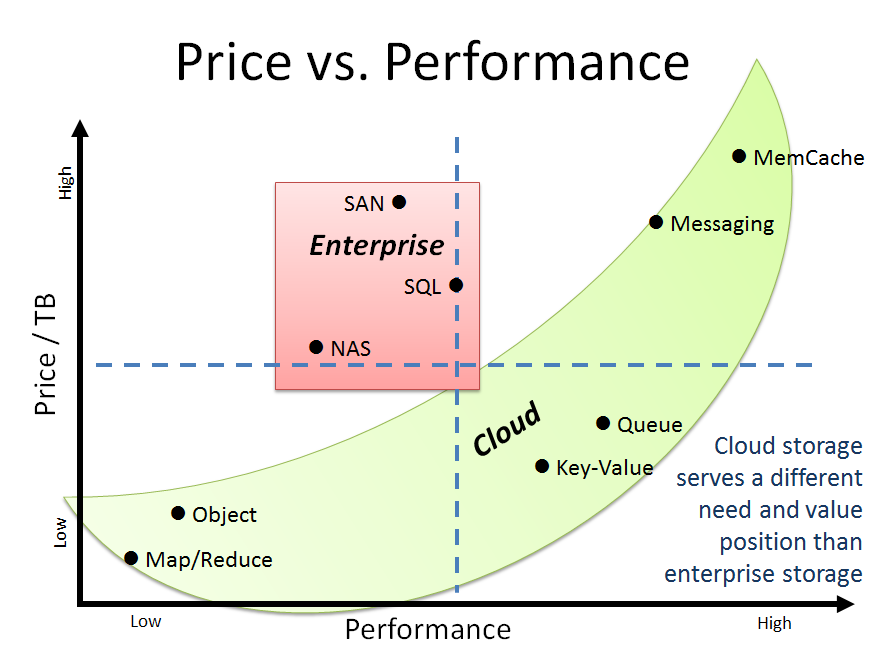
Our latest effort led to a pleasantly succinct explanation of why cloud storage is different than enterprise storage.  Ultimately, it’s a matter of control and optimization.  Cloud persistence (Cache, Queue, Tables, Objects) is functionally diverse in order to optimize for price and performance while enterprise storage (SAN, NAS, SQL) is control and centralization driven.  Unfortunately for enterprises, the data genie is out of the Pandora’s box with respect to architectures that drive much lower cost and higher performance.

The background on this irresistible transformation begins with seeing storage as a spectrum of services as per the table below.

Enterprise:

Consistent


Block (SAN) iSCSI, Infiband:

Amazon EBS, EqualLogic, EMC Symmeterix

File (NAS) NFS, CIFS:

NetApp, PowerVault, EMC Clariion

Database (ACID) MS SQL, Oracle 11g, MySQL, Postgres
Cloud:

Distributed

Partitioned

Object DX/Caringo, OpenStack Swift, EMC Atmos
Map/Reduce Hadoop DFS
Key Value Cassandra, CouchDB, Riak, Reddis, Mongo
Queue (Bus) RabbitMQ, ActiveMQ, ZeroMQ, OpenMQ, Celery
Cloud:

Transitory


Messaging AMPQ, MSMQ (.NET)
Shared RAM MemCache, Tokyo Cabinet

From this table, I approximated the relative price and performance for each component in the storage spectrum.

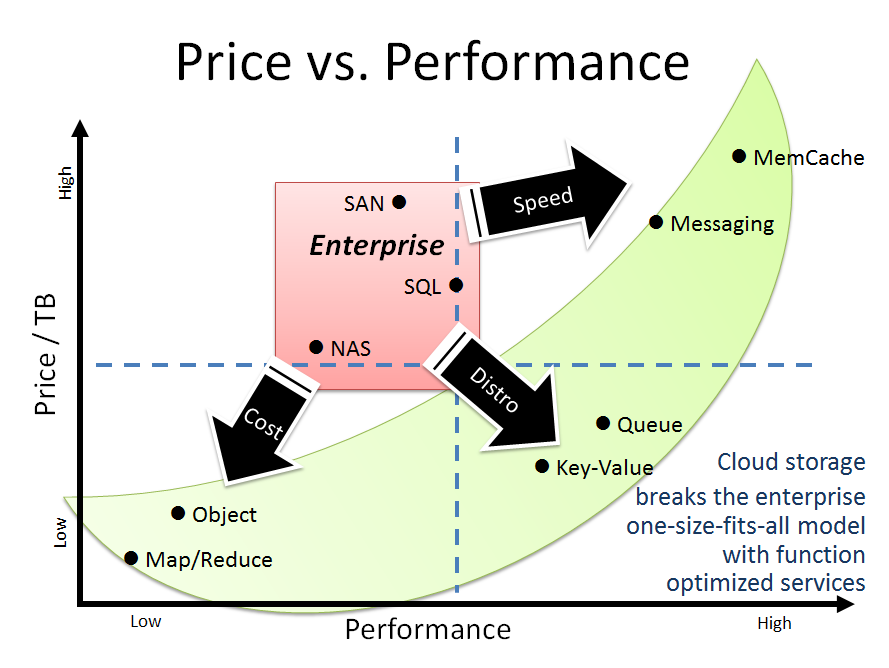
The result was the “cloud storage banana” graph.  In this graph, enterprise storage is clustered in the “compromise” quadrant where there’s a high price for relatively low performance.  The cloud persistence refuses to be clustered at all.  To save cost and enable distributed data, applications will use cheap but slow object storage.  This drives the need for high speed RAM based cache and distributed buses. These approaches are required when developers build fault tolerance at the application level.

Enterprises have enjoyed the false luxury of perceived hardware reliability.  Where these assumptions are removed, applications are freed to scale more gracefully and consider resource cost in their consumption plans.

When we compare the enterprise Pandora’s box storage to the cloud persistence banana, a more general pattern emerges.  The cloud persistence pattern represents a fragmentation of monolithic, IT controlled services into a more functional driven architecture.  In this case, we see desire for speed, distribution and cost forcing change to application design patterns.

We also see similar dispersion patterns driving changes in compute and networking conventions.

So next time your corporate IT refuses to deploy Rabbit MQ or MemCacheD, just remember my mother’s sage advice for cloud architects: “time flies like an arrow, fruit flies like an banana.”

OpenStack videos peek into cloud shakers

Barton George (Dell’s cloud evangalist and cloud shouter) has posted videos from the OpenStack conference last week: