OpenStack discussion at 5/19 Central Texas Linux Users Group (CTLUG ATX)

image

Greg Althaus (@glathaus) and I will be leading a discussion about OpenStack at the May CTLUG  on 5/19 at 7pm.  The location is Mangia Pizza on Burnet and Duval (In the strip mall where Taco Deli is).

We’ll talk about how OpenStack works, where we see it going, and what Dell is doing to participate in the community.

OpenStack should be very interesting to the CTLUG because of the technologies being used AND way that the community is engaged in helping craft the software.

OpenStack Design Conference Observations (plus IPv6 thread)

I’m not going to post OpenStack full conference summary because I spent more time talking 1 on 1 with partners and customers than participating in sessions.  Other members of the Dell team (@galthaus) did spend more time (I’ll see if he’ll post his notes).

I did lead an IPv6 unconference and those notes are below.

Overall, my observations from the conference are:

  • A constantly level of healthy debate.  For OpenStack to thrive, the community must be able to disagree, discuss and reach consensus.   I saw that going in nearly every session and hallway.  There were some pitched battles with forks and branches but no injuries.
  • Lots of adopters.  For a project that’s months old, there were lots of companies that were making plans to use OpenStack in some way.
  • Everyone was in a rush.  There’s been something of a log jam for decision making because the market is changing so fast companies seem to delay committing waiting for the “next big thing.”
  • Service Providers and implementers were out in force.
  • IPv6 is interesting to a limited audience, but consistently injected.

While IPv6 deserves more coverage here, I thought it would be worthwhile to at least preserve my notes/tweets from the IPv6 unconference discussion (To IP or not to IPv6? That will be the question.) at the OpenStack Design Summit.

NOTE: My tweets for this topic are notes, not my own experience/opinions

  • RT @opnstk_com_mgr #openstack unconference in camino real today < #IPv6 session going now – good size crowd
  • #NTT has IPv6 for VMs and tests for IPv6. If you set the mac, then you will know what the address will be.
  • it will be helpful to break out VMs to multiple networks – could have a VM on both IPv6 & IPv4
  • @zehicle @sjensen1850 (Dell) if IPv6 100% then may break infrastructure products – inside, easier to stay v4
    • you don’t want to paint yourself into a corner – IPv6 should not become your major feature requirement
  • typing IPv6 address not that hard to remember. DNS helps, but not required if you want to get to machines.
  • using IPv6 not hard – issue is the policy to do it. Until it’s forced. We need to find a path for DUAL operation.
  • chicken/egg problem. Our primary job is to make sure it works and is easy to adopt.
    • we are missing information on what options we have for transforms
  • where is the responsibility to do the translation? floating IP scheme needs to be worked out. IPv6 can make this easier.
  • idea, IPv6 should be the default. Fill gap with IPv4 as a Service? Floating needs NAT – v4aaS is LB/Proxy
  • unconference session was great! Good participation and ideas. Lots of opinions.

We had a hallway conversation after the unconference about what would force the switch.  In a character, it’s $.

Votes for IPv6 during the keynote (tweet: I’d like to hear from audience here if that’s important to them. RT to vote).  Retweeters:

Modularizing Crowbar via Barclamps – Dell prepares to open source our #OpenStack installer

My team at Dell is working diligently to release Crowbar (Apache 2) to the community.

  • We have ramped up our team size (Andi Abes was spotted recently posting on the Swift list).
  • We are collaborating with partners like Rackspace, Opscode and Citrix
  • We brought in UI expertise (Jon Roberts) to improve usability and polish.
  • We are making sure that the code is integrated with our Dell OpenStack Solution (DOSS).
  • We are lining up customers for real field trials.

The single most critical aspect of Crowbar involves a recent architectural change by Greg Althaus to make Crowbar much more modular.  He dubbed the modules “barclamps” because they are used to attach new capabilities into the system.  For example, we include barclamps for DNS, discovery, Nova, Swift, Nagios, Gangalia, and BIOS config.  Users select which combination to use based on their deployment objectives.

In the Crowbar architecture, nearly every capability of the system is expressed as a barclamp.  This means that the code base can be expanded and updated modularly.  We feel that this pattern is essential to community involvement.

For example, another hardware vendor can add a barclamp that does the BIOS configuration for their specific equipment (yes! that is our intent).  While many barclamps will be included with the open source release to install open source components, we anticipate that other barclamps will be only available with licensed products or in limited distribution.

A barclamp is like a cloud menu planner: it evaluates the whole environment and proposes configurations, roles, and recipes that fit your infrastructure.  If you like the menu, then it tells Chef to start cooking.

Barclamps complement the “PXE state machine” aspect of Crowbar by providing logic Crowbar evaluates as the servers reach deployment states.  These states are completely configurable via the provisioner barclamp; consequently, Crowbar users can choose to change order of operations.  They can also add barclamps and easily incorporate them into their workflow where needed.

Barclamps take the form of a Rails controller that inherits from the barclamp superclass.  The superclass provides the basic REST verbs that each barclamp must service while the child class implements the logic to create a “proposal” leveraging the wealth of information in Chef.  Proposals are JSON collections that include configuration data needed for the deployment recipes and a mapping of nodes into roles.

Users are able to review and edit proposals (which are versioned) before asking Crowbar to implement the proposal in Chef.  The proposal is implemented by assigning the nodes into the proposed roles and allowing Chef to work it’s magic.

Users can operate barcamps in parallel.  In fact, most of our barclamps are designed to operate in conjunction.

Reminder: It is vital to understand that Crowbar is not a stand-alone utility.  It is coupled to Chef Server for deployment and data storage.  Our objective was to leverage the outstanding capabilities and community support for Chef as much as possible.

We’re excited about this architecture addition to Crowbar and encourage you to think about barclamps that would be helpful to your cloud deployment.

How OpenStack installer (crowbar + chefops) works (video from 3/14 demo)

July 24th 2012 Update:

This page is very very old and Crowbar has progressed significantly since this was posted.  For better information, please visit the Crowbar wiki and  review my Crowbar 2 writeups.

August 5th 2011 Update:

While still relevant and accurate, the information on this page does not reflect the latest information about the now Apache 2 released Crowbar code.  In the 4+ months following this post, we substantially refactored the code make make it more modular (see Barclamps), better looking, and multi-vendor/multi-application (Hadoop & RHEL).  If you want more information, I recommend that you try Crowbar for yourself.

Original March 14th 2011 Text:

I’ve been getting some “how does Crowbar work” inquiries and wanted to take a shot at adding some technical detail.   Before I launch into technical babble, there are some important things to note:

  1. Dell has committed to open source release the code for Crowbar (Apache 2)
  2. Crowbar is an extension of Chef Server – it does not function stand alone and uses Chef’s APIs to store all it’s data.
  3. The OpenStack components install is managed by Chef cookbooks & recipes jointly developed by Dell, Opscode and Rackspace.
  4. Crowbar can be used to simply bootstrap your data center; however, we believe it is the start of a cloud operational model that I described in the hyperscale cloud white paper.

LIVE DEMO (video via Barton George): If you’re at SXSW on 3/14 @ 2pm in Kung Fu Salon, you can ask Greg Althaus to explain it – he does a better job than I do.

Here’s what you need to know to understand Crowbar:

Crowbar is a PXE state machine.

The primary function of Crowbar is to get new hardware into a state where it can be managed by Chef.   To get hardware into a “Chef Ready” state, there are several steps that must be performed.  We need to setup the BIOS, RAID, figure out where the server is racked, install an operating system, assign IP networking and names, synchronize clocks (NTP) and setup a chef client linked to our server.  That’s a lot of steps!

In order to do these steps, we need to boot the server through a series of controlled images (stages) and track the progress through each state.  That means that each state corresponds to a PXE boot image.  The images have a simple script that uses WGET to update the Crowbar server (which stores it’s data in Chef) when the script completes.  When a state is finished, Crowbar will change the PXE server to provide the next image in the sequence.

During the Crowbar managed part of the install, the servers will reboot several times.  Once all of the hardware configuration is complete, Crowbar will use an operating system install image to create the base configuration.  For the first release, we are only planning to have a single Operating System (Ubuntu 10.10); however, we expect to be adding more operating system options.

The current architecture of Crowbar (and the Chef Server that it extends) is to use a dedicated server in the system for administration.  Our default install adds PXE, DHCP, NTP, DNS, Nagios, & Ganglia to the admin server.  For small systems, you can use Chef to add other infrastructure capabilities to the admin server; unfortunately, adding components makes it harder to redeploy the components.  For dynamic configurations where you may want to rehearse deployments while building Chef recipes, we recommend installing other infrastructure services on the admin server.

Of course, the hardware configuration steps are vendor specific.  We had to make the state machine (stored in Chef data bags) configurable so that you can add or omit steps.  Since hardware config is slow, error prone and painful, we see this as a big value add.  Making it work for open source will depend on community participation.

Once Chef has control of the servers, you can use Chef (on the local Chef Server) to complete the OpenStack installation.  From there, you can continue to use Chef to deploy VMs into the environment.  Because Chef encourages a DevOps automation mindset, I believe there is a significant ROI to your investment in learning how this tool operates if you want to manage hyperscale clouds.

Crowbar effectively extends the reach of Chef earlier into the cloud management life cycle.

3/21 Note: Updated graphic to show WGET.
Demo Redux: OpenStack installer SXSW demo of Chef + Crowbar

If you missed the OpenStack installer demo at Cloud Connect Event then you’ll have another chance to see us go from bare iron to provisioning VMs in under 30 minutes at SXSW on Monday 3/14 from 2-4 pm at Kung Fu Saloon.

Note: Rackspace rented out the Kung Fu Saloon all day Monday, and are doing various events — from live webinars to a Scoble tweetup to a happy hour and more VIP after hours event.

The demo will be orchestrated by Greg Althaus from my team at Dell.  Greg is the primary architect for Crowbar and responsible for some of it’s amazing capabilities including the Chef integrations, network discovery and rockin’ PXE state machine.  Dell Cloud Evanglist, Barton George, will also be on hand.

Of course, our friends from Opscode & Rackspace will be there too – this is Rackspace’s party (they are a Platinum SXSW sponsor)

More more information (outside of this blog, of course), check out http://www.Dell.com/OpenStack.

Dell to spin bare iron into OpenStack gold

I’m at the CloudConnect conference today supporting my team’s initial OpenStack foray.   Our announcement part of the Rackspace Cloud Builders announcement.

Tonight (3/8), we’re at the Rackspace Launch with a pony rack of servers (6 nodes) where we will run a LIVE DEMO of our cloud installer (codename “Crowbar”).  The initial offer includes my hyperscale white paper and our cloud foundation kit.

Interested in the details?  Here are background posts that talk about the Lean/Agile process we use, what is Crowbar, and my write up about hyperscale (“flat edge”) data centers.

Added 3/9: Links to articles about the release:

Here’s what Dell is saying about OpenStack on Dell.com/openstack:

Dell is one of the original partners in the OpenStack community, which has now grown to more than 50 companies and participants. To accelerate adoption of this powerful platform, Dell has worked to develop an effortless out-of-box OpenStack experience with:
  • Optimized PowerEdge™ C-based hardware configurations
  • A technical whitepaper that details the design of an OpenStack hyperscale cloud on PowerEdge C server technology
  • An OpenStack installer that allows bare metal deployment of OpenStack clouds in a few hours (vs. a manual installation period of several days)

Read more about the steps to design an OpenStack hyperscale cloud in a Dell technical whitepaper entitled “Bootstrapping OpenStack Clouds.”

Interested?  Contact OpenStack@Dell.com.

Unboxing OpenStack clouds with Crowbar and Chef [in just over 9,000 seconds! ]

I love elegant actionable user requirements so it’s no wonder that I’m excited about how simply we have defined the deliverable for project Crowbar**, our OpenStack cloud installer.

On-site, go from 6+ servers in boxes to a fully working OpenStack cloud before lunch.

That’s pretty simple!  Our goal was to completely eliminate confusion, learning time and risk in setting up an OpenStack cloud.  So if you want to try OpenStack then our installer will save you weeks of effort in figuring out what to order, how to set it up and, most critically, how to install all myriad of pieces and parts required.

That means that the instructions + automation must be able to:

  • Starting with servers in boxes and without external connectivity
  • Setup the BIOS and RAID on all systems
  • Identify the networking topology
  • Install the base operating systems
  • Discover the resources available
  • Select resources for deployment
  • Install the OpenStack infrastructure appropriately on those resources
  • Validate the system is operating correctly
  • Deploy a reference application
  • In under 4 hours (or 14400 seconds).

That’s a lot of important and (normally) painful work!

Crowbar does not do all this lifting alone.  It is really an extension of Opscode’s Chef Server – an already awesome deployment management product.  The OpenStack deployment scripts that we include are collaborations between Dell, Opscode (@MattRay), and RackSpace (@JordanRinke, Wayne Wallis (@waynewalls)
& Jason Cannavale).

There are two critical points to understand about our OpenStack installer:

  1. It’s an open source collaboration* using proven tools (centrally Chef)
  2. It delivers an operational model to cloud management (really a DevOps model)

One of my team’s significant lessons learned about installing clouds is that current clouds are more about effective operations than software features.  We believe that helping customers succeed with OpenStack should focus more heavily on helping you become operationally capable of running a hyperscale system than on adding lots of features to the current code base.

That is why our cloud installer delivers a complete operational environment.

I believe that the heart of this environment must be a strong automated deployment system.  This translates into a core operational model for hyperscale cloud success.  The operational model says that

  1. Individual nodes are interchangeable (can be easily reimaged)
  2. Automation controls the configuration of each node
  3. Effort is invested to make the system deployment highly repeatable
  4. System selection favors general purpose (80% case)
  5. Exceptions should really be exceptions

Based on this model, I expect that cloud operators may rebuild their entire infrastructure on a weekly (even daily!) basis during the pre-production phase while your Ops team works to get their automation into a predictable and repeatable state.  This state provides a stable foundation for expansion.

My experience with Crowbar reinforces this attitude.  We started making choices that delivered a smooth out-of-box experience and then quickly learned that we had built something more powerful than an installer.  It was the concept that you could build and then rebuild your cloud in the time it takes to get a triple caramel mochachino.

Don’t believe me?  I’ve got a system with your name on it just waiting in the warehouse.

*Open source note: Dell has committed to open source release (Apache 2) the Crowbar code base as part of our ongoing engagement in the OpenStack community.

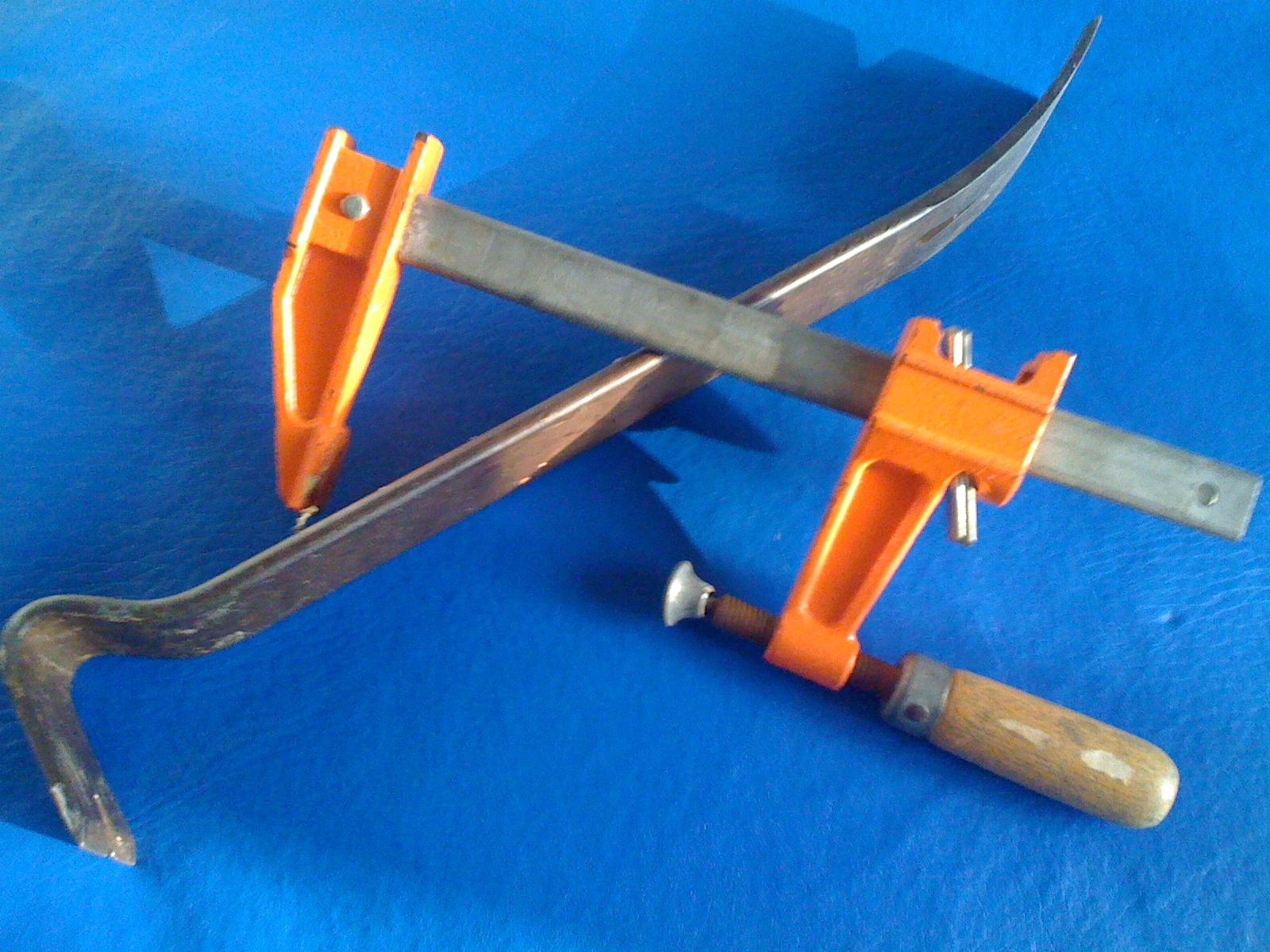
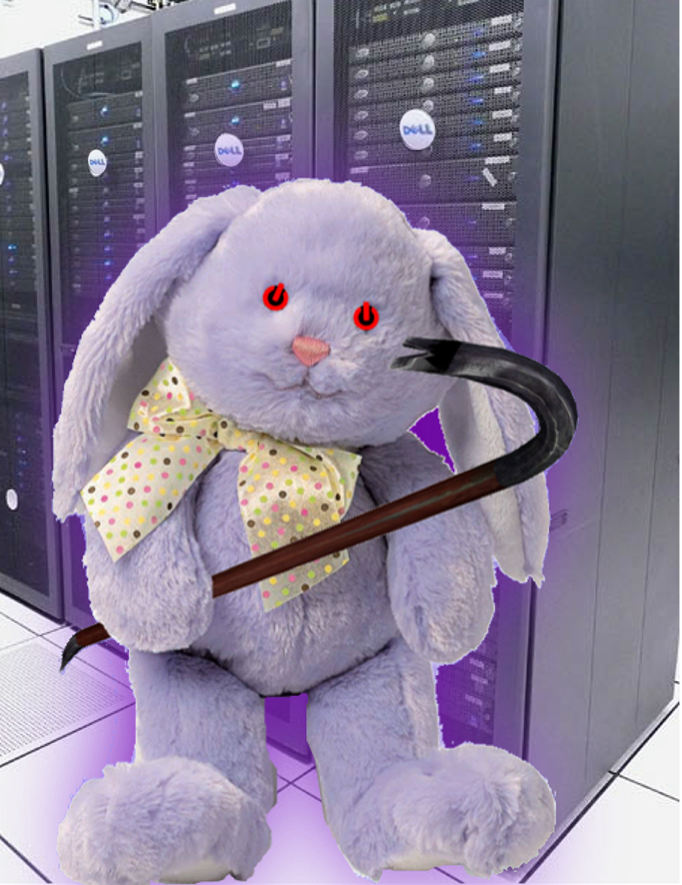
**Crowbar naming history.  The original code name for this project was offered by Greg Althaus as “you can name it purple fuzzy bunny for all I care.”  While excellent as a mascot, it was cumbersome to say quickly.  Crowbar was picked up as a code name because it is 1) easy to say, 2) used for unboxing things, 3) a powerful and fast tool and 4) the item you start with in a popular FPS.  Once properly equipped, our bunny (I call him “Mesa”) was ready to hit IT.

Why cloud compute will be free

Today at Dell, I was presenting to our storage teams about cloud storage (aka the “storage banana”) and Dave “Data Gravity” McCrory reminded me that I had not yet posted my epiphany explaining “why cloud compute will be free.”  This realization derives from other topics that he and I have blogged but not stated so simply.

Overlooking that fact that compute is already free at Google and Amazon, you must understand that it’s a cloud eat cloud world out there where losing a customer places your cloud in jeopardy.  Speaking of Jeopardy…

Answer: Something sought by cloud hosts to make profits (and further the agenda of our AI overlords).

Question: What is lock-in?

Hopefully, it’s already obvious to you that clouds are all about data.  Cloud data takes three primary forms:

  1. Data in transformation (compute)
  2. Data in motion (network)
  3. Data at rest (storage)

These three forms combine to create cloud architecture applications (service oriented, externalized state).

The challenge is to find a compelling charge model that both:

  1. Makes it hard to leave your cloud AND
  2. Encourages customers to use your resources effectively (see #1 in Azure Top 20 post)

While compute demands are relatively elastic, storage demand is very consistent, predictable and constantly grows.  Data is easily measured and difficult to move.  In this way, data represents the perfect anchor for cloud customers (model rule #1).  A host with a growing data consumption foot print will have a long-term predictable revenue base.

However, storage consumption along does not encourage model rule #2.  Since storage is the foundation for the cloud, hosts can fairly judge resource use by measuring data egress, ingress and sidegress (attrib @mccrory 2/20/11).  This means tracking not only data in and out of the cloud, but also data transacted between the providers own cloud services.  For example, Azure changes for both data at rest ($0.15/GB/mo) and data in motion ($0.01/10K).

Consequently, the financially healthiest providers are the ones with most customer data.

If hosting success is all about building a larger, persistent storage footprint then service providers will give away services that drive data at rest and/or in motion.  Giving away compute means eliminating the barrier for customers to set up web sites, develop applications, and build their business.  As these accounts grow, they will deposit data in the cloud’s data bank and ultimately deposit dollars in their piggy bank.

However, there is a no-free-lunch caveat:  free compute will not have a meaningful service level agreement (SLA).  The host will continue to charge for customers who need their applications to operate consistently.  I expect that we’ll see free compute (or “spare compute” from the cloud providers perspective) highly used for early life-cycle (development, test, proof-of-concept) and background analytic applications.

The market is starting to wake up to the idea that cloud is not about IaaS – it’s about who has the data and the networks.

Oh, dem golden spindles!  Oh, dem golden spindles!

OpenStack Swift Retriever Demo Online (with JavaScript xmlhttprequest image retrieval)

This is a follow-up to my earlier post with the addition of WORKING CODE and an ONLINE DEMO. Before you go all demo happy, you need to have your own credentials to either a local OpenStack Swift (object storage) system or RackSpace CloudFiles.

The demo is written entirely using client side JavaScript. That is really important because it allows you to test Swift WITHOUT A WEB SERVER. All the other Swift/Rackspace libraries (there are several) are intended for your server application to connect and then pass the file back to the client. In addition, the API uses meta tags that are not settable from the browser so you can’t just browse into your Swift repos.

Here’s what the demo does:

  1. Login to your CloudFiles site – returns the URL & Token for further requests.
  2. Get a list of your containers
  3. See the files in each container (click on the container)
  4. Retrieve the file (click on the file) to see a preview if it is an image file

The purpose of this demo is to be functional, not esthetic. Little hacks like pumping the config JSON data to the bottom of the page are helpful for debugging and make the action more obvious. Comments and suggestions are welcome.

The demo code is 4 files:

  1. demo.html has all the component UI and javascript to update the UI
  2. demo.js has the Swift interfacing code (I’ll show a snippet below) to interact with Swift in a generic way
  3. demo.css is my lame attempt to make the page readable
  4. jQuery.js is some first class code that I’m using to make my code shorter and more functional.

1-17 update: in testing, we are working out differences with Swift and RackSpace. Please expect updates.

HACK NOTE: This code does something unusual and interesting. It uses the JavaScript XmlHttpRequest object to retrieve and render a BINARY IMAGE file. Doing this required pulling together information from several sources. I have not seen anyone pull together a document for the whole process onto a single page! The key to making this work is overrideMimeType (line G), truncating the 32 bit string to 16 bit ints ( & 0xFF in encode routine), using Base64 encoding (line 8 and encode routine), and then “src=’data:image/jpg;base64,[DATA GOES HERE]'” in the tag (see demo.html file).

Here’s a snippet of the core JavaScript code (full code) to interact with Swift. Fundamentally, the API is very simple: inject the token into the meta data (line E-F), request the /container/file that you want (line D), wait for the results (line H & 2). I made it a little more complex because the same function does EITHER binary or JSON returns. Enjoy!

retrieve : function(config, path, status, binary, results) {

1   xmlhttp = new XMLHttpRequest();

2   xmlhttp.onreadystatechange=function()  //callback

3      {

4         if (xmlhttp.readyState==4 && xmlhttp.status==200) {

5            var out = xmlhttp.responseText;

6            var type = xmlhttp.getResponseHeader("content-type");

7            if (binary)

8               results(Swift.encode(out), type);

9            else

A               results(JSON.parse(out));

B         }

C      }

D   xmlhttp.open('GET',config.site+'/'+path+'?format=json', true)

E   xmlhttp.setRequestHeader('Host', config.host);

F   xmlhttp.setRequestHeader('X-Auth-Token', config.token);

G   if (binary) xmlhttp.overrideMimeType('text/plain; charset=x-user-defined');

H   xmlhttp.send();
}

Cloud Gravity – launching apps into the clouds

Dave McCrory‘s Cloud Gravity series (Data Gravity & Escape Velocity) brings up some really interesting concepts and has lead to some spirited airplane discussions while Dell shuttled us to an end of year strategy meeting.  Note: whoever was on American 34 seats 22A/C – we apologize if we were too geek-rowdy for you.

Dave’s Cloud Gravity is the latest unfolding of how clouds are evolving as application architectures before more platform capable.  I’ve explored these concepts in previous posts (Storage Banana, PaaS vs IaaS, CAP Chasm) to show how cloud applications are using services differently than traditional applications.

Dave’s Escape Velocity post got me thinking about how cleanly Data Gravity fits with cloud architecture change and CAP theorem.

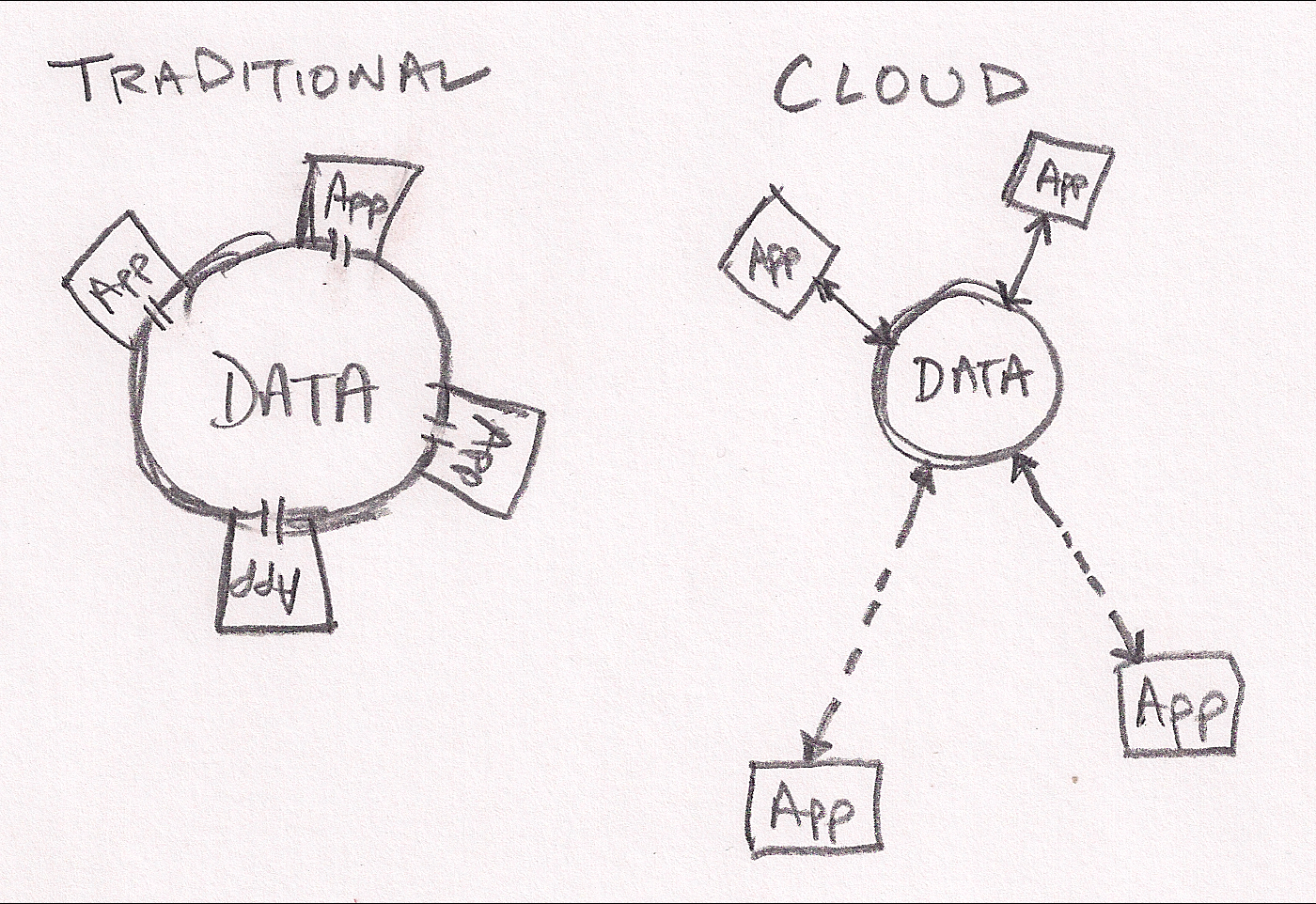
My first sketch shows how traditional applications are tightly coupled with the data they manipulate.  For example, most apps work directly on files or a database direct connection.  These apps rely on very consistent and available data access.  They are effectively in direct contact with their data much like a building resting on it’s foundation.  That works great until your building is too small (or too large).  In that case, you’re looking a substantial time delay before you can expand your capcity.

Cloud applications have broken into orbit around their data.  They still have close proximity to the data but they do their work via more generic network connections.  These connections add some latency, but allow much more flexible and dynamic applications.  Working within the orbit analogy, it’s much much easier realign assets in orbit (cloud servers) to help do work than to move buildings around on the surface.

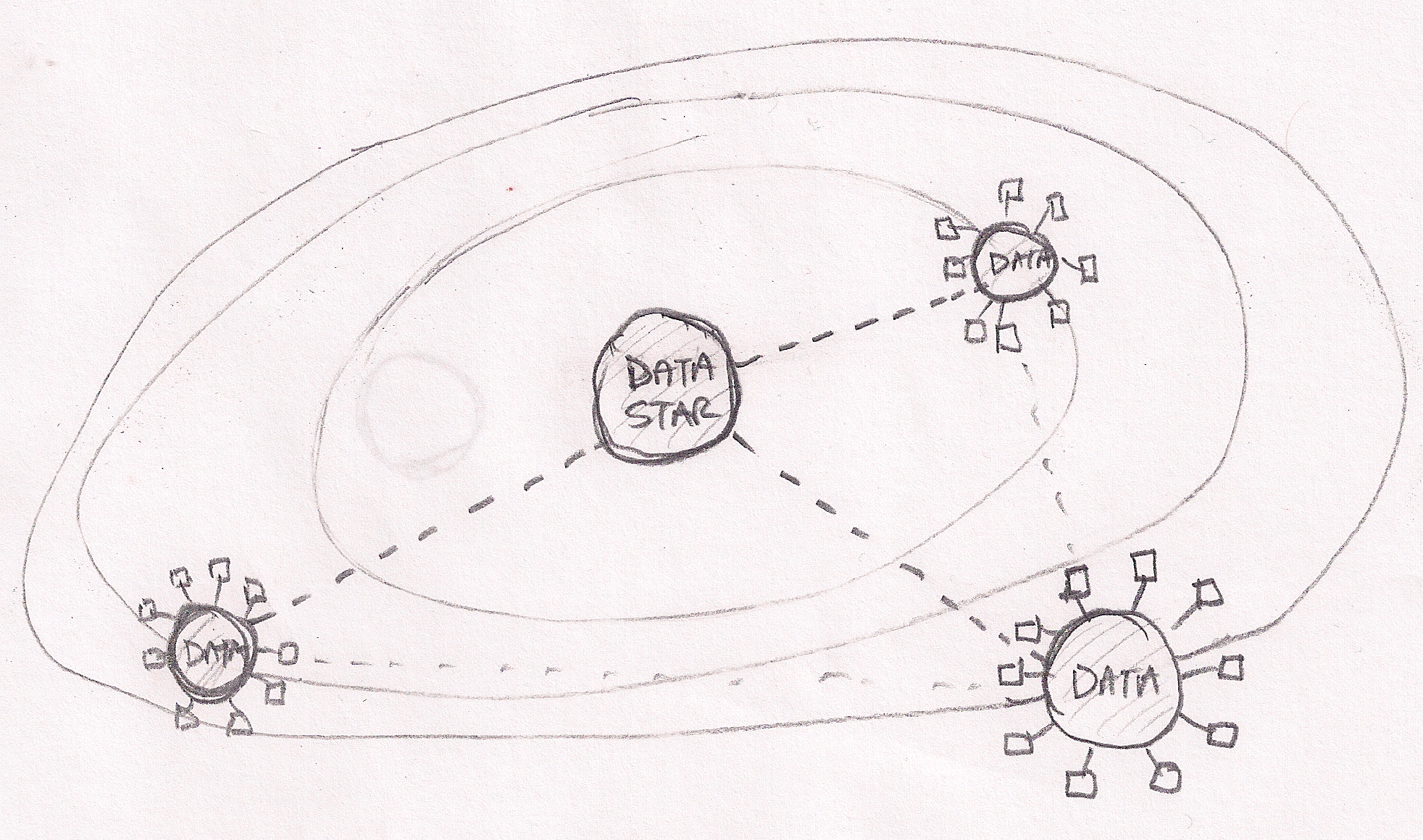
In the cloud application orbital analogy, components of applications may be located in close proximity if they need fast access to the data.  Other components may be located farther away depending on resource availability, price or security.  The larger (or more valuable) the data, the more likely it will pull applications into tight orbits.

My second sketch extends to analogy to show that our cloud universe is not simply point apps and data sources.  There truly a universe of data on the internet with hugh sources (Facebook, Twitter, New York Stock Exchange, my blog, etc) creating gravitational pull that brings other data into orbit around them.  Once again, applications can work effectively on data at stellar distances but benefit from proximity (“location does not matter, but proximity does”).

Looking at data gravity in this light leads me to expect a data race where clouds (PaaS and SaaS) seek to capture as much data as possible.